

Top choices
Specs as stated on the manufacturers' listings; the price shows on the retailer's page. Best for readers · Kindle books plus notesAmazon Kindle Scribe (32 GB, 2025)A large Kindle you can write on. Your Kindle library, notes in the margins of books with Active Canvas, PDFs from Google Drive or OneDrive, notebooks exported to OneNote. The listing gives 5.4 mm, 400 g, a pen that never needs charging and weeks of battery life.Watch out: Amazon's announcement places the AI notebook tools (summaries, search, refining handwriting) in the U.S. and does not mention Canada. Check before you count on them.Check price on Amazon.ca ↗
 Android apps · colour E InkBOOX Note Air5 CAn open tablet: Android 15 with the Google Play Store pre-installed, per BOOX, so you can install the Kindle, Kobo or note apps you already use. The listing adds a microSD slot, a fingerprint power button, speakers, a microphone, 6 GB of RAM and 64 GB of storage.Watch out: The listing itself warns that colour E Ink looks darker and greyer than an LCD, that colour is 150 ppi against 300 ppi in black and white, and that most phone apps are not built for slow E Ink refresh.Check price on Amazon.ca ↗
 Least expensive · no screen, no batteryRocketbook Fusion (letter size)The least expensive of our picks when we checked. Write with a Pilot Frixion pen, scan the page with the free app to Google Drive, Dropbox, OneNote, Slack or email, then wipe it with a damp cloth. 42 pages with weekly planner, monthly calendar, task list, dot-grid and lined pages.Watch out: It is paper: no PDFs, no reading, no undo. Ink needs 15 seconds to dry, per the listing, and only Pilot Frixion pens work.Check price on Amazon.ca ↗
An E Ink tablet is a digital notebook with a screen that works like printed paper. You write with a pen, the ink appears where the tip touches, and the page stays put once it is drawn. No email pings, no video, no glare. People buy them for meeting notes, a daily planner, marking up PDFs and reading in the evening. The differences that matter are not in the screen size: they are in the pen, the software, the subscription and the files each tablet will open.
The short answer
- Best for writing: reMarkable Paper Pro, colour screen, reading light, pen in the box.
- Best if you read Kindle books: Kindle Scribe, a pen that never needs charging.
- Best for apps: BOOX Note Air5 C, Android with the Google Play Store.
- Best for library books: Kobo Elipsa 2E, OverDrive built in.
- Smallest budget: a Rocketbook reusable notebook and your phone.
How we picked, and what we did not do: we have not tested these tablets. Product specifications are quoted from each manufacturer’s Amazon.ca listing, checked November 19, 2026, and every product on a card was in stock in Canada that day. Facts that are not on a listing (subscriptions, file formats, battery life, lights) come from the maker’s own page, linked where they appear. Links to Amazon are affiliate links; BranchéQC may earn a commission at no extra cost to you. We do not write prices: the button says “Check price on Amazon.ca” and the Amazon page is what counts.
E Ink tablets compared on published specs
Screen, pen, light and files come from each listing, or from the maker’s page where the listing is silent: reMarkable’s support pages for the Paper Pro, Paper Pro Move and Paper Pure, Amazon’s Send to Kindle help, and Kobo’s Elipsa 2E page.
| Tablet | Screen | Light | Pen | System | Files | Subscription |
|---|---|---|---|---|---|---|
| reMarkable Paper Pro | 11.8" colour (Canvas Colour) | Adjustable reading light | Marker Plus with eraser, included | reMarkable software | PDF, EPUB | Connect optional, 50-day trial |
| Amazon Kindle Scribe (32 GB, 2025) | 11" black and white | Front light, auto brightness, adjustable warmth | Premium Pen included, no charging | Kindle software | Kindle books; PDF, EPUB via Send to Kindle | None named for notes |
| BOOX Note Air5 C | 10.3" colour (Kaleido 3) | Front light, warm and cold | Not stated on the listing | Android 15, third-party apps | PDF, EPUB, MOBI, AZW3, DOCX, PPTX and more | None on the listing |
| reMarkable Paper Pure | 10.3" black and white | None | Marker Plus included (this listing) | reMarkable software | PDF, EPUB | Connect optional |
| reMarkable Paper Pro Move | 7.3" colour (Canvas Colour) | Reading light | Marker Plus included | reMarkable software | PDF, EPUB | Connect optional |
| Kobo Elipsa 2E | 10.3" black and white (Carta 1200) | ComfortLight PRO, adjustable warmth | Kobo Stylus 2 included, rechargeable | Kobo software | EPUB, PDF, MOBI, CBZ and more (15) | Kobo Plus optional |
| BOOX Go Color 7 Gen II | 7" colour (Kaleido 3) | Front light, warm and cold | Sold separately (InkSense) | Android 13, third-party apps | PDF, EPUB, MOBI, AZW3, DOCX and more | None on the listing |
| Rocketbook Fusion (letter size) | Paper, 8.5 x 11", 42 pages | None | Pilot Frixion pen included | Free Rocketbook app (iOS, Android) | Scans to Google Drive, Dropbox, OneNote, email… | None, free app |
Which E Ink tablet for you
reMarkable Paper ProBest for writing · colour and reading lightThe pick if writing comes first. The listing promises realistic friction from a pen designed only for this screen, colour for sketches and highlights, folders and tags, writing directly on PDFs and converting handwriting to typed text. Up to two weeks per charge and 64 GB of storage, per reMarkable's support page.Watch out: The most expensive of our picks when we checked. No Kindle books, and handwriting search and unlimited cloud sync need a Connect subscription.Check price on Amazon.ca ↗Amazon Kindle Scribe (32 GB, 2025)Best for readers · Kindle books plus notesA large Kindle you can write on. Your Kindle library, notes in the margins of books with Active Canvas, PDFs from Google Drive or OneDrive, notebooks exported to OneNote. The listing gives 5.4 mm, 400 g, a pen that never needs charging and weeks of battery life.Watch out: Amazon's announcement places the AI notebook tools (summaries, search, refining handwriting) in the U.S. and does not mention Canada. Check before you count on them.Check price on Amazon.ca ↗BOOX Note Air5 CAndroid apps · colour E InkAn open tablet: Android 15 with the Google Play Store pre-installed, per BOOX, so you can install the Kindle, Kobo or note apps you already use. The listing adds a microSD slot, a fingerprint power button, speakers, a microphone, 6 GB of RAM and 64 GB of storage.Watch out: The listing itself warns that colour E Ink looks darker and greyer than an LCD, that colour is 150 ppi against 300 ppi in black and white, and that most phone apps are not built for slow E Ink refresh.Check price on Amazon.ca ↗reMarkable Paper PureBlack and white reMarkable · 10.3"reMarkable's 10.3-inch black-and-white tablet, the size of the reMarkable 2, which reMarkable compares it with. The listing gives a third-generation display, whiter, with more contrast, and ink that appears in 21 ms. reMarkable lists up to 3 weeks per charge, 32 GB and about 360 g.Watch out: No reading light, per reMarkable's support page: you need a lamp at night. reMarkable's base kit ships with the simpler Marker; this listing has the Marker Plus with eraser.Check price on Amazon.ca ↗reMarkable Paper Pro MovePocket size · meeting notesThe meeting notebook: smaller than a paperback, slips into a jacket pocket, says the listing. Up to 15 days per charge and 0 to 90% in under 45 minutes, plus live screen sharing to turn it into a whiteboard during a meeting.Watch out: 7.3 inches is tight for full-page PDFs. Searching your handwriting needs a Connect subscription, per the listing.Check price on Amazon.ca ↗Kobo Elipsa 2ELibrary books · stylus includedFor readers who borrow. The listing names built-in OverDrive for public library ebooks, the Kobo Store, Google Drive and Dropbox. You write in the margins of ebooks and PDFs, and Kobo's own page lists converting handwriting to typed text.Watch out: The stylus writes only on EPUB, Kobo EPUB and non-protected PDF files, per Kobo's help page, and it needs a charge before first use.Check price on Amazon.ca ↗BOOX Go Color 7 Gen IISmall Android reader · page-turn buttonsA one-hand reader that runs Android apps: about 195 g, physical page-turn buttons, microSD slot and speaker, per the listing. A good second device for reading on the bus, with notes when you add the pen.Watch out: No pen in the box, and it works only with the BOOX InkSense active stylus, not EMR pens. Too small for real note-taking on letter-size pages.Check price on Amazon.ca ↗Rocketbook Fusion (letter size)Least expensive · no screen, no batteryThe least expensive of our picks when we checked. Write with a Pilot Frixion pen, scan the page with the free app to Google Drive, Dropbox, OneNote, Slack or email, then wipe it with a damp cloth. 42 pages with weekly planner, monthly calendar, task list, dot-grid and lined pages.Watch out: It is paper: no PDFs, no reading, no undo. Ink needs 15 seconds to dry, per the listing, and only Pilot Frixion pens work.Check price on Amazon.ca ↗
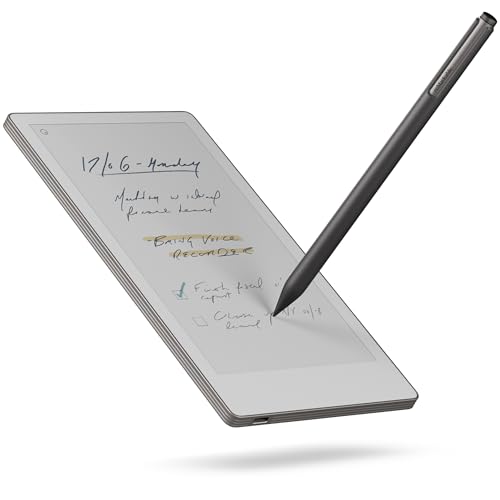
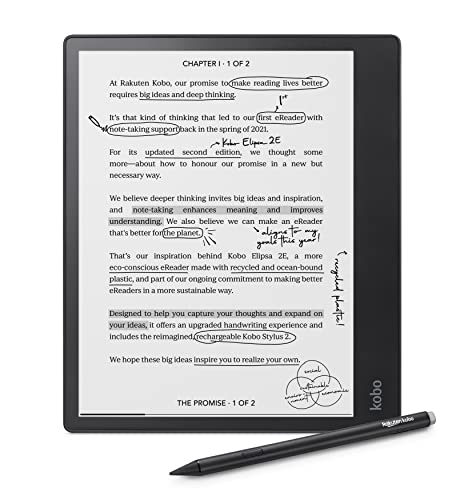

Two more worth knowing. The Kindle Scribe Colorsoft is the colour version of the Scribe, with an 11-inch colour display and the same pen. The Kobo Libra Colour is a 7-inch waterproof colour reader that takes notes only with the Kobo Stylus 2, sold separately.
E Ink vs an LCD tablet
An iPad or Android tablet shines light from behind the screen and redraws it many times a second. E Ink works the other way: tiny particles move to form the page, then stay put, and the screen reflects room light like paper. The BOOX listing puts the trade-offs in plain words: E Ink is slower to refresh, colour E Ink looks darker and greyer than an LCD, and most phone apps are designed for bright, animated screens. In return you get a page you can read in sunlight, weeks of battery on some models and no notifications.
- Good at: handwriting, PDFs, ebooks, planners, reading outside.
- Poor at: video, fast scrolling, photos, games.
- Ghosting: faint traces of the last page. BOOX offers several refresh modes to reduce it, per its listings.
Pen included or not
Check the box before you compare prices. The reMarkable listings include a Marker Plus, the pen with a built-in eraser; reMarkable’s own base Paper Pure kit comes with the plain Marker, per its spec page. The Kindle Scribe includes the Premium Pen, which needs no charging. The Kobo Elipsa 2E includes the Kobo Stylus 2, which is rechargeable and must be charged briefly before first use, per Kobo’s help page. The BOOX Go Color 7 Gen II ships without a pen, and the Note Air5 C listing does not say. A third-party pen made for one brand does not always work on another: the Go Color 7 accepts only BOOX’s InkSense active stylus, not EMR pens.
Subscription needed or not
None of these tablets locks basic writing behind a subscription. What changes is what you get on top.
- reMarkable Connect: handwriting search, unlimited cloud storage and sync, integrations and AI tools such as the Meeting Notes Tool, per reMarkable’s Connect page. A 50-day free trial starts when you pair a device to an account without a subscription. If you cancel, files that go unedited for 50 days stop syncing with the desktop and mobile apps, and you can no longer edit notes in those apps.
- Kindle Scribe: the listing names no subscription for notebooks. Amazon’s announcement of the AI notebook tools says Send to Alexa needs Prime or an Alexa+ subscription, and places the AI notebook features in the U.S.
- Kobo: Kobo Plus is an optional subscription for unlimited ebooks and audiobooks, with a 30-day trial, per the listing.
- BOOX and Rocketbook: no subscription on the listings; the Rocketbook app is free.
Android apps or a closed system
BOOX is the outlier. Its tablets run Android, and BOOX says the Note Air5 C ships with the Google Play Store pre-installed. That opens the door to reading and note apps you already use, with the caveat the listing itself gives: most apps are built for bright, fast screens. reMarkable, Kindle and Kobo are built around their maker’s own software, and none of their listings names third-party app support. For many buyers that is the point: fewer settings and fewer distractions. reMarkable calls the Paper Pro Move “distraction-free by design” on its listing. reMarkable connects to the outside through its phone and computer apps and cloud integrations; the Kindle Scribe through Google Drive, OneDrive and OneNote; the Kobo through Google Drive and Dropbox.
Colour E Ink: worth it?
Colour helps for highlighting, diagrams and comics. It comes with compromises. On the BOOX Kaleido 3 screens, colour is 150 ppi against 300 ppi in black and white, per the listings. reMarkable calls its colour screen Canvas Colour, and Amazon describes the Scribe Colorsoft as a custom oxide-based display. If you write mostly text and read novels, black and white is sharper and usually costs less: the reMarkable Paper Pure and the Kindle Scribe both skip colour.
Screen size: 7, 10.3, 11 or 11.8 inches
| Size | Good for | Examples |
|---|---|---|
| 7 to 7.3" | Pocket notes, novels, commuting | reMarkable Paper Pro Move, BOOX Go Color 7 Gen II |
| 10.3" | Notes and most PDFs, close to a paper notebook | reMarkable Paper Pure, BOOX Note Air5 C, Kobo Elipsa 2E |
| 11 to 11.8" | Full-page PDFs, sheet music, sketching | Kindle Scribe, reMarkable Paper Pro |
| Letter paper | Planner pages you scan, no reading | Rocketbook Fusion |
File formats: PDF, EPUB, Kindle books
- reMarkable: imports PDF and EPUB and exports PDF, SVG and PNG, per its support pages. Its ebook page says Kindle books are not compatible and DRM-protected ebooks cannot be opened.
- Kindle Scribe: your Kindle library, plus PDF, EPUB, text and image files through Send to Kindle, and documents from Google Drive and OneDrive, per the listing.
- Kobo Elipsa 2E: 15 formats natively including EPUB, PDF, MOBI, CBZ and CBR, per Kobo. The stylus writes only on EPUB, Kobo EPUB and non-protected PDF.
- BOOX: the widest list on the listings, from PDF, EPUB and MOBI to DOCX, PPTX and comic files, plus whatever Android apps you install.
Handwriting to text
The reMarkable listings, the Kindle Scribe listing and Kobo’s Elipsa 2E page all promise conversion of handwriting to typed text. On reMarkable, searching your handwriting is a Connect feature. On the Kindle Scribe, the summaries, handwriting refinement and note search are part of the AI tools Amazon announced for the U.S. The BOOX Note Air5 C listing does not state handwriting conversion, so we leave it out. The Rocketbook app scans pages to the cloud; its listing does not promise text conversion.
Front light or no light
An E Ink screen has no backlight. A front light adds a soft glow across the surface so you can read in bed. The Kindle Scribe adjusts brightness to the room and lets you warm the colour at night; the Kobo Elipsa 2E and the BOOX tablets also offer warm and cold light. The reMarkable Paper Pro and Paper Pro Move have a reading light. The reMarkable Paper Pure and the reMarkable 2 have none: reMarkable describes the reMarkable 2 screen as sunlight readable, but you need a lamp in the dark.
Pick by what you will do with it
| Use | Our pick | Why |
|---|---|---|
| Meeting notes | reMarkable Paper Pro Move | Pocket size, screen sharing, up to 15 days per charge |
| Daily planner | Rocketbook Fusion | Weekly, monthly and task pages built in |
| PDF markup | reMarkable Paper Pro | 11.8" screen, writing directly on PDFs |
| Kindle books | Kindle Scribe | Notes in the margins with Active Canvas |
| Library ebooks | Kobo Elipsa 2E | OverDrive built in, stylus included |
| Apps you already use | BOOX Note Air5 C | Android 15 and Google Play |
What about the reMarkable 2?
The reMarkable 2 is still the most searched name in this category in Canada. On November 19, 2026, the new unit on Amazon.ca showed only a lead time, with a renewed reMarkable 2 in stock. reMarkable’s support page gives it a 10.3-inch black-and-white screen, no reading light, up to 2 weeks per charge and PDF and EPUB import. The Paper Pure keeps that size; reMarkable lists up to 3 weeks of battery for it and compares the two side by side on its own site.
Frequently asked questions
What is the best E Ink tablet in Canada?
For writing, the reMarkable Paper Pro: colour, a reading light and the Marker Plus in the box. For reading Kindle books with notes, the Kindle Scribe. For Android apps on E Ink, the BOOX Note Air5 C. All three were in stock on Amazon.ca on November 19, 2026. On a tight budget, a Rocketbook reusable notebook does the scanning part without a screen.
Does the reMarkable need a subscription?
Not to write and read on the tablet. Connect, reMarkable's subscription, adds handwriting search, unlimited cloud storage and sync, integrations and AI tools such as the Meeting Notes Tool. New accounts get a 50-day free trial when they pair a device. After you cancel, files that go unedited for 50 days stop syncing with the desktop and mobile apps, per reMarkable.
Kindle Scribe or reMarkable: which is better?
The Kindle Scribe if you read Kindle books and want to write in them; the reMarkable if writing and PDF markup come first. reMarkable cannot open Kindle books. Our full head-to-head is at /en/kindle-scribe-vs-remarkable-vs-boox.
Is the reMarkable 2 still available in Canada?
On November 19, 2026, the new reMarkable 2 on Amazon.ca showed only a lead time, not stock; a renewed unit was available. reMarkable's support page still says you can buy it in its webshop. The reMarkable Paper Pure is the 10.3-inch black-and-white model we list instead; reMarkable compares the two directly.
Can you read Kindle books on a reMarkable or a Kobo?
Not on a reMarkable: its support page says Kindle books are not compatible and DRM-protected ebooks cannot be opened. Kobo's list of supported formats (EPUB, PDF, MOBI and others) does not include Kindle's own book format. A BOOX tablet runs Android with the Google Play Store, so Android reading apps are an option there; check that the app you want behaves well on E Ink.
Does an E Ink tablet have a backlight?
No. E Ink reflects light like paper. Some models add a front light that lights the surface for reading in the dark: the Kindle Scribe, Kobo Elipsa 2E and BOOX tablets do, the reMarkable Paper Pro and Paper Pro Move have a reading light, and the reMarkable Paper Pure and reMarkable 2 have none.
Can an E Ink tablet convert handwriting to text?
Yes on the reMarkable, the Kindle Scribe and the Kobo Elipsa 2E, per their listings and makers' pages. On reMarkable, searching your handwriting needs Connect. On the Kindle Scribe, the AI summaries and search are announced for the U.S.; check them for Canada.
Keep reading
Torn between the three big names? Our Kindle Scribe vs reMarkable vs Boox comparison goes attribute by attribute. An E Ink tablet also makes a thoughtful gift for a student or someone who lives in meetings: our Canadian gift guide has more ideas, and the light therapy lamp guide covers the other screen-free desk companion for a Canadian winter.