
Top choices
Specs as stated on the manufacturers' listings; the price shows on the retailer's page. Kindle · best for readersKindle Scribe (32 GB, 2025)Readers first. Your Kindle library, notes beside the text with Active Canvas, PDFs from Google Drive and OneDrive, notebooks exported to OneNote. 5.4 mm and 400 g, per the listing, and the least expensive of the five when we checked.Watch out: No colour. Amazon's announcement places the AI notebook tools in the U.S. and does not mention Canada.Check price on Amazon.ca ↗
 reMarkable · best for writingreMarkable Paper ProWriters, sketchers and anyone who marks up PDFs all day. The listing promises a pen designed for this screen alone, realistic friction, writing directly on PDFs and converting handwriting to typed text. The largest screen of the five.Watch out: Kindle books and DRM-protected ebooks do not open, per reMarkable. Handwriting search and unlimited sync need Connect.Check price on Amazon.ca ↗
 BOOX · best for appsBOOX Note Air5 CTinkerers and anyone who needs more than one app. Android 15 with the Google Play Store pre-installed, per BOOX, the longest file list of the five, a microSD slot, speakers and a microphone, per the listing.Watch out: The listing warns that colour E Ink looks darker than an LCD and that most apps are not built for E Ink. Check that a pen is in the box before you buy.Check price on Amazon.ca ↗
The short answer
- You read Kindle books: Kindle Scribe. reMarkable cannot open them.
- You mostly write and mark up PDFs: reMarkable Paper Pro.
- You need apps: BOOX Note Air5 C, Android with Google Play.
- You want the longest battery: reMarkable Paper Pure, but no light.
How we compared, and what we did not do: we have not tested these tablets. Product specifications are quoted from each manufacturer’s Amazon.ca listing, checked November 19, 2026, and every product on a card was in stock in Canada that day. Facts that are not on a listing (subscriptions, file formats, battery life, lights) come from the maker’s own page, linked where they appear. Links to Amazon are affiliate links; BranchéQC may earn a commission at no extra cost to you. We do not write prices: the button says “Check price on Amazon.ca” and the Amazon page is what counts.
At a glance
Five models, three brands. The new reMarkable 2 showed only a lead time on Amazon.ca on November 19, 2026, so the Paper Pure, reMarkable’s 10.3-inch black-and-white tablet, stands in for it.
| Tablet | Screen | Light | Pen | Apps | Kindle books | Subscription | Battery |
|---|---|---|---|---|---|---|---|
| Kindle Scribe (32 GB, 2025) | 11" black and white | Front light, auto brightness, warmth | Premium Pen, no charging | Kindle software | Yes | None named for notes | "Weeks" (listing) |
| Kindle Scribe Colorsoft (64 GB) | 11" colour (Colorsoft) | Front light | Premium Pen, no charging | Kindle software | Yes | None named for notes | "Weeks" (listing) |
| reMarkable Paper Pro | 11.8" colour (Canvas Colour) | Adjustable reading light | Marker Plus with eraser | reMarkable software | No | Connect optional | Up to 2 weeks (reMarkable) |
| reMarkable Paper Pure | 10.3" black and white | None | Marker Plus (this listing) | reMarkable software | No | Connect optional | Up to 3 weeks (reMarkable) |
| BOOX Note Air5 C | 10.3" colour (Kaleido 3) | Front light, warm and cold | Not stated on the listing | Android 15, Google Play | Through Android apps | None on the listing | 3,700 mAh, duration not stated |
Writing
Writing is where reMarkable is built to win. The Paper Pro listing describes a Marker Plus designed to work exclusively with its colour display for realistic friction, with a built-in eraser on the other end. The Paper Pure listing gives digital ink in 21 ms. Both write directly on PDFs and convert handwriting to typed text.
The Kindle Scribe answers with a textured surface, a Premium Pen that never needs charging and, per the listing, 40% faster writing and page turns than before. Its trick is Active Canvas: start writing on a book page and the text makes room for your note. The BOOX Note Air5 C lists 4,096 levels of pressure on its stylus touch layer; the listing does not say whether a pen is in the box, so check before you order.
Reading
The Kindle Scribe is a Kindle first: your Amazon library, recaps of bestseller series, and notes in the margins. reMarkable is not a Kindle replacement. Its ebook support page says Kindle books are not compatible and DRM-protected ebooks cannot be opened; DRM-free EPUB and PDF are fine. BOOX sits between the two: its own reader opens PDF, EPUB, MOBI, AZW3 and more, per the listing, and Android reading apps from the Play Store are an option, with the listing’s own warning that most apps are not built for E Ink.
Screen and light
- Largest: reMarkable Paper Pro, 11.8 inches in colour, with an adjustable reading light. reMarkable warns that keeping the light at maximum brightness reduces battery life, on its Paper Pro page.
- Kindle Scribe and Colorsoft: 11 inches, front light that adapts to the room, warmth adjustable at night on the Scribe, per its listing.
- BOOX Note Air5 C: 10.3 inches, warm and cold front light. Colour is 150 ppi, black and white 300 ppi, per the listing.
- reMarkable Paper Pure: 10.3 inches, black and white, no reading light, per the support page.
Colour or not? The Colorsoft and the Paper Pro cost more than their black-and-white siblings when we checked. Colour pays off for highlights, diagrams and covers; for plain notes and novels, black and white does the job.
Files and cloud
| Brand | Opens | Exports or shares | Cloud |
|---|---|---|---|
| Kindle Scribe | Kindle books; PDF, EPUB, text and images via Send to Kindle | Notebooks to OneNote; annotated PDFs | Google Drive, OneDrive |
| reMarkable | PDF, EPUB (no Kindle, no DRM) | PDF, SVG, PNG; email from the tablet | Google Drive, Dropbox, Word and more via apps and plugins |
| BOOX Note Air5 C | PDF, EPUB, MOBI, AZW3, DOCX, PPTX, CBZ and more | Not stated on the listing | Through Android apps |
reMarkable’s formats come from its Paper Pro and Paper Pure support pages; the cloud services from the Paper Pure listing. Amazon’s Kindle Scribe announcement covers Google Drive, OneDrive and OneNote.
Apps and ecosystem
This is the deepest split. BOOX runs Android 15 and, per its Note Air5 C announcement, ships with the Google Play Store pre-installed. If you live in OneNote, a specific PDF app or several reading stores, that freedom is the reason to buy a BOOX. Kindle and reMarkable are built around their own software, and neither listing names third-party app support. For many people that is the attraction: fewer settings, fewer distractions. reMarkable adds its own apps for macOS, Windows, iOS and Android to view and organise your notes, per its spec page.
Subscriptions
- reMarkable Connect: handwriting search, unlimited cloud storage and sync, integrations and AI tools, per reMarkable. A 50-day free trial starts when you pair a device. After cancelling, files that go unedited for 50 days stop syncing with the desktop and mobile apps.
- Kindle Scribe: no subscription named on the listing for the notebook. Amazon’s AI notebook announcement says Send to Alexa needs Prime or Alexa+, and it places the AI notebook tools in the U.S. without mentioning Canada.
- BOOX: none on the listing.
Battery
The makers measure differently, so compare with care. reMarkable rates the Paper Pure at up to 3 weeks, based on one hour of note-taking a day, on its Paper Pure page, and the Paper Pro at up to 2 weeks, based on two hours of writing a day, five days a week. The Kindle Scribe listings say “weeks” without a number. The BOOX listing gives a 3,700 mAh battery and no duration; Android apps and the front light will set the real figure.
Price tier
We do not print prices, but here is the order on Amazon.ca on November 19, 2026. The Kindle Scribe was the least expensive of the five, with the reMarkable Paper Pure close behind. The BOOX Note Air5 C sat in the middle. The reMarkable Paper Pro and the Kindle Scribe Colorsoft were the most expensive, close to each other. Remember the extras: reMarkable Connect after the trial, and a pen if your BOOX box does not include one.
The five models
Kindle Scribe (32 GB, 2025)Kindle · best for readersReaders first. Your Kindle library, notes beside the text with Active Canvas, PDFs from Google Drive and OneDrive, notebooks exported to OneNote. 5.4 mm and 400 g, per the listing, and the least expensive of the five when we checked.Watch out: No colour. Amazon's announcement places the AI notebook tools in the U.S. and does not mention Canada.Check price on Amazon.ca ↗Kindle Scribe Colorsoft (64 GB)Kindle in colourThe same Scribe with a colour screen Amazon describes as custom, oxide-based and free of distracting flashes when writing. Colour covers, colour highlights and twice the storage of the 32 GB Scribe.Watch out: One of the two most expensive of the five when we checked, with the reMarkable Paper Pro.Check price on Amazon.ca ↗reMarkable Paper ProreMarkable · best for writingWriters, sketchers and anyone who marks up PDFs all day. The listing promises a pen designed for this screen alone, realistic friction, writing directly on PDFs and converting handwriting to typed text. The largest screen of the five.Watch out: Kindle books and DRM-protected ebooks do not open, per reMarkable. Handwriting search and unlimited sync need Connect.Check price on Amazon.ca ↗reMarkable Paper PurereMarkable · black and whiteThe reMarkable writing feel at the reMarkable 2 size: a third-generation display with more contrast, ink in 21 ms, per the listing, and the longest battery figure of the five, per reMarkable.Watch out: No reading light, per reMarkable's support page. 10.3 inches is smaller than the Scribe and the Paper Pro for full-page PDFs.Check price on Amazon.ca ↗BOOX Note Air5 CBOOX · best for appsTinkerers and anyone who needs more than one app. Android 15 with the Google Play Store pre-installed, per BOOX, the longest file list of the five, a microSD slot, speakers and a microphone, per the listing.Watch out: The listing warns that colour E Ink looks darker than an LCD and that most apps are not built for E Ink. Check that a pen is in the box before you buy.Check price on Amazon.ca ↗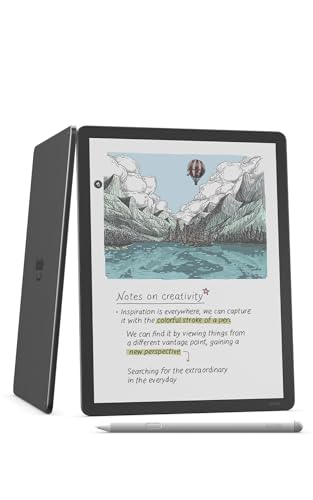

Which should you buy
The Kindle reader
Kindle Scribe. Your library is already there, the pen never needs charging, and it was the least expensive of the five when we checked.
The note-taker and PDF reviewer
reMarkable Paper Pro. The largest screen, colour, a reading light and a pen built for it. Budget for Connect if you want handwriting search.
The writer on a tighter budget
reMarkable Paper Pure. The same writing focus, the longest battery figure, no light.
The colour reader
Kindle Scribe Colorsoft. Kindle books and notes in colour.
The app user and tinkerer
BOOX Note Air5 C. Android 15, Google Play and the longest list of file formats. Accept the slower, greyer screen that comes with colour E Ink.
Not sure yet
Start with the full best E Ink tablets in Canada guide: it adds the Kobo Elipsa 2E for library borrowing, the pocket-size reMarkable Paper Pro Move and the low-tech Rocketbook.
Frequently asked questions
Kindle Scribe or reMarkable: which is better?
It depends on what you do most. For reading Kindle books and writing in them, the Kindle Scribe: reMarkable cannot open Kindle books. For writing, sketching and PDF markup, the reMarkable Paper Pro, with its colour screen, reading light and Marker Plus pen. The Kindle Scribe was the less expensive of the two when we checked on November 19, 2026.
Kindle Scribe or Boox: which should I buy?
The Kindle Scribe if you want a focused device for Kindle books and notes, with a pen that never needs charging. The BOOX Note Air5 C if you need Android apps from the Google Play Store and the widest list of file formats. The BOOX listing itself warns that most apps are not designed for E Ink.
Does the Kindle Scribe need a subscription?
The listing names none for the notebook. Amazon's announcement says Send to Alexa needs Prime or an Alexa+ subscription, and it describes the AI notebook tools as available in the U.S. without mentioning Canada.
Does the reMarkable need a subscription?
Not to write and read on the tablet. Connect adds handwriting search, unlimited cloud storage and sync, integrations and AI tools, per reMarkable. A 50-day free trial starts when you pair a device, and after cancelling, files unedited for 50 days stop syncing with the apps.
Which has the best battery life?
On the makers' own figures, the reMarkable Paper Pure: up to 3 weeks, based on one hour of note-taking a day. The Paper Pro is rated up to 2 weeks, the Kindle Scribe listing says weeks, and the BOOX listing gives a 3,700 mAh battery without a duration.
Which one has a front light?
The Kindle Scribe, Kindle Scribe Colorsoft and BOOX Note Air5 C have a front light, and the reMarkable Paper Pro has a reading light. The reMarkable Paper Pure has none, per reMarkable's support page.
Is there a cheaper way to get the same idea?
A Rocketbook reusable notebook: write with a Pilot Frixion pen, scan with the free app, wipe clean. It is in our full guide to the best E Ink tablets in Canada, with the Kobo Elipsa 2E and two smaller tablets.
Keep reading
The full list, with pens, subscriptions and file formats for all eight picks, is in our guide to the best E Ink tablets in Canada. Shopping for someone else? Our Canadian gift guide has more ideas.