

Top choices
Specs as stated on the manufacturers' listings; the price shows on the retailer's page. Dogs and cats · 2K, smaller treatsFurbo Mini 360° Camera (Core Features, No Ongoing Cost)The smaller Furbo, and the one to choose for a cat: barking and meowing alerts, 2K video, a 360° rotating view, 2-way audio and colour night vision, with no subscription required for those features. It holds up to 10 bite-sized training treats.Watch out: The listing says larger treats will not fit and that it has no AI alerts. USB-A power adapter not included.Check price on Amazon.ca ↗
 Biggest treat container · scheduled treatsPetcube Bites 2 LiteFor the pet that eats more treats than a Furbo Mini holds: a dishwasher-safe 1.5 lb treat container, three toss distances, and scheduled automatic treat dispensing in the free Petcube app. Sound and motion push alerts, 2-way audio and Alexa voice control are on the listing, with a 1-year warranty.Watch out: The camera does not rotate. It connects to 2.4 GHz Wi-Fi only. AI pet and person alerts need the optional Petcube Care plan, and a separate Bites 2 Lite listing requires that plan to work at all.Check price on Amazon.ca ↗
 Treat camera · 2.4 and 5 GHz Wi-FiArenti PET3T 360° 2K Pet Treat CameraThe only treat camera here that states both 2.4 GHz and 5 GHz Wi-Fi, useful if your router only shows one network name. It tracks your pet across 355°, sends barking alerts, has 2-way audio and dispenses treats from the Arenti app.Watch out: The listing does not state the treat capacity, the storage options or whether any feature needs a subscription. Check the app's terms before you rely on recordings.Check price on Amazon.ca ↗
A pet camera, or pet cam, is a Wi-Fi camera you leave on a shelf so you can check on your dog or cat from your phone. There are two kinds: treat-tossing cameras built for pets, like Furbo and Petcube, and plain indoor cameras from security brands that do the watching and talking for much less. The right one depends on your pet, your Wi-Fi and whether you are willing to pay for a monthly plan.
The short answer
- Dog, with treats: the Furbo 360° Dog Camera, “No Ongoing Cost” version, 1080p and 360° rotating view, no subscription for core features.
- Cat, or small treats: the Furbo Mini 360°, 2K, meowing alerts, up to 10 small treats.
- Lots of treats on a schedule: the Petcube Bites 2 Lite, 1.5 lb container and scheduled tosses.
- Just watch and talk: the Tapo C210 pan/tilt camera with microSD recording, or the Wyze Cam Pan v3 for colour night vision.
How we picked, and what we did not do: we have not used any of these cameras. We looked for one model per real need (dog with treats, cat, big treat container, dual-band Wi-Fi, budget pan/tilt, colour night vision, AI clips, compact Alexa camera), and read every specification from the manufacturer’s Amazon.ca listing on November 27, 2026. Every product on a card was in stock in Canada that day. Two in-stock listings were left out on purpose: the Furbo and Petcube versions marked “Subscription Required”, which do not work until you buy a plan. Where a listing leaves something out, we write “not stated”. Links to Amazon are affiliate links; BranchéQC may earn a commission at no extra cost to you. We do not write prices or plan fees by hand: the button says “Check price on Amazon.ca” and the Amazon page is what counts.
Treat-tossing camera or plain indoor camera?
Treat-tossing pet cameras (Furbo, Petcube, Arenti)
A treat camera is a camera with a hopper. From the app you watch, talk and send a treat flying across the floor. It is the classic dog camera: a reward for a quiet dog, a game during a long workday, a reason for the dog to walk up to the lens. It is also the bigger, pricier object, and treats have to fit the dispenser: the Furbo Mini listing states 0.25 to 0.5 in treats only.
Plain indoor cameras used as pet cameras (Tapo, Wyze, eufy, Blink)
Most of what a pet camera does, watching, listening, talking back and night vision, a regular indoor Wi-Fi camera does too. Pan/tilt models such as the Tapo C210, Wyze Cam Pan v3 and eufy E220 rotate to follow your pet, and several brands now list them as baby and pet cameras. You give up the treats, and you gain a camera that also watches the door. We compare those brands in depth in our Tapo camera, eufy and Blink camera guides.
The eight pet cameras, compared on published specs
Every figure is the manufacturer’s own, from the Amazon.ca listing. Where a listing gives no detail, the table says so rather than guessing.
| Model | Type | Video | View | Night vision | Treats | Wi-Fi | Subscription (as listed) |
|---|---|---|---|---|---|---|---|
| Furbo 360° Dog Camera (Core Features, No Ongoing Cost) | Treat-tossing camera | 1080p Full HD, 4x zoom | 360° rotating | Colour night vision | Yes, adjustable treat size | Not stated | None required for core features, as listed |
| Furbo Mini 360° Camera (Core Features, No Ongoing Cost) | Treat-tossing camera | 2K QHD, 4x zoom | 360° rotating | Colour night vision | Up to 10 small treats (0.25-0.5 in) | Not stated | None required for core features, as listed |
| Petcube Bites 2 Lite | Treat-tossing camera | 1080p HD, 110°, 8x digital zoom | Fixed, 110° wide angle | Up to 30 ft | 1.5 lb container, short/medium/long toss, schedules | 2.4 GHz only | Optional Petcube Care for AI alerts, as listed |
| Arenti PET3T 360° 2K Pet Treat Camera | Treat-tossing camera | 2K | 355° horizontal tracking | Infrared, colour night vision in title | Yes, one-touch feeding | 2.4 GHz and 5 GHz | Not stated |
| Tapo C210 2K Pan/Tilt Camera | Indoor pan/tilt camera | 2K | 360° pan, 114° tilt | IR, up to 40 ft | No | Not stated | Optional Tapo Care cloud; microSD local storage |
| Wyze Cam Pan v3 | Indoor/outdoor pan/tilt camera | 1080p | 360° pan, 180° tilt | Colour night vision | No | Not stated | Not stated |
| eufy Indoor Cam E220 | Indoor pan/tilt camera | 2K (1080p in HomeKit) | 360° pan and tilt | Night vision (title) | No | 2.4 GHz only | Not stated; HomeBase compatible |
| Blink Mini 2K+ | Compact plug-in camera | 2K, 4x zoom | Fixed | Colour night vision | No | Not stated | Optional Blink plan for cloud clips and smart detection |
Which pet camera for your home
Furbo 360° Dog Camera (Core Features, No Ongoing Cost)Treat-tossing camera · 1080p Full HD, 4x zoomThe dog camera most people mean when they say "pet camera", in the version that works out of the box. The listing says live 360° view, barking alerts, 2-way audio, colour night vision and treat tossing all work with no subscription. You toss a treat from the Furbo app to reward a quiet dog, and adjust the treat size to your dog.Watch out: Make sure the listing says "No Ongoing Cost": another Furbo 360° listing requires a paid plan and an activation fee before anything works. The USB-A power adapter is not included, and the Wi-Fi band is not stated.Check price on Amazon.ca ↗Furbo Mini 360° Camera (Core Features, No Ongoing Cost)Treat-tossing camera · 2K QHD, 4x zoomThe smaller Furbo, and the one to choose for a cat: barking and meowing alerts, 2K video, a 360° rotating view, 2-way audio and colour night vision, with no subscription required for those features. It holds up to 10 bite-sized training treats.Watch out: The listing says larger treats will not fit and that it has no AI alerts. USB-A power adapter not included.Check price on Amazon.ca ↗Petcube Bites 2 LiteTreat-tossing camera · 1080p HD, 110°, 8x digital zoomFor the pet that eats more treats than a Furbo Mini holds: a dishwasher-safe 1.5 lb treat container, three toss distances, and scheduled automatic treat dispensing in the free Petcube app. Sound and motion push alerts, 2-way audio and Alexa voice control are on the listing, with a 1-year warranty.Watch out: The camera does not rotate. It connects to 2.4 GHz Wi-Fi only. AI pet and person alerts need the optional Petcube Care plan, and a separate Bites 2 Lite listing requires that plan to work at all.Check price on Amazon.ca ↗Arenti PET3T 360° 2K Pet Treat CameraTreat-tossing camera · 2KThe only treat camera here that states both 2.4 GHz and 5 GHz Wi-Fi, useful if your router only shows one network name. It tracks your pet across 355°, sends barking alerts, has 2-way audio and dispenses treats from the Arenti app.Watch out: The listing does not state the treat capacity, the storage options or whether any feature needs a subscription. Check the app's terms before you rely on recordings.Check price on Amazon.ca ↗Tapo C210 2K Pan/Tilt CameraIndoor pan/tilt camera · 2KIf you only want to see and talk to your pet, a pan/tilt camera does the job for much less. The C210 follows motion around the room, detects motion and people, has 2-way audio and 850 nm night vision up to 40 ft, and records to a microSD card so you do not need a cloud plan.Watch out: No treats. The title says microSD up to 256 GB and the feature list says up to 512 GB; the card is sold separately. More on the range in our Tapo camera guide.Check price on Amazon.ca ↗Wyze Cam Pan v3Indoor/outdoor pan/tilt camera · 1080pA pan/tilt camera that locks onto moving "furry" subjects, as the listing puts it, and can patrol 4 preset waypoints around a room. Colour night vision shows the dog on the couch in colour after dark, and the gears are described as quiet, which matters for a nervous cat.Watch out: 1080p only. IP65 for outdoor use, but outdoors needs the Wyze Outdoor Power Adapter v2 sold separately. Storage and subscription terms are not stated on the listing.Check price on Amazon.ca ↗eufy Indoor Cam E220Indoor pan/tilt camera · 2K (1080p in HomeKit)The listing says on-device AI decides whether a person or a pet is present and records only those events, so you scroll through clips of the dog instead of hours of an empty room. It tracks motion, has 2-way audio and works with Apple HomeKit, Google Assistant and Alexa.Watch out: 2.4 GHz Wi-Fi only, as stated. Video drops to 1080p in HomeKit. See our eufy guide for HomeBase and storage.Check price on Amazon.ca ↗Blink Mini 2K+Compact plug-in camera · 2K, 4x zoomA small plug-in camera for one room, with noise-cancelling 2-way audio and Alexa control, and the power adapter in the box. In an Alexa or Blink home it is the simplest way to check on a cat from your phone.Watch out: It does not rotate. Saved cloud clips and person detection come with an optional Blink Subscription Plan (30-day trial included). More in our Blink camera guide.Check price on Amazon.ca ↗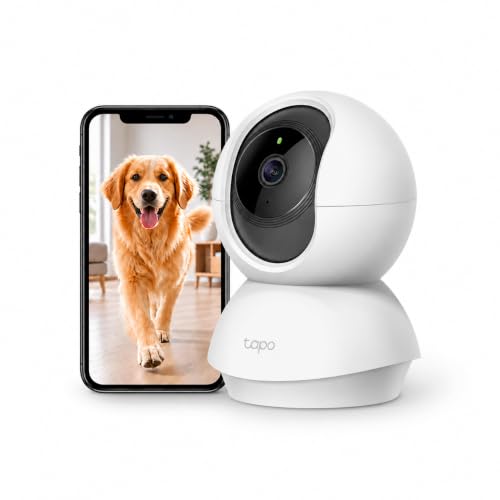



Subscription or no subscription: read the listing title
This is the trap in the pet camera aisle. On Amazon.ca, Furbo and Petcube each sell the same camera under two listings, and the cheaper-looking one is the one that costs more over time.
- Furbo. The listings marked “Core Features, No Ongoing Cost” state that live view, barking alerts, 2-way audio, night vision and treat tossing work with no subscription. The Furbo 360° listing marked “Subscription Required” says a paid Furbo Nanny plan and a one-time activation fee are required, that no feature works before activation, and that core features remain if you cancel after the initial commitment.
- Petcube. The regular Bites 2 Lite works with the free app; AI alerts need the optional Petcube Care plan. The Bites 2 Lite listing marked “Subscription Required” needs Petcube Care to unlock the camera, with a 12-month commitment.
- Tapo. Records to a microSD card in the camera; the Tapo Care cloud plan is optional.
- Blink. Live view and 2-way audio work from the app; saved cloud clips and person detection come with an optional Blink Subscription Plan, with a 30-day trial.
- Wyze, eufy, Arenti. The listings we read do not state subscription terms. Check the app before you count on recordings. Wyze sells a Wyze Cam v4 whose title says “No Subscription Required”, a fixed camera rather than a pan/tilt.
Wi-Fi 2.4 GHz: the most common setup problem
Many pet cameras connect only to the 2.4 GHz band of your router. The Petcube Bites 2 Lite and the eufy E220 listings say so plainly. 2.4 GHz travels farther through walls and floors, which suits a camera in a basement or at the other end of a house, but setup can fail when the router broadcasts 2.4 and 5 GHz under one network name. If that happens, turn on a separate 2.4 GHz network in the router settings, or move the camera closer for setup. The Arenti PET3T states support for both 2.4 and 5 GHz.
Live video uses your upload bandwidth all the time you watch. In a split-level or a house with a concrete basement, check the signal where the camera will sit, and add a Wi-Fi extender if the image freezes.
Night vision, two-way audio and alerts
- Night vision. Canadian winter days are short; at 5 p.m. the living room is dark. Infrared night vision gives a black-and-white image (Tapo states up to 40 ft, Petcube up to 30 ft). Colour night vision, on the Furbo, Wyze and Blink listings, keeps colours in low light.
- Two-way audio. Every pick has a speaker and a microphone. Some pets come to the voice, others get confused by it; try a few short sessions.
- Alerts. Barking alerts (Furbo, Arenti), meowing alerts (Furbo Mini), sound and motion alerts (Petcube), person and pet detection (eufy, Tapo). More alerts means more notifications: tune them in the app.
- Rotation. A 360° camera (Furbo, Tapo, Wyze, eufy) follows a pet around the room; a fixed camera (Petcube, Blink) watches one zone, like the food bowl or the couch.
Pet camera for cats
Cats rarely sit in front of a treat dispenser waiting for a reward, and they like high shelves and windowsills. A rotating camera placed high, with night vision, sees more of a cat's day than a fixed one at floor level. The Furbo Mini is the treat camera to pick for a cat, with meowing alerts and small treats. For a cat that ignores treats, a Tapo C210 or Wyze Cam Pan v3 does the watching. Automatic cat feeders with a built-in camera exist too: they are feeders first, so pick them for meals, not for watching.
Collar cameras, searched as “cat camera collar”, are action cameras your cat wears. They record what your cat sees for you to watch later; they do not stream live to your phone. Fun for curiosity, not for checking in from work.
Privacy: practical steps for a camera inside your home
A pet camera films the inside of your home, often the living room or kitchen. A few habits keep that footage yours:
- Use a unique password for the camera app account, not one you use elsewhere, and a password manager if you have one.
- Turn on two-step verification in the app if it offers it, so a stolen password is not enough to log in.
- Update the app and the camera firmware when the app asks.
- Turn it off when you are home. Use the app's privacy mode or schedule if it has one; otherwise unplug it or turn the lens to the wall.
- Point it at the pet's space, not at a bedroom or bathroom, and tell a dog walker, pet sitter or guest that a camera is recording.
- Share access through the app's family sharing, rather than handing out your own login.
Placement and power
Every camera on this page plugs into a regular outlet through a USB power adapter. Furbo says the USB-A adapter is not in the box for either Furbo model; Blink includes one. Place a treat camera on a stable surface about where your pet can reach the treats but not knock the camera over, and keep the cable out of chewing range. A pan/tilt camera works best on a shelf at about chest height, with a view of the whole room.
Want a camera outside too, for the yard or the driveway? See our French guide to the best wireless outdoor security camera in Quebec, or the English best security camera in Canada.
Where to buy a pet camera in Canada
| Retailer | Strength | Note |
|---|---|---|
| Amazon.ca | Furbo, Petcube, Arenti, Tapo, Wyze, eufy, Blink | Read the title: "No Ongoing Cost" vs "Subscription Required" |
| PetSmart.ca, Pet Valu | Pet store range, Instachew and others | Check the subscription terms on the box |
| Best Buy, Walmart.ca, Canadian Tire | Indoor cameras and pet cameras | Compare the Wi-Fi band and storage, as on this page |
| Brand websites | Furbo, Petcube and others sell direct | Check warranty and return terms in Canada |
Frequently asked questions
What is the best pet camera in Canada?
For a dog, the Furbo 360° Dog Camera in its "No Ongoing Cost" version: its listing says live 360° view, barking alerts, 2-way audio, colour night vision and treat tossing work with no subscription. For a cat, the Furbo Mini 360°, with meowing alerts and 2K video. To only watch and talk, a Tapo C210 pan/tilt camera does it for much less. All were in stock on Amazon.ca on November 27, 2026.
Is there a pet camera with no subscription?
Yes, several. The Furbo 360° and Furbo Mini listings marked "Core Features, No Ongoing Cost" state that live view, alerts, audio, night vision and treat tossing need no subscription. The Tapo C210 records to a microSD card. Avoid the listings marked "Subscription Required": Furbo and Petcube both sell one that does not work until you pay for a plan.
Do I need a Furbo subscription?
Not with the right listing. The Furbo 360° and Furbo Mini sold as "No Ongoing Cost" work without one, as stated. The Furbo 360° sold with "Furbo Nanny" requires a paid plan and a one-time activation fee, and its listing says no feature works before activation. Furbo Nanny adds AI alerts and video history.
What is the best camera for a cat?
A camera that rotates and works in the dark, because cats move from room to window to bed. The Furbo Mini 360° sends meowing alerts and tosses small treats; the Wyze Cam Pan v3 and Tapo C210 follow motion around the room. Wyze describes its pan motor as quiet, which helps with a cat that startles easily.
Are pet cameras always recording?
Not by default, and it depends on the model. Many record short clips when they detect motion or sound, and continuous recording usually needs a microSD card or a cloud plan. The eufy E220 listing says it records only when its AI sees a person or a pet; the Tapo C210 records to a microSD card or the Tapo Care cloud.
Why won't my pet camera connect to Wi-Fi?
Often because it only speaks 2.4 GHz. The Petcube Bites 2 Lite and eufy E220 listings state 2.4 GHz only. If your router shows one network name for both bands, or the camera sits far from the router, the setup can fail; a Wi-Fi extender or a separate 2.4 GHz network name usually fixes it. The Arenti PET3T supports 2.4 and 5 GHz.
How do I clean a pet camera?
Unplug it and follow the maker's manual. Wipe the lens with a dry microfibre cloth, since nose prints and fur blur the image and the night vision. On a treat camera, empty the treat container and clean it; Petcube says its Bites 2 Lite container is dishwasher-safe. Let it dry fully before refilling.
What about a cat or dog collar camera?
That is a different product: a small action camera worn on the collar that films what your pet sees, usually recorded to a card for later. It does not let you watch live from work or talk to your pet. For checking in while you are away, use a camera on a shelf.
What is the cheapest good pet camera?
A plain pan/tilt Wi-Fi camera, not a treat camera. The Tapo C210, Wyze Cam Pan v3 and eufy E220 all rotate, have 2-way audio and night vision, and cost much less than a treat-tossing model. Check the current price on Amazon.ca; we do not write prices on this page because they change often.
Keep reading
Watching a baby rather than a dog? Our best baby monitor in Canada guide compares Wi-Fi and non-Wi-Fi monitors, and its French version covers the baby monitor in Quebec. For the front door, see the best doorbell camera, and to turn a lamp on from your phone while you watch the dog, the best smart plug.
A pet camera makes a thoughtful gift for a new dog or cat owner. For more ideas, see our gift guide for Canada.