

Top choices
Specs as stated on the manufacturers' listings; the price shows on the retailer's page. Least expensive · no subscription, no cameraWinnovo 15.6-inch Smart Digital CalendarThe least expensive of our picks when we checked, with chores, to-do lists, meal planning, reminders that ring and a 32 GB photo frame, all without a subscription, per the listing. French and English on the device, and no built-in camera or microphone.Watch out: A smaller brand: every spec here comes from the listing only. The front opening is a light sensor, not a camera, says the listing.Check price on Amazon.ca ↗
 Big wall screen · portrait or landscapeSkylight Calendar Max (27 in.)A large family, or a hallway command centre read from across the room. The 27-inch screen adjusts itself to portrait or landscape, and the listing title calls this an English/French edition.Watch out: Skylight says the Calendar Max must be wall mounted: there is no stand in the box. Same Plus split as the 15-inch models.Check price on Amazon.ca ↗
 Calendar widget plus Fire TV and AlexaAmazon Echo Show 15A home already run with Alexa: calendar and to-do widgets at a glance, a smart home dashboard for lights and cameras, Fire TV, video calls and a photo frame mode, per the listing.Watch out: A smart display first, a family planner second: no chore chart or meal planner is listed. It has a camera and microphones, with a mic/camera-off button and a shutter. The listing does not say which calendar services link.Check price on Amazon.ca ↗
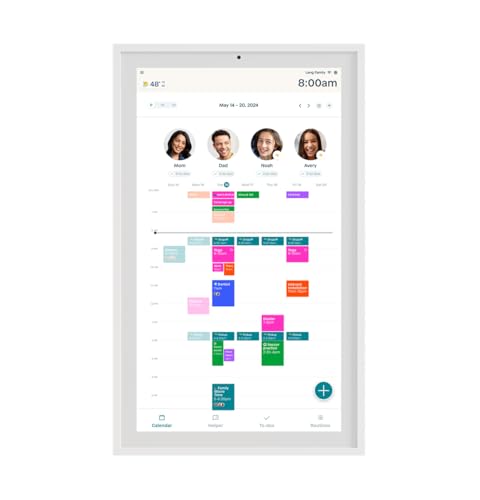
A digital calendar is a touchscreen that lives in a shared spot, usually the kitchen, and shows the whole family’s schedule at once. It pulls in the calendars you already use on your phones, so nobody retypes hockey practice. The good ones add chore charts, shared lists and meal plans. The differences that matter: which calendars it syncs, whether it stands or hangs, and which features sit behind a paid plan.
The short answer
- Best overall: Skylight Calendar 2, counter or wall, free sync, optional Plus plan.
- Lowest cost, no subscription: Winnovo 15.6-inch, French and English, no camera.
- Big wall screen: Skylight Calendar Max or Hearth Display, both 27 inches.
- Already an Alexa home: Echo Show 15, a calendar widget plus Fire TV.
- Whatever you pick: plan an outlet nearby. None of these runs on a battery.
How we picked, and what we did not do: we have not tested these calendars. Product specifications are quoted from each manufacturer’s Amazon.ca listing, checked November 19, 2026, and every product on a card was in stock in Canada that day. Calendar services and plan contents are quoted from each maker’s own site, linked where they appear. Links to Amazon are affiliate links; BranchéQC may earn a commission at no extra cost to you. BranchéQC is independent and not affiliated with any brand on this page. We do not write prices: the button says “Check price on Amazon.ca” and the Amazon page is what counts.
Digital family calendars compared
Compared on published specs. “Paid plan” is what the maker says the subscription adds; we do not list plan prices, which change.
| Calendar | Screen | Mounting | Syncs | Paid plan | Also |
|---|---|---|---|---|---|
| Skylight Calendar 2 (15 in.) | 15 in., Full HD | Stand or wall, both included | Google, Apple, Outlook, Yahoo, Cozi, Readdle (Skylight) | Optional Plus: meal plans, photo screensaver, Magic Import, rewards | 4 GB RAM, magnetic Snap Frame |
| Skylight Calendar (15 in., first model) | 15.4 in. per the listing, Full HD | Stand or wall, mount included | Google, iCloud, Outlook, Cozi, Yahoo (listing) | Optional Plus: Magic Import, photo screensaver, meal plans, rewards | Chore chart |
| Skylight Calendar Max (27 in.) | 27 in., HD | Wall only (Skylight) | Google, Apple, Outlook, Yahoo, Cozi (listing) | Optional Plus: Magic Import, photo screensaver, meal plans, rewards | Auto-rotates, swappable frames, bilingual edition |
| Hearth Display (27 in.) | 27 in., anti-glare | Wall, custom mount | Google, Apple iCal, Outlook, URL calendars (Hearth) | Family Membership: routines, to-dos, meal plans, Hearth Helper | Sleep Mode, Privacy Mode, kid icons |
| Cozyla Calendar Plus 2 (15.6 in.) | 15.6 in. | Desk stand included; wall not stated | Google, Apple, Outlook, Yahoo (listing); CalDAV, URL (Cozyla) | Sync without subscription, per the listing | Google Play, voice commands, recipes, shopping lists |
| Amazon Echo Show 15 | 15.6 in., Full HD | Not stated (stand bundles sold) | Family calendars widget; services not named on the listing | None for the calendar; streaming apps may need one | Fire TV, smart home dashboard, video calls, photo frame |
| Winnovo 15.6-inch Smart Digital Calendar | 15.6 in., HD | Wall or counter, portrait or landscape | Google, Apple, Outlook (listing) | No subscription required, per the listing | 32 GB photo frame, AI import, French and English, no camera or mic |
Which digital calendar for your family
Skylight Calendar 2 (15 in.)15 in., Full HD · Stand or wall, both includedThe busy family that wants one screen in the kitchen and no fuss. Calendars, tasks and lists for everyone come without a subscription, the screen sits on a 180° adjustable stand or goes on the wall with the included mount, and the listing title mentions French.Watch out: Meal planning, the photo screensaver, Magic Import and rewards need the optional Plus plan, per the listing and Skylight's site. It must stay plugged in and on Wi-Fi to work, says Skylight.Check price on Amazon.ca ↗Skylight Calendar (15 in., first model)15.4 in. per the listing, Full HD · Stand or wall, mount includedThe same Skylight app and calendar sync as the Calendar 2, for less: it cost less than the Calendar 2 when we checked. Add events on the screen or from the Skylight app, colour-code each person, and keep a chore chart on the counter or the wall.Watch out: The first-generation model: the Calendar 2 adds the Snap Frame and, per its listing, 4 GB of RAM for faster syncing. The same features sit behind the Plus plan.Check price on Amazon.ca ↗Skylight Calendar Max (27 in.)27 in., HD · Wall only (Skylight)A large family, or a hallway command centre read from across the room. The 27-inch screen adjusts itself to portrait or landscape, and the listing title calls this an English/French edition.Watch out: Skylight says the Calendar Max must be wall mounted: there is no stand in the box. Same Plus split as the 15-inch models.Check price on Amazon.ca ↗Hearth Display (27 in.)27 in., anti-glare · Wall, custom mountFamilies who want a routine coach as much as a calendar: profiles for everyone, kid-friendly icons, step-by-step routines and streaks, per the listing. Hearth's site adds URL calendars such as TeamSnap and school district calendars.Watch out: The most expensive of our picks when we checked. Without the Family Membership you keep unlimited profiles and basic calendar visibility, per Hearth; routines, to-dos, meal plans and Hearth Helper need it. Listed dimensions: 16.5 x 26.7 x 1.2 in.Check price on Amazon.ca ↗Cozyla Calendar Plus 2 (15.6 in.)15.6 in. · Desk stand included; wall not statedThe tinkerer: it runs apps from the Google Play Store next to drag-and-drop widgets for calendars, chores with points, meal plans, recipes and shopping lists. Two-way sync, per Cozyla's site.Watch out: More to set up than a Skylight, and the voice commands mean a listening device in the kitchen. The listing names a desk stand only; check the mount before you plan a wall.Check price on Amazon.ca ↗Amazon Echo Show 1515.6 in., Full HD · Not stated (stand bundles sold)A home already run with Alexa: calendar and to-do widgets at a glance, a smart home dashboard for lights and cameras, Fire TV, video calls and a photo frame mode, per the listing.Watch out: A smart display first, a family planner second: no chore chart or meal planner is listed. It has a camera and microphones, with a mic/camera-off button and a shutter. The listing does not say which calendar services link.Check price on Amazon.ca ↗Winnovo 15.6-inch Smart Digital Calendar15.6 in., HD · Wall or counter, portrait or landscapeThe least expensive of our picks when we checked, with chores, to-do lists, meal planning, reminders that ring and a 32 GB photo frame, all without a subscription, per the listing. French and English on the device, and no built-in camera or microphone.Watch out: A smaller brand: every spec here comes from the listing only. The front opening is a light sensor, not a camera, says the listing.Check price on Amazon.ca ↗

Two close relatives: the Echo Show 21 is the 21-inch version of the Echo Show 15, with the same widgets, Fire TV and camera. The Cozyla Calendar Neo is a simpler 15.6-inch Cozyla that goes on a wall or a counter and syncs Google, Apple or Outlook calendars, per its listing.
Which calendars does it sync?
This is the first thing to check. Your family already keeps its plans somewhere: a work Outlook calendar, a shared Google calendar, iPhone calendars. The screen should read all of them.
- Skylight: Google, Apple, Outlook, Yahoo, Cozi and Readdle calendars, plus any calendar with a public sharing link, per Skylight’s calendar page.
- Hearth: Google, iCal and Outlook, which Hearth says you can connect for free, plus URL calendars such as TeamSnap and school district calendars, per its features page.
- Cozyla: Apple, Google, Outlook, CalDAV and URL-based calendars with two-way sync, per Cozyla’s site; the Calendar Plus 2 listing adds Yahoo.
- Winnovo: Google, Apple and Outlook, per its listing.
- Echo Show 15: the listing shows “your family’s calendars” in a widget but does not name the services. Check Amazon’s Alexa help before you count on a specific one.
What needs a paid plan
Every maker on this list lets the calendar itself work without a subscription. The extras are where the plans start.
| Maker | Free | Paid plan adds |
|---|---|---|
| Skylight | Calendar sync, tasks, custom lists, profiles, parental lock | Plus: meal planning, photo screensaver, Magic Import, rewards, Disney Mode (Skylight) |
| Hearth | Unlimited profiles, basic calendar visibility | Family Membership: shared calendars and to-dos, routines, meal planning, Hearth Helper, weather, Privacy Mode (Hearth) |
| Cozyla | Calendar sync without subscription (listing) | Not stated on the listing or the pages we read |
| Winnovo | Everything listed, no subscription required (listing) | None listed |
| Echo Show 15 | Calendar and to-do widgets | Streaming apps may need their own subscription (listing) |
On the Hearth, the Amazon.ca listing says you activate a membership to set up the display, with a one-month trial, and can then choose the free plan for basic calendar features. In other words: budget for the plan if routines and meal plans are why you want it.
Screen size: 15 or 27 inches?
A 15-inch screen (15 to 15.6 inches on our list) reads well from a kitchen island or a desk and fits on a counter. A 27-inch screen, like the Skylight Calendar Max or the Hearth Display, is made for a wall you see from across the room, and for a family with four or five colour-coded people. The Skylight Max turns itself to portrait or landscape, per Skylight; the Hearth is a tall wall unit, 16.5 by 26.7 inches, per its listing.
Wall or counter
- Both in the box: Skylight Calendar 2 and the first 15-inch Skylight; Skylight’s site describes a tilt-capable countertop stand and a wall mount with bubble level.
- Wall only: Skylight Calendar Max (“must be wall mounted”, says Skylight) and the Hearth Display.
- Either way: the Winnovo, in portrait or landscape, and the Cozyla Neo.
- Counter first: the Cozyla Calendar Plus 2 listing names a desk stand. The Echo Show 15 is sold alone or in bundles with a frame or a stand.
A wall unit still needs power. Mount it near an outlet, or plan a cord cover; an electrician can add an outlet behind the screen if you want a clean wall.
Chore charts, lists and meal planning
The “chore chart” is half the reason families buy one. Skylight, Hearth, Cozyla and Winnovo all list chores and routines; Skylight and Hearth add stars and rewards for kids; on Skylight, rewards are part of the Plus plan. Meal planning works the same way: built in on the Cozyla (with recipes, shopping lists and pantry tracking, per its listing) and the Winnovo, a Plus feature on Skylight, a membership feature on Hearth. The Echo Show 15 shows to-do lists in a widget, per its listing, but no chore chart.
Photo frame mode
When nobody is looking at the week, most of these become a photo frame. On Skylight, the photo screensaver is a Plus feature, per Skylight. The Winnovo lists a 32 GB photo frame with sharing through its app, and the Echo Show 15 can turn its home screen into a digital photo frame. If photos are the main point, a dedicated frame costs less: Skylight’s own frames are covered on our Skylight Calendar in Canada page.
Privacy: accounts, cloud and cameras
Every calendar here needs a Wi-Fi connection and an account with the maker, because your events sync through its cloud. Skylight says its calendars need Wi-Fi at all times to operate; the Hearth is set up by scanning a personalized QR code, per its listing. Two points worth checking before a screen goes in the kitchen:
- Cameras and microphones: the Echo Show 15 has both, with a mic/camera-off button and a built-in shutter. The Winnovo listing says it has no camera or microphone. The Cozyla takes voice commands.
- Who can edit: Skylight has a parental lock among its free features, per Skylight, and Hearth has a Privacy Mode wallpaper, per its features page.
Power: plug-in only
Skylight states plainly that its calendars must be plugged into an outlet to work, with no battery option. The Hearth, Cozyla Neo and Winnovo listings all describe plugging in. Expect a cord. In a power outage, the screen goes dark with everything else; your calendars stay safe in the cloud and on your phones. If outages are common where you live, our portable power station guide covers keeping the essentials running.
Who it suits
- The busy family: Skylight Calendar 2, one screen, every calendar, chores free, Plus if you want meal plans.
- Young kids who need routines: Hearth Display, with the Family Membership.
- Shared custody: any calendar that syncs both parents’ own calendars. Skylight also reads any calendar with a public sharing link, Hearth reads URL calendars.
- Grandparents: a simple screen with large text: the Skylight 15-inch, or a Skylight frame if photos matter more than appointments.
- The tinkerer: Cozyla Calendar Plus 2 for Google Play apps, or DAKboard, which turns a TV, monitor, tablet or Raspberry Pi into a calendar display, syncs Google, iCloud and Office 365 calendars, and has a free plan (its chores need the Essentials or Plus plan).
Frequently asked questions
What is the best digital family calendar in Canada?
For most families, the Skylight Calendar 2: it syncs Google, Apple, Outlook, Yahoo and Cozi calendars, it sits on a counter or goes on the wall with both mounts in the box, and calendars, tasks and lists need no subscription. For the lowest cost with no plan at all, the Winnovo 15.6-inch calendar. For a big wall screen, the Skylight Calendar Max or the Hearth Display.
Do digital calendars need a subscription?
It depends on the maker. Skylight's calendar sync, tasks and lists are free, and its optional Plus plan adds meal planning, a photo screensaver, Magic Import and rewards. Hearth keeps basic calendar visibility free and puts routines, to-dos and meal plans in its Family Membership. The Cozyla Calendar Plus 2 and the Winnovo listings say their sync works without a subscription.
Which digital calendar works with Google Calendar and Outlook?
All the dedicated calendars on our list: Skylight (Google, Apple, Outlook, Yahoo, Cozi, Readdle), Hearth (Google, Apple iCal, Outlook, URL calendars), Cozyla (Google, Apple, Outlook, Yahoo, CalDAV) and Winnovo (Google, Apple, Outlook), according to their sites and listings. The Echo Show 15 listing mentions family calendars without naming the services.
Can I wall mount a digital calendar?
Yes, on most. The Skylight Calendar 2 and first-model 15-inch ship with a wall mount and a stand. The Skylight Calendar Max and the Hearth Display are wall units. The Winnovo goes on a wall or a counter. The Cozyla Calendar Plus 2 listing names a desk stand only.
Do digital calendars run on batteries?
No. Skylight says its calendars must be plugged into an outlet and stay on Wi-Fi to work, and the Hearth, Cozyla Neo and Winnovo listings all describe plugging in. Plan the spot near an outlet, or budget for a cord cover on the wall.
Is a digital calendar good for shared custody?
It can help. Each parent keeps their own Google, Apple or Outlook calendar and syncs it to the screen, so the kids see both homes' plans in one place. Skylight also syncs any calendar with a public sharing link, and Hearth handles URL calendars such as school district and TeamSnap calendars.
Is an Echo Show 15 a good family calendar?
As a calendar widget on a smart display, yes, if your home already uses Alexa. Its listing shows family calendars and to-do lists at a glance, plus Fire TV and a smart home dashboard. It does not list a chore chart or a meal planner, and it has a camera and microphones.
Keep reading
Deciding between Skylight models, or wondering what the Plus plan adds? See our Skylight Calendar in Canada page. A family calendar often sits next to the rest of the smart home: our guides to the smart home in Canada and the best smart plugs start there. Shopping for someone else? Our Canadian gift guide has more.