
Top choices
Specs as stated on the manufacturers' listings; the price shows on the retailer's page. The current Skylight · counter or wallSkylight Calendar 2 (15 in.)Most families. Skylight's current 15-inch calendar: Full HD, 16 GB of storage per Skylight, 4 GB of RAM per the listing, a magnetic Snap Frame you can swap, and a 180° adjustable stand plus a wall mount with built-in level in the box.Watch out: Meal planning, the photo screensaver, Magic Import, rewards and Disney Mode need the Plus plan. Plugged in and on Wi-Fi at all times, says Skylight.Check price on Amazon.ca ↗
 The original · lower costSkylight Calendar (15 in., first model)The family that wants the Skylight app and sync for less: it cost less than the Calendar 2 when we checked. Same colour-coded calendar, tasks and lists, same companion app.Watch out: No Snap Frame, and its listing gives no RAM figure. Skylight's site now calls it the Calendar 1, next to the Calendar 2.Check price on Amazon.ca ↗
 Skylight's largest · wall onlySkylight Calendar Max (27 in.)Large families and command-centre walls. The 27-inch screen adjusts itself to portrait or landscape, frame styles swap, and the listing title calls it a bilingual English/French edition.Watch out: Skylight says the Calendar Max must be wall mounted: no stand. The most expensive Skylight calendar when we checked.Check price on Amazon.ca ↗
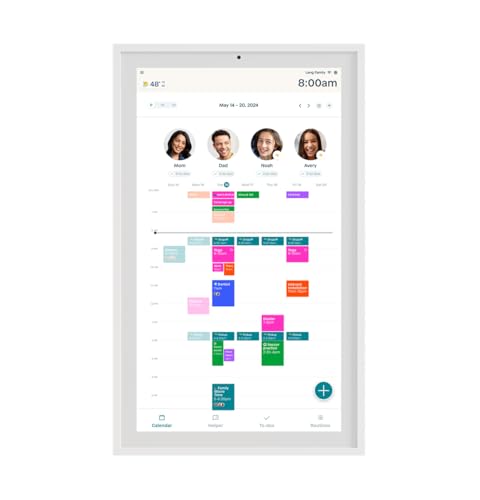
The Skylight Calendar is a plug-in touchscreen that puts the whole family’s calendars, chores and lists on one screen in the kitchen. Judging by search volume, it is the digital calendar Canadians look up most. This page sorts out the models, what the Plus plan really adds, where to buy one here, and when another screen is the better buy.
The short answer
- Most families: Skylight Calendar 2, 15 inches, counter or wall.
- Big family, big wall: Calendar Max, 27 inches, wall only.
- Skylight Plus: optional. Calendars, tasks and lists are free; meal plans, photos and Magic Import are not.
- Where to buy: Amazon.ca or Skylight’s Canadian store, which ships within Canada.
- Want photos, not schedules? That is the Skylight Frame, a different product.
How we picked, and what we did not do: this is an independent buyer’s guide. BranchéQC is not affiliated with, sponsored by or endorsed by Skylight or any other brand here, and we have not tested these devices. Product specifications are quoted from each manufacturer’s Amazon.ca listing, checked November 19, 2026, and every product on a card was in stock in Canada that day. Plan contents and calendar services are quoted from each maker’s own site, linked where they appear. Links to Amazon are affiliate links; BranchéQC may earn a commission at no extra cost to you. We do not write prices: the button says “Check price on Amazon.ca” and the Amazon page is what counts.
Skylight and its alternatives, compared
Compared on published specs: every pick on this page, Skylight first.
| Device | Brand | Screen | Mounting | Syncs | Paid plan |
|---|---|---|---|---|---|
| Skylight Calendar 2 (15 in.) | Skylight | 15 in., 1920 x 1080 (Skylight) | Stand and wall mount included | Google, Apple, Outlook, Yahoo, Cozi, Readdle | Plus optional |
| Skylight Calendar (15 in., first model) | Skylight | 15.4 in. per the listing, Full HD | Stand or wall, mount included | Google, iCloud, Outlook, Cozi, Yahoo (listing) | Plus optional |
| Skylight Calendar Max (27 in.) | Skylight | 27 in., HD | Wall only, portrait or landscape | Google, Apple, Outlook, Yahoo, Cozi, Readdle | Plus optional |
| Skylight Frame (10 in.) | Skylight | 10 in., 1280 x 800 | Not stated on the listing | No calendar: photos by email or app | No subscription needed (listing) |
| Hearth Display (27 in.) | Hearth | 27 in., anti-glare | Wall, custom mount | Google, Apple iCal, Outlook, URL calendars | Family Membership for most features |
| Cozyla Calendar Plus 2 (15.6 in.) | Cozyla | 15.6 in. | Desk stand included | Google, Apple, Outlook, Yahoo; CalDAV, URL | Sync without subscription (listing) |
| Amazon Echo Show 15 | Amazon | 15.6 in., Full HD | Not stated (stand bundles sold) | Family calendars widget; services not named | None for the calendar |
| Winnovo 15.6-inch Smart Digital Calendar | Winnovo | 15.6 in., HD | Wall or counter | Google, Apple, Outlook (listing) | No subscription required (listing) |
Every Skylight Calendar model
Skylight’s Canadian site lists two calendar sizes, 15 and 27 inches, across three models. We found no 10-inch Skylight calendar on that site: the 10-inch Skylight product is the photo frame.
- Calendar 2, 15 inches: 1920 x 1080 Full HD, 16 GB of storage, interchangeable Snap Frames, stand and wall mount included, per its product page.
- Calendar 1, 15 inches: the first model, still listed by Skylight next to the Calendar 2 and still sold on Amazon.ca.
- Calendar Max, 27 inches: portrait or landscape, adjusts automatically, “exclusively designed for wall mounting”, per the Calendar Max page.
On Amazon.ca, the finish is part of the listing. These were in stock on November 19, 2026:
| Model | Finishes on Amazon.ca |
|---|---|
| Calendar 2 (15 in.) | White, Classic White, Classic Sage, Shadow Box Silver, Walnut wood |
| Calendar 1 (15 in.) | White |
| Calendar Max (27 in.) | White, Black, Charcoal, Silver |
| Frame (photos only) | 10 in. Black, 15 in. Black |
Two traps when you shop: several listings from other brands put “Skylight” in their title. Check that the seller and brand say Skylight. And the price can differ between finishes of the same model: compare the finish you want, not only the model.
The picks, one by one
Skylight Calendar 2 (15 in.)15 in., 1920 x 1080 (Skylight) · Stand and wall mount includedMost families. Skylight's current 15-inch calendar: Full HD, 16 GB of storage per Skylight, 4 GB of RAM per the listing, a magnetic Snap Frame you can swap, and a 180° adjustable stand plus a wall mount with built-in level in the box.Watch out: Meal planning, the photo screensaver, Magic Import, rewards and Disney Mode need the Plus plan. Plugged in and on Wi-Fi at all times, says Skylight.Check price on Amazon.ca ↗Skylight Calendar (15 in., first model)15.4 in. per the listing, Full HD · Stand or wall, mount includedThe family that wants the Skylight app and sync for less: it cost less than the Calendar 2 when we checked. Same colour-coded calendar, tasks and lists, same companion app.Watch out: No Snap Frame, and its listing gives no RAM figure. Skylight's site now calls it the Calendar 1, next to the Calendar 2.Check price on Amazon.ca ↗Skylight Calendar Max (27 in.)27 in., HD · Wall only, portrait or landscapeLarge families and command-centre walls. The 27-inch screen adjusts itself to portrait or landscape, frame styles swap, and the listing title calls it a bilingual English/French edition.Watch out: Skylight says the Calendar Max must be wall mounted: no stand. The most expensive Skylight calendar when we checked.Check price on Amazon.ca ↗Skylight Frame (10 in.)10 in., 1280 x 800 · Not stated on the listingGrandparents who want photos, not schedules. Each frame gets its own Skylight email address, so family can send photos and videos from anywhere, and an offline mode keeps showing existing photos without Wi-Fi, per the listing.Watch out: It does not show calendars or chores. Wi-Fi is needed to receive new photos. A 15-inch version is also listed.Check price on Amazon.ca ↗Hearth Display (27 in.)27 in., anti-glare · Wall, custom mountFamilies with young children who need step-by-step routines and streaks, plus URL calendars such as TeamSnap and school district calendars, per Hearth.Watch out: The most expensive of our picks when we checked. Without the membership: unlimited profiles and basic calendar visibility only, per Hearth.Check price on Amazon.ca ↗Cozyla Calendar Plus 2 (15.6 in.)15.6 in. · Desk stand includedAnyone who wants apps on the family screen: Google Play Store, drag-and-drop widgets, chores with points, meal planning with recipes and shopping lists, voice commands, per the listing.Watch out: More setup than a Skylight, and voice commands mean a listening device. Wall mounting is not stated on the listing.Check price on Amazon.ca ↗Amazon Echo Show 1515.6 in., Full HD · Not stated (stand bundles sold)An Alexa home: calendar and to-do widgets, a smart home dashboard, Fire TV, video calls and a photo frame mode, per the listing.Watch out: No chore chart or meal planner listed. Camera and microphones, with a mic/camera-off button and a shutter.Check price on Amazon.ca ↗Winnovo 15.6-inch Smart Digital Calendar15.6 in., HD · Wall or counterThe budget option: the least expensive of our picks when we checked, with chores, lists, meal planning and a 32 GB photo frame without a subscription. French and English menus, no camera or microphone, per the listing.Watch out: A smaller brand; every spec here comes from the listing only.Check price on Amazon.ca ↗


What Skylight Plus adds
The calendar works without a subscription. Skylight lists tasks, custom lists, profiles and the parental lock as subscription-free on its calendar page, and the Amazon.ca listings describe calendars, tasks and lists for the whole family as included. The optional Plus plan, per Skylight’s Calendar Plus page, adds:
- Magic Import with Sidekick: forward a school email, or a PDF, and it becomes calendar events.
- Meal planning: breakfast, lunch, dinner and snack plans for the week.
- Photo and video screensaver: the calendar becomes a photo frame when nobody is using it.
- Rewards: stars on chores that kids trade for rewards.
- Disney Mode: character avatars, animations and screensavers.
Worth it? If you want only one of these, probably not: a shared phone calendar and the free chore chart cover a lot. If meal plans and Magic Import would save you a weekly chore, the plan earns its keep. Skylight’s site sells calendar bundles with the Plus plan included; we do not write plan prices, which change.
Calendars, setup, power and privacy
- Calendars: Google, Apple, Outlook, Yahoo, Cozi and Readdle, plus any calendar with a public sharing link, per Skylight. That covers shared custody well: each parent syncs their own calendar.
- Setup: plug in, connect to Wi-Fi, sync your calendars, per the listings. Edit from the screen or the Skylight app.
- Power: outlet only, no battery, and Wi-Fi at all times, per Skylight. Plan the cord.
- Privacy: events sync through a Skylight account and its cloud. A parental lock is among the free features. The Skylight listings we read do not mention a camera or a microphone.
- Language: the Calendar 2 White and Calendar Max White listings mention French in their titles.
Where to buy a Skylight Calendar in Canada
| Where | What to know |
|---|---|
| Amazon.ca | All three calendars and the frames were in stock on November 19, 2026. Check that the brand is Skylight. |
| Skylight's Canadian store | Orders ship within Canada through Amazon’s shipping service, with no customs fees, per Skylight’s product page. Bundles with the Plus plan are offered. |
| Costco, Walmart, Best Buy | May carry Skylight calendars in some stores or online. Check the model name (Calendar 2 or first model) and the size before you buy. |
Skylight vs Hearth, Cozyla, Echo Show 15 and a budget screen
The four alternatives most people weigh against a Skylight, on the points that decide:
| Device | Sizes | Mounting | Free | Paid plan for | Chores | Camera, mic |
|---|---|---|---|---|---|---|
| Skylight | 15 or 27 in. | Counter or wall (Max: wall) | Sync, tasks, lists, profiles | Meals, photos, import, rewards | Yes, rewards with Plus | Not mentioned |
| Hearth Display | 27 in. | Wall | Profiles, basic calendar | Routines, to-dos, meals, Helper | Routines and streaks | Not mentioned |
| Cozyla Calendar Plus 2 | 15.6 in. (more sizes) | Desk stand | Sync (listing) | Not stated | Yes, with points | Voice commands |
| Echo Show 15 | 15.6 in. | Not stated | Calendar widget | Streaming apps | Not listed | Both, with shutter |
| Winnovo 15.6-inch | 15.6 in. | Wall or counter | Everything listed | None | Yes | Neither |
Hearth’s free and paid features are from its features page and its membership page; Cozyla’s sync list (Apple, Google, Outlook, CalDAV, URL, two-way) from its site. Everything else is from the Amazon.ca listings.
Which should you buy
- Busy family, one kitchen screen: Skylight Calendar 2.
- Skylight on a tighter budget: the first 15-inch Skylight.
- Five people, one big wall: Skylight Calendar Max.
- Young kids and routines: Hearth Display, with its membership.
- Apps on the family screen: Cozyla Calendar Plus 2.
- An Alexa home: Echo Show 15.
- No subscription, ever, and no camera: Winnovo 15.6-inch.
- Grandparents who want photos: the Skylight Frame, not a calendar.
More brands, and a section on screen size, chores and photo modes, are in our guide to the best digital family calendars in Canada.
Frequently asked questions
Is the Skylight Calendar available in Canada?
Yes. The Calendar 2, the first 15-inch model and the 27-inch Calendar Max were all in stock on Amazon.ca on November 19, 2026. Skylight also runs a Canadian store: its product page says those orders ship within Canada through Amazon's shipping service, with no customs fees.
What sizes does the Skylight Calendar come in?
Two sizes on Skylight's Canadian site: 15 inches (the Calendar 2 and the older Calendar 1, which its Amazon.ca listing gives as 15.4 inches) and 27 inches (the Calendar Max). We found no 10-inch Skylight calendar; the 10-inch Skylight product is the photo frame.
Do you need Skylight Plus?
No. Calendar sync, tasks, custom lists, profiles and the parental lock work without it. Skylight Plus adds meal planning, a photo screensaver, Magic Import (forward a school email, get calendar events), star rewards for chores and Disney Mode. Get it if two or more of those matter to you.
Which calendars sync with Skylight?
Google, Apple, Outlook, Yahoo, Cozi and Readdle calendars, plus any calendar with a public sharing link, according to Skylight's calendar page. You can also add events on the screen or from the Skylight app.
Can the Skylight Calendar sit on a counter?
The 15-inch models can: Skylight includes a tilt-capable countertop stand and a wall mount with bubble level. The 27-inch Calendar Max cannot: Skylight says it must be wall mounted.
Does the Skylight Calendar have a battery?
No. Skylight says the calendar must be plugged into an electrical outlet to work and needs Wi-Fi at all times to operate.
What is the difference between Skylight Calendar and Skylight Frame?
The Calendar shows your family's schedules, chores and lists. The Frame is a digital photo frame: each one gets its own Skylight email address for photos, and its listing says no subscription is needed. A Calendar only shows photos as a screensaver with the Plus plan.
What is a good alternative to the Skylight Calendar?
The Hearth Display for routines and young kids, the Cozyla Calendar Plus 2 for Google Play apps, the Echo Show 15 for an Alexa home, and the Winnovo 15.6-inch calendar for the lowest cost without a subscription. Our full guide to digital family calendars compares them all.
Keep reading
Comparing every brand? Start with our best digital family calendar guide. Building out the rest of the smart home: see the smart home in Canada and the best smart thermostats. A Skylight is a popular family gift: our Canadian gift guide has more ideas.