

Top choices
Specs as stated on the manufacturers' listings; the price shows on the retailer's page. Works with provider equipment · one network nameNETGEAR Nighthawk EAX15 WiFi 6 ExtenderFor a home that rents its modem-router from the internet provider and wants to keep it. The listing says it is compatible with your internet provider's equipment and any router you already own, keeps your existing network name through Smart Roaming, and names the garage, basement and backyard as targets. WPA3 security and a Gigabit port.Watch out: Stated coverage and device count are lower than the RE515X's. The listing does not mention an access point mode, and says real-world speeds vary with your devices and internet plan.Check price on Amazon.ca ↗
 Budget · thermostats, cameras, smart plugsTP-Link RE315 AC1200 Dual Band WiFi Range ExtenderThe budget pick for gadgets that need a steady signal more than speed: a thermostat, a camera, a smart plug in the far corner. The listing names Ring cameras, Alexa Echo, Chromecast and Fire Sticks among the devices it serves. Dual band, AP mode, Tether app setup and a 2-year warranty.Watch out: It is Wi-Fi 5, not Wi-Fi 6, and its Ethernet port is 10/100, not Gigabit. The listing says it is not compatible with Deco mesh systems.Check price on Amazon.ca ↗
 Wi-Fi 6 mesh · whole house, wired backhaulTP-Link Deco X55 AX3000 WiFi 6 Mesh System, 3-PackFor a two-storey house with a finished basement, where one extender in one room is not enough. Three units share one network name and password and hand your phone from one to the next as you walk. Each has 3 Gigabit Ethernet ports, and the listing supports wired Ethernet backhaul: cable one unit to the main one and the link between them stops competing with your devices for Wi-Fi.Watch out: It replaces your router, so plan how it sits with the provider's modem-router (see the provider section). The listing gives speeds for 5 GHz and 2.4 GHz only, so there is no 6 GHz band.Check price on Amazon.ca ↗
Canadian houses are hard on Wi-Fi. The router sits by the front door where the provider installed it, the signal has to cross a concrete basement floor, and the garage is a separate building with two exterior walls in the way. Meanwhile more of the house depends on it: the smart thermostat, the doorbell and driveway cameras, the EV charger that schedules its charging overnight. Fixing a dead zone comes down to three questions: how big the weak area is (one room, or spread around), what is in the way (drywall, concrete, the outdoors), and whether you can run a cable.
The short answer
- One weak room or the basement: the TP-Link RE515X, a Wi-Fi 6 plug-in with a Gigabit port. Keeping the provider’s modem-router? The NETGEAR EAX15 states it works with provider equipment.
- Only a thermostat or a camera to reach: the budget TP-Link RE315.
- Weak spots all over the house: a mesh system, the Deco X55 (Wi-Fi 6, wired backhaul) or the eero 7 (Wi-Fi 7).
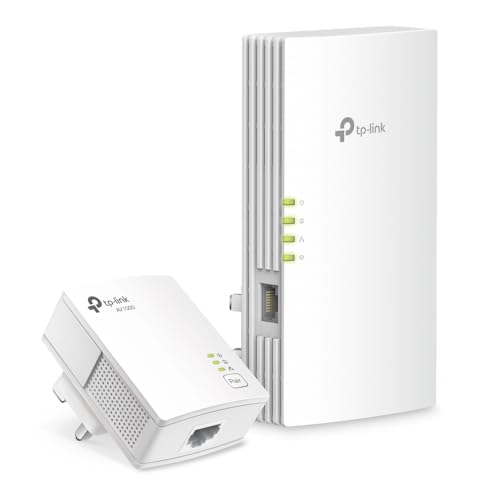
- Concrete or stone in the way: the TP-Link TL-WPA7817 powerline kit.
- Detached garage or the yard: the eero Outdoor 7, rated IP66 and -40 °C to 55 °C, with an eero system.
How we picked, and what we did not do: we have not set up or speed-tested these units. Every specification on this page is quoted from the manufacturer’s Amazon.ca listing, checked November 24, 2026, and every product on a card was in stock in Canada that day. Coverage areas, device counts and speeds are the makers’ own claims; where a listing leaves a number out, we write “not stated” rather than guess. Links to Amazon are affiliate links; BranchéQC may earn a commission at no extra cost to you. We do not write prices by hand: the button says “Check price on Amazon.ca” and the Amazon page is what counts.
Extender, mesh or access point: three ways to fix a dead zone
A WiFi extender repeats your router’s signal. It plugs into a wall outlet, connects to your Wi-Fi like a phone does, and rebroadcasts it into the weak area. It is the cheapest fix and works with the router you already have, but it only helps where it is placed, and it can only pass on the signal it receives. TP-Link’s RE515X listing says it plainly: extenders are designed to improve coverage, not to increase speed.
A mesh system replaces your router with two or three units that work as one network, with one name and one password, and move each device to the strongest unit as you walk around. The Deco X55 and eero 7 in this guide both come as 3-packs. Mesh is the fix when the weak spots are spread around a large or multi-level house, not just one room.
An access point needs a network cable. It takes a wired connection from the router and turns it into Wi-Fi at the other end, so nothing is lost to repeating. Several extenders have an access point (AP) mode for exactly this: the RE515X and RE315 listings state it. If there is already a network jack in the basement or the garage, an extender in AP mode is often the best result for the money.
Wi-Fi 6, 6E or 7: what do you need in 2026?
Wi-Fi 6 is the sensible floor for anything bought today. Four of our seven picks are Wi-Fi 6, on the 2.4 GHz and 5 GHz bands. The RE315 is the one Wi-Fi 5 unit, kept for smart-home gadgets that do not need speed.
Wi-Fi 6E adds the 6 GHz band. The TP-Link Deco XE75 tri-band mesh listing describes it as exclusive to Wi-Fi 6E traffic and, by default, uses it as a dedicated link between the mesh units. Only Wi-Fi 6E devices (and newer) can connect to 6 GHz directly.
Wi-Fi 7 builds on that with wider channels and multi-link operation (MLO), which lets a device use more than one band at once. The TP-Link RE655BE tri-band Wi-Fi 7 extender lists 320 MHz channels, a 6 GHz band and a 2.5G Ethernet port; the eero 7 mesh is dual band, per its title. Wi-Fi 7 pays off with an internet plan above a gigabit and devices that support it. To fix a basement dead zone, it is not required.
The speed numbers in model names (AX1500, AX3000, BE9300) add up the maximum of each band. They are lab ceilings, not what your phone will see: NETGEAR’s own listing says real-world speeds vary with the connected devices and the internet plan. We list them but do not rank on them.
Plug-in or desktop extender?
A plug-in extender goes straight into a wall outlet, so its spot is fixed by where your outlets are: usually low on the wall, sometimes behind furniture. It needs no cord and no shelf, which is why the RE515X, EAX15 and RE315 are all plug-ins. A desktop unit, like each node of the Deco X55 or eero 7, sits on a shelf on its own power cord. It can be moved higher and into the open, which helps the signal, and it usually has more Ethernet ports: three per unit on the Deco X55, two 2.5 GbE per unit on the eero 7.
Where to put a WiFi extender: halfway, not in the dead zone
The most common mistake is plugging the extender into the room that has no signal. It then repeats a weak signal, and the result is just as weak. The right spot is roughly halfway between the router and the dead zone, where the extender still receives a strong signal. TP-Link’s listings describe the signal indicator on their extenders as the tool for finding the optimal location between your router and the dead zone; use it.
- For the basement: try an outlet at the top of the stairs or on the ground floor right above the dead zone, before one in the basement itself.
- Avoid the obvious blockers: the electrical panel, the furnace and water heater, a large mirror or a fridge between the extender and the router.
- For mesh: each unit should be able to see the previous one well. A unit tucked behind the TV in the basement does the same job as an extender in the wrong spot.
- Test from the device: what counts is the signal at the thermostat or the camera, not at the extender.
Ethernet backhaul, powerline and MoCA
Every repeater or mesh unit has to talk to the main router somehow. Over Wi-Fi, that link shares airtime with your devices. Over a cable, it does not, and this is called Ethernet backhaul. The Deco X55 listing supports wired Ethernet backhaul, and its 3 Gigabit ports per unit leave room for the cable plus a TV or console. If a network cable can reach the basement or the far end of the house, use it: it is the single biggest improvement a mesh system can get.
Powerline is the fallback when no cable can be run. One adapter plugs in next to the router, the other where you need the network, and the data travels over the house wiring. The TP-Link TL-WPA7817 KIT states HomePlug AV2 at up to 1000 Mbps over up to 300 metres of line, and the second unit is a Wi-Fi 6 access point. Real speed depends on the wiring between the two outlets, so treat powerline as something to test, and plug the adapters straight into wall outlets rather than into a power bar.
MoCA does the same job over the coaxial cable that cable-TV homes often already have in several rooms. It is worth knowing about if there is an unused coax outlet in the basement, but we did not pick a MoCA adapter for this guide.
Bell, Rogers, Vidéotron and Telus routers: will an extender work?
Most Canadian homes run on the modem-router the provider installed, and that changes the choice.
- A plug-in extender joins your Wi-Fi like any device, so it does not need the provider’s permission or settings. The NETGEAR EAX15 listing states it is compatible with your internet provider’s equipment and any router. TP-Link’s mesh features (OneMesh, EasyMesh) only apply with a compatible router; without one, the extender still works as a plain extender.
- A mesh system such as the Deco X55 or eero 7 is a router itself. Behind a provider’s modem-router, you end up with two routers in a row unless the provider’s box is set to bridge mode. Whether yours can, and how, is a question for your provider: settings vary by model and by plan.
- Provider extenders and pods: searches like “Bell WiFi extender” and “Telus WiFi booster” are common. Ask your provider whether it offers its own extender for the equipment you rent; it is the option it will support on the phone.
WiFi extender for a detached garage or outdoors
A detached garage is the hardest case: the signal has to leave the house through an exterior wall, cross the yard and get through the garage wall. An indoor extender by the back door rarely solves it. In order of effort:
- An outdoor mesh node on the house. The eero Outdoor 7 lists IP66 protection from dust, rain and snow, a tested range of -40 °C to 55 °C, and up to a 21-metre radius of outdoor coverage. Mounted on the wall facing the garage, it can cover the yard in between if the garage sits within that stated radius. It needs an eero network. Deco owners have the TP-Link Deco X50-Outdoor, which lists weatherproofing and PoE+ or AC power but no operating temperature.
- Powerline to the garage. If the garage is fed from the house, a powerline kit may carry the network over that circuit. It may also not: test it with the store’s return policy in mind.
- A buried network cable. The reliable answer: a cable to the garage and an extender in AP mode or a mesh unit inside. If an electrician is already trenching to the garage for a new circuit, for an EV charger or a heater, ask about running a separate conduit for a network cable at the same time.
Outdoor gear has to survive a Quebec winter. Of our picks, only the eero Outdoor 7 states an operating temperature. The indoor units are for indoor use: a plug-in extender in an unheated garage is outside what its listing describes.
Smart thermostats, cameras and EV chargers on Wi-Fi
Often the reason to buy an extender is not Netflix but a device that keeps dropping offline. Many smart-home devices connect on the 2.4 GHz band, which reaches farther through walls than 5 GHz; check the manual of yours. Before you change the network, remember that a mesh system or a new extender that uses a different network name means reconnecting every device.
- Thermostats in a basement hallway are a classic dead zone. Our guide to the best smart thermostats in Canada compares the models.
- Cameras upload video all day, so a weak link shows as frozen clips and missed alerts. See the best security cameras in Canada and the best doorbell cameras; a driveway or garage camera is where the eero Outdoor 7 or a wired access point earns its place.
- EV chargers in the garage or on the driveway use Wi-Fi for scheduling, energy reports and updates. Our guide to the best home EV chargers in Canada compares them; check what a charger needs from Wi-Fi before you mount it at the far end of the driveway.
- Garage door openers sit at the far end of the house by design. See the best smart garage door openers.
The seven picks, compared on published specs
Every figure is the manufacturer’s own. Coverage is the maker’s claim for its own test conditions, so compare it within a brand, not across brands. Where a listing gives no number, the table says so rather than guessing.
| Model | Type | Wi-Fi | Stated coverage | Ethernet | Mesh and compatibility | Power and install |
|---|---|---|---|---|---|---|
| TP-Link RE515X AX1500 WiFi 6 Range Extender | Plug-in extender | Wi-Fi 6, AX1500 (1201 Mbps 5 GHz + 300 Mbps 2.4 GHz) | Up to 1,800 sq ft (about 167 m²), 64 devices | 1 Gigabit port | EasyMesh-compatible routers | Wall outlet; extender or access point (AP) mode |
| NETGEAR Nighthawk EAX15 WiFi 6 Extender | Plug-in extender | Wi-Fi 6, AX1800 (up to 1.8 Gbps) | Adds up to 1,500 sq ft (about 139 m²), 20 devices | 1 Gigabit port | Any router; Smart Roaming keeps your network name | Wall outlet; Nighthawk app or WPS button |
| TP-Link RE315 AC1200 Dual Band WiFi Range Extender | Plug-in extender | Wi-Fi 5, AC1200 (867 Mbps 5 GHz + 300 Mbps 2.4 GHz) | Up to 1,500 sq ft (about 139 m²), 25 devices | 1 Fast Ethernet port (10/100) | TP-Link OneMesh routers; not compatible with Deco | Wall outlet; extender or AP mode |
| TP-Link Deco X55 AX3000 WiFi 6 Mesh System, 3-Pack | Mesh system, 3 units (replaces the router) | Wi-Fi 6, AX3000 (2402 Mbps 5 GHz + 574 Mbps 2.4 GHz), 160 MHz | Up to 6,500 sq ft (about 604 m²), 150 devices | 3 Gigabit ports per unit (9 in total) | Ethernet backhaul supported; one network name | Desktop units, each on its own power cord |
| Amazon eero 7 Wi-Fi 7 Mesh System, 3-Pack | Mesh system, 3 units (router or added nodes) | Wi-Fi 7, dual band, wireless up to 1.8 Gbps, MLO | Up to 560 m² (about 6,000 sq ft) for 3 units, 120+ devices | 2 × 2.5 GbE auto-sensing ports per unit | Works with every eero generation, including eero Outdoor 7 | Desktop units; eero app setup |
| TP-Link TL-WPA7817 KIT Powerline WiFi 6 Extender | Powerline kit (wired adapter + Wi-Fi 6 unit) | Wi-Fi 6, AX1500 (1201 Mbps 5 GHz + 300 Mbps 2.4 GHz) | Not stated; powerline line length up to 300 m | Gigabit Ethernet port | EasyMesh; Wi-Fi Clone copies your router's settings | Two wall outlets, one next to the router |
| Amazon eero Outdoor 7 Wi-Fi 7 Mesh Router | Outdoor mesh node, 1 unit | Wi-Fi 7, dual band, wireless up to 2.1 Gbps | Up to 1,390 m² outdoors (21 m radius), 100+ devices | Not stated | Works with every eero generation | Outdoor mount; PoE+ (30 W adaptor included) or AC adaptor |
Which WiFi extender for your home
TP-Link RE515X AX1500 WiFi 6 Range ExtenderPlug-in extender · Wi-Fi 6, AX1500 (1201 Mbps 5 GHz + 300 Mbps 2.4 GHz)The default fix for one weak room or one floor. Plug it in, set it up in the TP-Link Tether app, and the signal indicator tells you whether the spot is right. Wi-Fi 6, a Gigabit Ethernet port for a TV or console, and an AP mode that turns a wired connection into a Wi-Fi hotspot. With an EasyMesh-compatible router it joins the same network.Watch out: TP-Link's own listing says extenders are designed to improve coverage, not to increase speed. The 1,800 sq ft figure is the maker's; it is not a detached-garage solution.Check price on Amazon.ca ↗NETGEAR Nighthawk EAX15 WiFi 6 ExtenderPlug-in extender · Wi-Fi 6, AX1800 (up to 1.8 Gbps)For a home that rents its modem-router from the internet provider and wants to keep it. The listing says it is compatible with your internet provider's equipment and any router you already own, keeps your existing network name through Smart Roaming, and names the garage, basement and backyard as targets. WPA3 security and a Gigabit port.Watch out: Stated coverage and device count are lower than the RE515X's. The listing does not mention an access point mode, and says real-world speeds vary with your devices and internet plan.Check price on Amazon.ca ↗TP-Link RE315 AC1200 Dual Band WiFi Range ExtenderPlug-in extender · Wi-Fi 5, AC1200 (867 Mbps 5 GHz + 300 Mbps 2.4 GHz)The budget pick for gadgets that need a steady signal more than speed: a thermostat, a camera, a smart plug in the far corner. The listing names Ring cameras, Alexa Echo, Chromecast and Fire Sticks among the devices it serves. Dual band, AP mode, Tether app setup and a 2-year warranty.Watch out: It is Wi-Fi 5, not Wi-Fi 6, and its Ethernet port is 10/100, not Gigabit. The listing says it is not compatible with Deco mesh systems.Check price on Amazon.ca ↗TP-Link Deco X55 AX3000 WiFi 6 Mesh System, 3-PackMesh system, 3 units (replaces the router) · Wi-Fi 6, AX3000 (2402 Mbps 5 GHz + 574 Mbps 2.4 GHz), 160 MHzFor a two-storey house with a finished basement, where one extender in one room is not enough. Three units share one network name and password and hand your phone from one to the next as you walk. Each has 3 Gigabit Ethernet ports, and the listing supports wired Ethernet backhaul: cable one unit to the main one and the link between them stops competing with your devices for Wi-Fi.Watch out: It replaces your router, so plan how it sits with the provider's modem-router (see the provider section). The listing gives speeds for 5 GHz and 2.4 GHz only, so there is no 6 GHz band.Check price on Amazon.ca ↗Amazon eero 7 Wi-Fi 7 Mesh System, 3-PackMesh system, 3 units (router or added nodes) · Wi-Fi 7, dual band, wireless up to 1.8 Gbps, MLOFor an internet plan above a gigabit, or a household that wants to buy once. Wi-Fi 7 with multi-link operation (MLO), two 2.5 GbE ports on each unit and support for plans up to 2.5 Gbps, as listed. Every eero generation works together, so the outdoor unit below joins the same network. Three-year warranty.Watch out: Dual band, per the title, and the listing does not mention a 6 GHz band. Advanced security, parental controls and ad blocking are part of the optional eero Plus subscription. The support phone number listed is a US number.Check price on Amazon.ca ↗TP-Link TL-WPA7817 KIT Powerline WiFi 6 ExtenderPowerline kit (wired adapter + Wi-Fi 6 unit) · Wi-Fi 6, AX1500 (1201 Mbps 5 GHz + 300 Mbps 2.4 GHz)When Wi-Fi cannot get through: a concrete basement floor, a stone wall, an addition at the far end. One adapter plugs in next to the router with a network cable, the other goes into an outlet where you need Wi-Fi, and the data rides the house wiring. The listing states HomePlug AV2, up to 1000 Mbps over a line length of up to 300 metres.Watch out: Real powerline speed depends on your wiring, and the listing gives no Wi-Fi coverage area. Whether the signal reaches a garage on a separate feed is something only a test in your house will tell.Check price on Amazon.ca ↗Amazon eero Outdoor 7 Wi-Fi 7 Mesh RouterOutdoor mesh node, 1 unit · Wi-Fi 7, dual band, wireless up to 2.1 GbpsFor the detached garage, the driveway camera and the EV charger that sit outside the house's Wi-Fi. The listing states IP66 protection from dust, rain and snow and a tested operating range of -40 °C to 55 °C, so it can stay outside all winter, and up to a 21-metre radius of outdoor coverage. Power comes over one Ethernet cable (PoE+, adaptor included) or from an AC adaptor.Watch out: It is an eero: it extends an eero network, so it pairs with a system like the eero 7 above, not with a TP-Link or Netgear one. The listing does not state its number of Ethernet ports. Running a cable or a permanent outdoor outlet to it is a job to plan before you buy.Check price on Amazon.ca ↗

Other models worth knowing
These were also in stock on Amazon.ca on November 24, 2026, and fit narrower cases than the seven cards.
- TP-Link RE705X: a faster Wi-Fi 6 plug-in, AX3000 with 160 MHz on 5 GHz, a Gigabit port and AP mode. The listing does not state a coverage area.
- TP-Link RE655BE: a tri-band Wi-Fi 7 extender with a 6 GHz band, MLO, a 2.5G port and EasyMesh, which pairs with an EasyMesh-compatible router or mesh system.
- TP-Link Deco XE75, 3-pack: Wi-Fi 6E mesh, up to 7,200 sq ft as listed, with the 6 GHz band used as a dedicated link between units by default.
- Amazon eero 6+, 3-pack: Wi-Fi 6 mesh for plans up to a gigabit, up to 420 m² as listed, with a built-in Thread and Zigbee smart home hub.
WiFi extender vs booster vs repeater
The names are marketing, not categories. The NETGEAR EAX15 is sold as an “extender” and a “WiFi booster” in the same title, and the TP-Link RE315 as a “range extender”, a “booster” and a “repeater”. All three words describe the same plug-in device that receives and rebroadcasts your Wi-Fi. The real choice is between the four types in this guide: plug-in extender, mesh system, access point and powerline.
Where to buy a WiFi extender in Canada
| Retailer | Strength | Note |
|---|---|---|
| Amazon.ca | Widest range: TP-Link, Deco, NETGEAR, eero, powerline kits | Check pack size (1, 2 or 3 units) before you order a mesh system |
| Electronics and big-box stores | May carry the main mesh brands in store | Range varies by store and by season |
| Your internet provider | May rent or sell its own extender for its equipment | Ask what it supports before buying a third-party mesh |
Frequently asked questions
What is the best WiFi extender in Canada?
For one weak room or floor, the TP-Link RE515X: Wi-Fi 6, a Gigabit Ethernet port, AP mode and a stated 1,800 sq ft of coverage. If you keep your provider's modem-router, the NETGEAR EAX15 states it works with provider equipment. For a whole house, the Deco X55 or eero 7 mesh systems. All were in stock on Amazon.ca on November 24, 2026.
Do I need a WiFi extender or a mesh system?
An extender for one dead zone: a bedroom, a basement corner, a back deck. A mesh system when the weak spots are spread around the house, or when you want one network that hands devices from unit to unit. Mesh replaces your router; an extender works alongside it.
Is a WiFi booster the same as a WiFi extender?
In stores, yes. Booster, extender, repeater and range extender are used for the same plug-in product, and the NETGEAR and TP-Link listings in this guide use several of those words in one title. What matters is the type: plug-in extender, mesh system, access point or powerline.
Where should I put a WiFi extender?
Halfway between the router and the area you want to cover, where the extender still gets a strong signal. TP-Link's listings describe their signal indicator as the tool for finding the optimal location between your router and the dead zone. Inside the dead zone, the extender has nothing good to repeat.
Will a WiFi extender work with my Bell, Rogers or Vidéotron modem?
A standard plug-in extender connects to any Wi-Fi network like a phone does, and the NETGEAR EAX15 listing says it is compatible with your internet provider's equipment. A mesh system that replaces the router is a different case: ask your provider whether its modem-router can run in bridge mode, or whether it rents its own extender for that equipment.
How do I get WiFi to a detached garage?
Three ways, from easiest to most reliable: an outdoor mesh node on the house wall facing the garage (the eero Outdoor 7 is rated IP66 and -40 °C to 55 °C), a powerline kit if the garage outlets carry the signal, or a network cable buried to the garage with an access point inside. If an electrician is trenching to the garage for an EV charger circuit, ask about the cable at the same time.
Does a WiFi extender slow down my internet?
It does not raise your speed. TP-Link's RE515X listing states that extenders are designed to improve coverage and not to increase speed. A device that was dropping out will often feel faster once its signal is steady, but the internet plan sets the ceiling.
Do I need Wi-Fi 7?
Not to fix a dead zone. Wi-Fi 6 covers most homes and most devices. Wi-Fi 7 starts to matter with an internet plan above a gigabit and newer phones or laptops that support it: the eero 7 supports plans up to 2.5 Gbps and has 2.5 GbE ports, as listed.
Keep reading
A steady network is the base of a smart home. Our guide to smart home automation in Canada shows how the pieces fit, and the best smart plugs in Canada are the easiest first step.
To keep the router and modem running through a power cut, see the best surge protectors in Canada and the best portable power stations in Canada.