

Top choices
Specs as stated on the manufacturers' listings; the price shows on the retailer's page. Neutral in the box · dimmingKasa Smart Dimmer Switch HS220The same Kasa formula with 0 to 100 percent dimming from the button or the app, fade-on with a click and fade-off with a double click. Neutral wire and 2.4 GHz required, UL certified, 2-year warranty as listed.Watch out: The listing gives no maximum LED wattage, so match it to the fixture yourself. Single-pole only: the listing points 3-way homes to the HS210 kit.Check price on Amazon.ca ↗
 No neutral · Caséta hubLutron Diva Smart Dimmer Starter Kit (Caséta)The no-neutral answer for an older home. One Diva smart dimmer, one Pico remote with pedestal and the Caséta Smart Hub in the box. The hub runs its own local network, and the listing says it keeps working when your Wi-Fi goes down.Watch out: Wall plate not included, sold separately, says the listing. The hub needs a spot near your router. The standalone Diva listing rates the dimmer at 600 W incandescent or 150 W LED.Check price on Amazon.ca ↗
 No neutral · Décora, Wi-Fi bridgeLeviton Decora Smart No-Neutral Dimmer + Wi-Fi Bridge Kit (DNKIT-1RW)The other no-neutral route, in the Décora shape most Canadian homes already have. The listing says line, load and ground are required, the bridge plugs into a wall outlet, and the My Leviton app sets preset levels, fade rates and bulb type.Watch out: The dimmer only works with the bridge, so it is a two-piece install. Multi-location control needs the optional companion (DAWDC or DAWSC) sold separately.Check price on Amazon.ca ↗
A smart light switch replaces the switch on the wall, so every bulb in the fixture becomes schedulable, dimmable and voice-controlled without changing a single bulb. That is its whole advantage over a smart bulb. It is also why the shopping question in Canada is not “which brand” but two things first: is there a neutral wire in your switch box, and who is allowed to connect it. American roundups skip both, and both decide whether the switch you order ends up in the wall or in a drawer.
The short answer
- Neutral in the box, you want on/off: the Kasa HS200. Neutral, 2.4 GHz, 15 A, no hub, as listed.
- Neutral in the box, you want dimming: the Kasa HS220, or the Leviton Decora Smart D36HD if you want Matter and 3-way in a Décora frame.
- No neutral (most pre-1985 boxes): the Lutron Diva Smart Dimmer Starter Kit with the Caséta hub, or the Leviton no-neutral dimmer and Wi-Fi bridge kit.
- One light, two switches: the Kasa HS210 3-way kit, or add a Pico remote to a Diva.
- Apple Home, three rooms at once: the Kasa Matter dimmer KS225P3 3-pack.
- You rent, or nobody is opening a wall: skip this page and read the best smart plugs in Canada or the best smart bulbs in Canada.
How we picked, and what we did not do: we have not wired these switches into a test wall. Every specification on this page is quoted from the manufacturer’s Amazon.ca listing, checked November 6, 2026, and every product on a card was in stock in Canada that day. Where a listing leaves a number out, such as a maximum LED wattage, we say so rather than fill it in. Links to Amazon are affiliate links; BranchéQC may earn a commission at no extra cost to you. We do not write prices by hand: the button says “Check price” and the Amazon page is what counts.
The neutral wire: the first thing to check in a Canadian home
A smart switch is a small computer that needs power even when the light is off. Most models take it from a neutral wire in the switch box. In homes wired from roughly the mid-1980s onward, the neutral is usually there: a bundle of white wires joined at the back of the box, not connected to the switch. In many older houses in Montreal, Toronto, Winnipeg or Halifax, the switch sits on a switch loop: power runs to the fixture first, and only two wires drop to the switch. No neutral, and a Kasa, Tapo or standard Leviton will not power up.
How to tell: breaker off, cover plate off, switch unscrewed and eased out. Two wires on the old switch plus a white bundle at the back means a neutral is available. Two wires and nothing else means a switch loop. One trap: on a switch loop the white wire is often a hot wire re-marked with black tape, and some are not re-marked at all. If what you see does not match the diagram in the box, stop. This is also the point at which the electrician you will call anyway (see below) earns the visit.
Two in-stock routes work without a neutral, both as listed. The Lutron Diva Smart Dimmer Starter Kit states “no neutral required” and ships with the Caséta Smart Hub that gives the dimmer its app, voice and schedules. The Leviton Decora Smart no-neutral dimmer kit DNKIT-1RW is sold “for older homes without neutral wiring”, needs line, load and ground, and talks to the My Leviton app through a bridge that plugs into any outlet. If you already own a Caséta hub, the standalone Diva smart dimmer with Claro wall plate adds a room without buying a second hub; its listing rates it at 600 W incandescent or 150 W LED.
Single-pole, 3-way, 4-way: count your switches before you order
Single-pole means one switch controls the light. Every pick on this page handles it. 3-way means two switches control the same light, the staircase and the hallway with a door at each end. A single-pole smart switch cannot simply replace one of the two: the Kasa HS200 and HS220 listings both say so and point to the HS210 kit. 4-way is three or more switches on one light; only a few smart products support it, and the TP-Link Tapo S515D kit mentioned below lists single-pole, 3-way and 4-way.
There are two ways to make a 3-way smart. The wired way replaces both switches with a matched kit, like the Kasa HS210 2-pack, which uses the travellers already in the wall. The wireless way puts one smart dimmer in the box that has power and a battery remote in the other location: Lutron’s Pico, which the Diva 3-way kit with Pico paddle remote bundles with a wall-mount bracket so the second “switch” sits on any wall, “no cutting holes or pulling wire required” per the listing. Leviton does the same with its Anywhere companions. The wireless route is also the one that rescues a 3-way where only one of the two boxes has a neutral.
Smart dimmers and LED bulbs: load ratings, flicker, and the one rule
A dimmer only dims bulbs built to be dimmed. Check the bulb package for “dimmable” before you blame the switch. Then check the load rating, which differs by bulb type because LED drivers behave nothing like a filament. The Lutron Diva listings state 600 W incandescent or 150 W LED. The Kasa HS220 and the Leviton D36HD listings give no wattage figure at all, so for a big chandelier or a long run of pot lights you have to find the number in the manufacturer’s spec sheet before buying. Treat a missing rating as a missing number, not as “unlimited”.
Two features separate a good LED dimmer from an annoying one, and both appear on the Leviton D36HD listing: an adjustable minimum dim level, so the bulbs do not flicker or drop out at the bottom of the slide, and a bulb type setting that matches the dimming curve to LED, CFL or incandescent. Lutron’s Diva offers a preset level and a slider with a soft-glow light bar; Kasa gives fade-on and fade-off from the paddle.
The one rule: never put a smart bulb on a dimmer. A smart bulb expects steady full power and does its own dimming inside. A dimmer feeds it chopped power, and the result is flicker, buzzing, a bulb that drops off the network, or a dead bulb. Choose one layer of intelligence per fixture: a smart dimmer with plain dimmable bulbs, or a plain switch left on with smart bulbs behind it. If you want colour-changing light in one lamp, that is a smart bulb job, not a switch job.
Wi-Fi, hubs, Matter: how the switch talks to your phone
Direct Wi-Fi. Kasa, Tapo, Leviton’s standard Decora Smart and Amazon Basics switches join your router directly. Every one of those listings specifies the 2.4 GHz band, not 5 GHz. If your router merges both bands under one name, you may need to split them during setup. Plan on one more device per switch on your network; a house full of switches is a lot of small clients on a consumer router.
A hub or bridge. Lutron Caséta uses its own radio to the Smart Hub, which the listing describes as “an ultra-reliable and responsive local network” that “works even when your Wi-Fi goes down”. The switch still responds at the wall and from a Pico during an outage of your internet, and the hub is what connects to Alexa, Apple Home, Google Assistant, Ring and Sonos. Leviton’s no-neutral line uses a similar bridge. The cost is one more box near the router; the gain is that the switches do not load your Wi-Fi.
Matter. Matter is the shared standard that lets one switch show up in Apple Home, Google Home, Alexa and SmartThings at the same time. The Kasa Matter dimmer KS225P3, the Tapo Matter switch S505 2-pack and the Tapo Matter 3-way dimmer kit S515D all list Matter plus local control over the LAN when the internet is down; the Leviton D36HD and its on/off sibling, the Decora Smart switch D315S, are “Matter ready out of the box”. Note what Matter does not change here: these are all Matter over Wi-Fi. No wall switch with a Thread radio came up in stock on Amazon.ca on November 6, 2026, so if you were hoping to skip Wi-Fi entirely, that product is not on the shelf today.
Décora shape, wall plates, and certification marks
Almost everything on this page is a flat rectangular rocker or paddle that fits a standard Décora-style opening, the shape Leviton named and the rest of the industry copied. The Lutron Diva and Kasa paddles fit the same plates. Two listing details matter at checkout: the Lutron starter kit says the wall plate is sold separately, while the standalone Diva and the Diva 3-way kit include a Claro plate; and Kasa says its switches need a box at least 2 inches deep, which some shallow older boxes are not. Multi-gang boxes may also need the heat-sink tabs on a dimmer snapped off; follow the instruction sheet.
On certification, the Kasa and Tapo listings say “UL certified”. For a device permanently connected in a Canadian wall, the mark an inspector looks for on the product itself is a Canadian one, such as cULus or CSA. The Amazon.ca listings we checked do not spell that out, so look for the mark on the switch or its box before the electrician installs it, and keep the packaging until the job is inspected.
Winter use: what a wall switch can and cannot control
A hardwired switch has no battery to freeze and lives indoors, so cold hits it only when it controls something outside or when the room itself is cold. The operating range is the number to read. The Kasa HS210 kit listing states 0 to 40 °C; the other Kasa and Leviton listings we checked give none. That rules a Wi-Fi switch out of an unheated detached garage, a shed or a cottage shut down for the winter at minus 20, and keeps it in heated rooms. A switch inside the heated house that feeds porch lights, a floodlight or a lit path outside is fine: the cold is on the fixture, not the switch.
Two winter uses are better served by a plug than a switch. Heat tape, a block heater cord or holiday lights on an outdoor outlet want an outdoor-rated smart plug with an operating range listed for cold, and a timer that survives a power blink; our smart plug guide covers those. And a battery remote such as the Pico should stay indoors; its listing does not state a cold rating, and small coin cells lose output quickly below freezing.
Privacy: what a cloud-connected wall switch knows about you
A smart switch logs when lights go on and off, which is a fairly exact record of when the house is occupied, when you wake, and when you leave. With a direct-Wi-Fi switch that data sits in the maker’s cloud account; with a hub it may also sit on the hub. In Canada, personal information collected by a company is covered by federal private-sector privacy law and, in Quebec, British Columbia and Alberta, by provincial laws that apply in its place. In plain terms, the maker needs a reason to collect it, must protect it, and must let you access and delete it. Read the privacy policy before you create the account, turn on two-factor authentication where the app offers it, and prefer products that advertise local control, as the Kasa Matter and Tapo Matter listings do, so the switch keeps working and your schedules keep running without a constant connection to a server.
The “away mode” that Kasa, Tapo and Lutron all list, which randomizes lights so the house looks lived in, is one of the better reasons to put a switch on the cloud. The flip side is that a shared account or a weak password gives someone else the same view. Use the household-sharing feature rather than one shared login, and remove old phones from the account when you upgrade.
Installing a smart switch is electrical work in Canada
Here is the paragraph the American reviews do not carry. A smart plug, a smart bulb or a stick-on Pico remote needs no tools and no permission. A smart switch is wired to the fixed wiring of the house, and in Canada that is electrical work under provincial rules, not a decorating project. In Quebec, a homeowner is not permitted to replace a switch or an outlet themselves; the work belongs to a licensed electrical contractor, and the CMEQ has a published fact sheet saying exactly that. In Ontario, a homeowner may do electrical work in their own home, but only after taking out a permit with the Electrical Safety Authority and having the work inspected. In the other provinces and territories, the rules vary: some allow homeowner work with a permit, some restrict it, and the authority to ask is the provincial electrical safety body or your utility. Insurance adjusters ask the same question after a fire. If the answer in your province is “licensed electrician”, the smart switch is the kind of small, quick job an electrician will often bundle with other work, such as adding a neutral to the box or replacing a worn receptacle, so make one list before you call.
If none of that fits your situation, the no-wiring route still gets you most of the way. A smart plug handles any lamp, and a set of smart bulbs handles a ceiling fixture whose switch you leave on. Our overview of smart home automation in Canada lays out where each layer fits.
The seven picks, compared on published specs
Every entry is the manufacturer’s own wording. Where a listing gives no number, the table says so rather than guessing.
| Model | Type | Neutral wire | Wiring | Hub or bridge | Platforms (as listed) |
|---|---|---|---|---|---|
| Kasa Smart Light Switch HS200 | On/off switch, Wi-Fi | Required (as listed) | Single-pole only | None | Alexa, Google Home |
| Kasa Smart Dimmer Switch HS220 | Dimmer, Wi-Fi | Required (as listed) | Single-pole only | None | Alexa, Google Home |
| Lutron Diva Smart Dimmer Starter Kit (Caséta) | Dimmer + hub kit | Not required (as listed) | Single-pole; add a Pico for a 2nd location | Caséta Smart Hub, included | Alexa, Apple Home, Google Assistant, Ring, Sonos |
| Leviton Decora Smart No-Neutral Dimmer + Wi-Fi Bridge Kit (DNKIT-1RW) | Dimmer + bridge kit | Not required (as listed) | Single-pole; wire-free 3-way with a companion | Leviton Wi-Fi bridge, included (plugs into an outlet) | Google, Alexa, Apple Siri |
| Kasa Smart 3-Way Switch Kit HS210 (2-pack) | On/off 3-way kit, Wi-Fi | Required (as listed) | 3-way or single-pole | None | Alexa, Google Home |
| Kasa Matter Smart Dimmer KS225P3 (3-pack) | Dimmer, Matter over Wi-Fi | Required (as listed) | Single-pole only | None | Apple Home, Alexa, Google Home, SmartThings (Matter) |
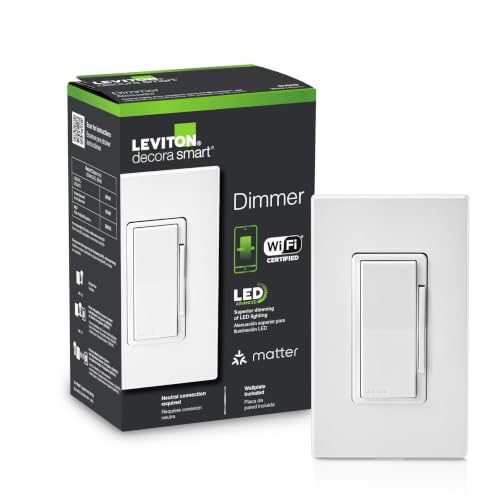
| Leviton Decora Smart Dimmer D36HD-1RW (Wi-Fi, Matter) | Dimmer, Wi-Fi, Matter ready | Required (as listed) | Single-pole, wired 3-way or wire-free 3-way | None | Alexa, Google Assistant, Apple Home, SmartThings, Home Assistant, Sonos, Resideo |
Which smart light switch or dimmer for your home
Kasa Smart Light Switch HS200On/off switch, Wi-Fi · Neutral: Required (as listed)The default first smart switch when your box has a neutral. The listing states 100 to 120 VAC, 15 A, 2.4 GHz Wi-Fi, UL certified, and a wall box at least 2 inches deep. Schedules, countdown timer and an away mode that randomizes lights.Watch out: Not a dimmer, and single-pole only: it will not replace one of the two switches on a staircase. No Apple Home on this model.Check price ↗Kasa Smart Dimmer Switch HS220Dimmer, Wi-Fi · Neutral: Required (as listed)The same Kasa formula with 0 to 100 percent dimming from the button or the app, fade-on with a click and fade-off with a double click. Neutral wire and 2.4 GHz required, UL certified, 2-year warranty as listed.Watch out: The listing gives no maximum LED wattage, so match it to the fixture yourself. Single-pole only: the listing points 3-way homes to the HS210 kit.Check price ↗Lutron Diva Smart Dimmer Starter Kit (Caséta)Dimmer + hub kit · Neutral: Not required (as listed)The no-neutral answer for an older home. One Diva smart dimmer, one Pico remote with pedestal and the Caséta Smart Hub in the box. The hub runs its own local network, and the listing says it keeps working when your Wi-Fi goes down.Watch out: Wall plate not included, sold separately, says the listing. The hub needs a spot near your router. The standalone Diva listing rates the dimmer at 600 W incandescent or 150 W LED.Check price ↗Leviton Decora Smart No-Neutral Dimmer + Wi-Fi Bridge Kit (DNKIT-1RW)Dimmer + bridge kit · Neutral: Not required (as listed)The other no-neutral route, in the Décora shape most Canadian homes already have. The listing says line, load and ground are required, the bridge plugs into a wall outlet, and the My Leviton app sets preset levels, fade rates and bulb type.Watch out: The dimmer only works with the bridge, so it is a two-piece install. Multi-location control needs the optional companion (DAWDC or DAWSC) sold separately.Check price ↗Kasa Smart 3-Way Switch Kit HS210 (2-pack)On/off 3-way kit, Wi-Fi · Neutral: Required (as listed)Two switches that control one light from two locations: top and bottom of the stairs, house to garage. Replaces a traditional 3-way pair. Neutral wire and 2.4 GHz required, UL certified, 2-year warranty, as listed.Watch out: Non-dimmable. The listing states an operating range of 0 to 40 °C, so this is for heated indoor spaces, not an unheated garage or a winterized cottage left cold.Check price ↗Kasa Matter Smart Dimmer KS225P3 (3-pack)Dimmer, Matter over Wi-Fi · Neutral: Required (as listed)Three Matter dimmers for the price of one box. The listing says they keep working over the local network when the internet is down and talk to Apple Home, Alexa, Google Home and SmartThings through one app of your choice. 1 to 100 percent dimming, UL certified, 2-year warranty.Watch out: Still Wi-Fi 2.4 GHz and still neutral required. Matter here is over Wi-Fi, not Thread: no Thread border router is involved.Check price ↗Leviton Decora Smart Dimmer D36HD-1RW (Wi-Fi, Matter)Dimmer, Wi-Fi, Matter ready · Neutral: Required (as listed)The Décora dimmer sold through Canadian hardware channels, now Matter ready out of the box per the listing. Adjustable bulb type, minimum dim and maximum bright settings for flicker-free LED dimming, night-time softer levels, and both wired and wire-free 3-way.Watch out: Neutral required. The listing does not state a maximum LED wattage, so check the fixture against the box before you buy.Check price ↗

One budget note: the Kasa HS200 also comes as the HS200P3 3-pack, same 100 to 120 VAC, 15 A, neutral and 2.4 GHz requirements as listed, which is the cheapest way we found to do a whole floor of single-pole on/off switches in one electrician visit.
Where to buy smart switches in Canada
| Retailer | Strength | Note |
|---|---|---|
| Amazon.ca | Widest range: Kasa, Tapo, Lutron, Leviton, multipacks, no-neutral kits | Read the neutral line and the single-pole / 3-way line on every listing |
| Home Depot, RONA, Home Hardware | Lutron Caséta and Leviton Decora Smart on the shelf | Useful when the electrician is already in the parking lot |
| Canadian Tire | Some smart switches in the electrical aisle | Range varies by store |
| Best Buy | Kasa, Tapo and some Lutron | Check the box for 3-way vs single-pole |
| Electrical wholesalers | Leviton and Lutron contractor stock | Your electrician may supply the switch at a better price than retail |
If the room runs on Philips Hue bulbs, the wall control is a different decision: Hue sells its own battery dimmer switch and Tap dial that talk to the Bridge instead of cutting power to the bulbs. Our guide to Philips Hue in Canada covers the Bridge, the accessories and the starter kits.
Frequently asked questions
What is the best smart light switch in Canada?
With a neutral wire in the box: the Kasa HS200 for on/off, the Kasa HS220 or the Leviton Decora Smart D36HD for dimming. Without a neutral: the Lutron Diva Smart Dimmer Starter Kit with the Caséta hub, or the Leviton no-neutral dimmer and bridge kit. All seven picks were in stock on Amazon.ca on November 6, 2026.
How do I know if my switch box has a neutral wire?
With the breaker off, pull the switch out. A bundle of white wires joined at the back of the box, not connected to the switch, is a neutral. Only two wires on the old switch and no white bundle means a switch loop with no neutral. If you are not sure, that is the electrician's first question anyway.
Which smart switch works without a neutral wire?
On Amazon.ca on November 6, 2026: the Lutron Diva smart dimmer for Caséta (hub required, no neutral required, as listed) and the Leviton Decora Smart no-neutral dimmer kit DNKIT-1RW with its Wi-Fi bridge (line, load and ground required, as listed). Both need their hub or bridge to work.
Does a Lutron Caséta smart switch need a hub?
For app, voice and schedules, yes: the Caséta Smart Hub (L-BDG2-WH), included in the starter kits and sold separately otherwise. Without the hub, a Diva smart dimmer still works from the wall and from a Pico remote, as the listing states.
Kasa HS200 or HS220: what is the difference?
HS200 is an on/off switch; HS220 is a dimmer. Both are single-pole, need a neutral wire and 2.4 GHz Wi-Fi, and work with Alexa and Google Home, as listed. For a light controlled from two switches, Kasa points to the HS210 3-way kit instead.
Can I put a smart bulb on a smart dimmer?
No. A smart bulb needs constant full power and does its own dimming; a dimmer chops that power and the bulb flickers, buzzes or fails. Pick one: dimmer with plain dimmable bulbs, or a plain switch left on with smart bulbs.
Is this the same as Samsung Smart Switch?
No. Samsung Smart Switch is a phone app for moving your data to a new Galaxy. A smart light switch is a wall switch that controls a light fixture. The names collide; the products have nothing in common.
Can I install a smart light switch myself in Canada?
A hardwired switch is electrical work. In Quebec a homeowner cannot replace a switch or outlet; a licensed electrician must. In Ontario, homeowner work on your own home needs an ESA permit and inspection. In other provinces, check the provincial electrical safety authority first. A smart plug or a smart bulb avoids the question.
Keep reading
No wiring at all: the best smart plugs in Canada and the best smart bulbs in Canada cover lamps and fixtures you can automate tonight.
The bigger picture is in our guide to smart home automation in Canada, and the device that pays for itself fastest is still the smart thermostat.