

Top choices
Specs as stated on the manufacturers' listings; the price shows on the retailer's page.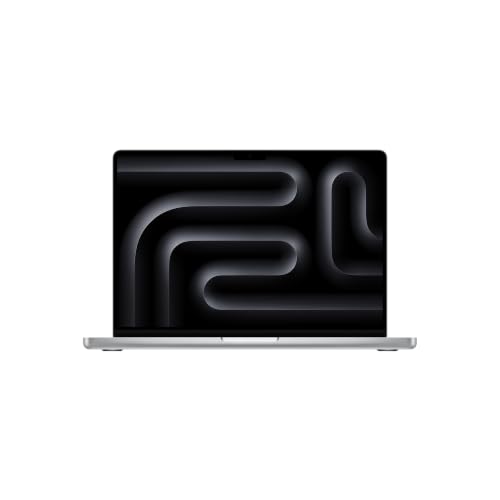 Best pro laptop for codingMacBook Pro 14" M6 (16 GB, 1 TB)The step up when you want more ports and a better screen without the M5 Pro price. Apple lists three Thunderbolt 4 ports plus HDMI and an SD slot, a 120 Hz ProMotion display at 1000 nits sustained, a 12-core CPU and up to 24 hours of video playback. HDMI on the side means one less dongle in a meeting room.Watch out: The 16 GB in this configuration is the same as a base Air; for containers or VMs, choose 24 or 32 GB from Apple. Still two external displays, like the Air.Check price on Amazon.ca ↗
 Heavy builds · local AI · three displaysMacBook Pro 16" M5 Pro (24 GB, 1 TB, French keyboard)For big monorepos, long compiles, Android Studio with several emulators, or running language models on your own machine. The 18-core M5 Pro, three Thunderbolt 5 ports and up to three external displays are the headline. The listing says Apple designed the M5 Pro and M5 Max for demanding on-device AI workloads like LLM inference and training, and promises an SSD up to 2x faster.Watch out: This Amazon.ca configuration has a French keyboard, per the listing: if you prefer a US layout, check before you buy. 24 GB is the M5 Pro's floor; local AI work wants more. At 2.14 kg, per Apple, it is the heaviest pick.Check price on Amazon.ca ↗
 Best Windows laptop for codingDell 14 Plus (Core Ultra 7 256V, 16 GB, 1 TB)A sensible Windows machine for .NET, PowerShell, game engines that target Windows, or anyone whose employer runs Windows. The listing gives a 14-inch 16:10 2.5K screen, an Intel Core Ultra 7 256V, 16 GB of LPDDR5X memory, a 1 TB SSD, a backlit keyboard with a Copilot key and an aluminum body.Watch out: The listing details we read give no battery, port or external-display figures: check the full listing and Dell's spec sheet. 16 GB is fine for most work but tight for several VMs.Check price on Amazon.ca ↗
Almost any recent laptop can run a code editor. The best laptop for programming is the one that still feels quick when your editor, a browser with twenty tabs of documentation, a dev server, a database in a container and a video call all run at once. That comes down to memory, screen space, ports for your monitors and an operating system that runs your toolchain. Raw processor speed matters less than most reviews suggest.
The short answer
- Most developers: MacBook Air 15" M5 with 24 GB and 1 TB.
- Students and a tighter budget: MacBook Air 13" M5 with 16 GB.
- More ports and a 120 Hz screen: MacBook Pro 14" M6.
- Heavy builds, local AI, three monitors: MacBook Pro 16" M5 Pro.
- Windows: Dell 14 Plus, or the ASUS Zenbook S14 for an OLED screen.
How we picked, and what we did not do: we have not tested these laptops and ran no benchmarks. Mac specifications are quoted from Apple Canada’s spec pages, Windows specifications from each Amazon.ca listing, all checked November 19, 2026; every product on a card was in stock in Canada that day. Links to Amazon are affiliate links; BranchéQC may earn a commission at no extra cost to you. We do not write Amazon prices: the button says “Check price on Amazon.ca” and the Amazon page is what counts. Starting prices we quote are Apple Canada’s, dated.
How we picked
This is a buyer’s guide compared on published specs. We ranked laptops on what developers run into every day:
- Memory for Docker, virtual machines, mobile emulators and local AI models. On a MacBook it is chosen at purchase and cannot be added later.
- Sustained performance, as the maker states it. Apple publishes no sustained-performance figures. What its spec pages do say is that the Air is fanless. A fanless laptop is silent, but it has no fan to help when a long build keeps the chip busy. Apple’s pages do not describe how the Pro is cooled.
- Keyboard: every MacBook Air and Pro lists a backlit keyboard with Touch ID; the Dell lists a backlit keyboard too.
- Screen space: resolution and size decide how many panes fit side by side.
- Ports and external displays: how many monitors you can drive, and how many dongles you carry.
- Battery: Apple’s rated hours, as a guide to a day away from a plug.
- Operating system fit: whether your toolchain runs natively.
What specs coding really needs
The RAM tiers below are our guidance, based on what each kind of work keeps open at once. They are not Apple’s or Microsoft’s numbers. Buy for the next three or four years: projects grow, and memory on a MacBook stays what you ordered.
| Kind of work | Memory (our guidance) | Storage (our guidance) | Good fit |
|---|---|---|---|
| Learning to code, scripting, web and front-end | 16 GB | 512 GB | MacBook Air 13" M5 |
| Mobile: Xcode simulators or Android Studio emulators | 24 GB | 1 TB | MacBook Air 15" M5 24 GB, MacBook Pro 14" M6 with 24 GB |
| Containers and VMs: Docker stacks, Kubernetes, a Windows VM | 32 GB or more | 1 TB or more | Pro 14" M6 with 32 GB, or an M5 Pro |
| Local AI models: running or fine-tuning LLMs on the laptop | 48 GB or more | 2 TB or more | MacBook Pro with M5 Pro (48 or 64 GB) or M5 Max |
Why containers need so much: on a Mac, Linux containers run inside a lightweight virtual machine, which reserves memory of its own before your first container starts. For local language models, the model’s weights have to fit in memory beside your editor and browser. On Apple silicon the memory is shared by the CPU and GPU, which is why Apple pitches its high-memory chips at this work: the M5 Pro listing says the M5 Pro and M5 Max are designed for demanding on-device AI workloads like LLM inference and training.
Memory options, per Apple Canada’s Air and Pro spec pages: the Air M5 and the Pro 14 M6 offer 16, 24 or 32 GB; the M5 Pro 24, 48 or 64 GB; the M5 Max 36 GB up to 128 GB. The MacBook Neo comes only with 8 GB.
Storage. 512 GB is a floor for development. Xcode and its simulators, Android SDKs, Docker images and node_modules folders add up quickly, and a single local model can take many gigabytes on its own. We would pick 1 TB for most developers. The Air goes from 512 GB to 4 TB; the Pro 14 M6 starts at 1 TB.
Screen size. A 13 or 14-inch screen is easy to carry and fine with an external monitor at your desk. If the laptop is your desk, a 15 or 16-inch screen fits an editor and a terminal or browser side by side without squinting. The 15.3-inch Air shows 2880 × 1864 pixels and the 16.2-inch Pro 3456 × 2234, per Apple.
Ports. Count your monitors, your keyboard, your Ethernet cable and any device you test on. The Air has two Thunderbolt 4 ports. The Pro adds a third Thunderbolt port, HDMI and an SD card slot, which spares you a hub in a meeting room.
Laptops for programming compared
Mac figures come from Apple Canada’s spec pages; Windows figures from each Amazon.ca listing. Where a listing is silent, we say so instead of guessing.
| Laptop | Chip | Memory | Storage | Screen | Ports | External displays | Battery |
|---|---|---|---|---|---|---|---|
| MacBook Air 15" M5 (24 GB, 1 TB) | Apple M5, 10-core CPU, 10-core GPU | 24 GB (Air offers 16, 24 or 32 GB) | 1 TB | 15.3" Liquid Retina, 2880 × 1864, 500 nits | 2 × Thunderbolt 4, MagSafe 3, headphone jack | Up to 2 external | 66.5 Wh; up to 18 h video, 15 h web (Apple) |
| MacBook Air 13" M5 (16 GB, 512 GB) | Apple M5, 10-core CPU, 8-core GPU | 16 GB | 512 GB | 13.6" Liquid Retina, 2560 × 1664, 500 nits | 2 × Thunderbolt 4, MagSafe 3, headphone jack | Up to 2 external | 53.8 Wh; up to 18 h video, 15 h web (Apple) |
| MacBook Pro 14" M6 (16 GB, 1 TB) | Apple M6, 12-core CPU, 12-core GPU | 16 GB (Pro M6 offers 16, 24 or 32 GB) | 1 TB | 14.2" Liquid Retina XDR, 3024 × 1964, ProMotion 120 Hz | 3 × Thunderbolt 4, HDMI, SDXC, MagSafe 3, headphone jack | Up to 2 external | 72.4 Wh; up to 24 h video, 16 h web (Apple) |
| MacBook Pro 16" M5 Pro (24 GB, 1 TB, French keyboard) | Apple M5 Pro, 18-core CPU, 20-core GPU | 24 GB (M5 Pro offers 24, 48 or 64 GB) | 1 TB | 16.2" Liquid Retina XDR, 3456 × 2234, 1600 nits peak | 3 × Thunderbolt 5, HDMI, SDXC, MagSafe 3, headphone jack | Up to 3 external | 100 Wh; up to 24 h video, 17 h web (Apple) |
| Dell 14 Plus (Core Ultra 7 256V, 16 GB, 1 TB) | Intel Core Ultra 7 256V, Intel Arc graphics | 16 GB LPDDR5X | 1 TB SSD | 14" 16:10, 2.5K 2560 × 1600 | Not detailed in the listing points we read | Not stated in the listing | Not stated in the listing |
| ASUS Zenbook S14 (Core Ultra 7 355, 16 GB, 1 TB) | Intel Core Ultra 7 355, NPU up to 49 TOPS | 16 GB | 1 TB | 14" 3K 2880 × 1800 OLED touch, 120 Hz, up to 1100 nits | Not detailed in the listing points we read | Not stated in the listing | Not stated in the listing |
The picks, and who each one is for
MacBook Air 15" M5 (24 GB, 1 TB)Best overall for most developersThe configuration we would hand most working developers. 24 GB leaves room for an editor, a browser full of docs, a dev server and a few containers at once, and 1 TB holds Docker images, SDKs and toolchains without constant clean-up. The 15.3-inch screen fits a code pane and a terminal side by side, and Apple lists up to 18 hours of video playback.Watch out: Fanless, per Apple: no fan to help during long builds. Only two Thunderbolt 4 ports and no HDMI or SD slot, so plan on a hub or dock at the desk.Check price on Amazon.ca ↗MacBook Air 13" M5 (16 GB, 512 GB)Budget Mac for coding · studentsThe least expensive Mac we would suggest for real coding. 16 GB is enough for web and front-end work, scripting and coursework, and the 13.6-inch Air weighs 1.23 kg, per Apple, which matters in a backpack between classes. Same two external displays and Wi-Fi 7 as the 15-inch.Watch out: 512 GB fills fast once Xcode, simulators or Docker images arrive. A 13.6-inch screen is tight for side-by-side panes without an external monitor.Check price on Amazon.ca ↗MacBook Pro 14" M6 (16 GB, 1 TB)Best pro laptop for codingThe step up when you want more ports and a better screen without the M5 Pro price. Apple lists three Thunderbolt 4 ports plus HDMI and an SD slot, a 120 Hz ProMotion display at 1000 nits sustained, a 12-core CPU and up to 24 hours of video playback. HDMI on the side means one less dongle in a meeting room.Watch out: The 16 GB in this configuration is the same as a base Air; for containers or VMs, choose 24 or 32 GB from Apple. Still two external displays, like the Air.Check price on Amazon.ca ↗MacBook Pro 16" M5 Pro (24 GB, 1 TB, French keyboard)Heavy builds · local AI · three displaysFor big monorepos, long compiles, Android Studio with several emulators, or running language models on your own machine. The 18-core M5 Pro, three Thunderbolt 5 ports and up to three external displays are the headline. The listing says Apple designed the M5 Pro and M5 Max for demanding on-device AI workloads like LLM inference and training, and promises an SSD up to 2x faster.Watch out: This Amazon.ca configuration has a French keyboard, per the listing: if you prefer a US layout, check before you buy. 24 GB is the M5 Pro's floor; local AI work wants more. At 2.14 kg, per Apple, it is the heaviest pick.Check price on Amazon.ca ↗Dell 14 Plus (Core Ultra 7 256V, 16 GB, 1 TB)Best Windows laptop for codingA sensible Windows machine for .NET, PowerShell, game engines that target Windows, or anyone whose employer runs Windows. The listing gives a 14-inch 16:10 2.5K screen, an Intel Core Ultra 7 256V, 16 GB of LPDDR5X memory, a 1 TB SSD, a backlit keyboard with a Copilot key and an aluminum body.Watch out: The listing details we read give no battery, port or external-display figures: check the full listing and Dell's spec sheet. 16 GB is fine for most work but tight for several VMs.Check price on Amazon.ca ↗ASUS Zenbook S14 (Core Ultra 7 355, 16 GB, 1 TB)Thin Windows · OLED screenFor a Windows developer who wants the sharpest screen of our picks: a 14-inch 3K OLED at 120 Hz, up to 1100 nits and 100% DCI-P3, per the listing. Wi-Fi 7, a Ceraluminum body and MIL-STD 810H durability testing round it out. The listing rates its NPU at up to 49 TOPS.Watch out: Stock was listed as scarce on November 19, 2026. As with the Dell, the listing points we read give no battery or port list. 16 GB is the only memory size on this listing.Check price on Amazon.ca ↗

Apple Canada’s starting prices, read November 19, 2026: MacBook Air 13-inch from $1,799 and 15-inch from $2,099; MacBook Pro 14-inch M6 from $2,799 and 16-inch with M5 Pro from $4,199. The configurations on our cards have more memory or storage than some base models, so check the listing. If you want the most memory without the 16-inch size, the MacBook Pro 14" PROLED XDR with M5 Pro and 48 GB was also in stock that day; Apple’s spec page lists a tandem OLED touch screen and up to three external displays. Torn between the two families? Our MacBook Air vs MacBook Pro comparison goes attribute by attribute.
Why not the MacBook Neo for most coding
The MacBook Neo is Apple’s least expensive laptop: Apple Canada lists it from $949 (read November 19, 2026). It is a fine first computer. For daily development, two specs hold it back, per Apple’s Neo spec page:
- 8 GB of memory, with no other option. An editor, a browser and a dev server fit. Add a simulator, a container or a video call and 8 GB runs out quickly.
- One external display, at up to 4K 60 Hz, and only from the left USB 3 port. Its two ports are one USB 3 at 10 Gb/s and one USB 2 at 480 Mb/s, with no Thunderbolt and no MagSafe.
For a student learning Python or HTML, the Neo can work. For anyone who codes for a living, the Air 13 with 16 GB is the smallest step we would take. More in our MacBook Neo guide and the MacBook Neo vs MacBook Air comparison.
macOS vs Windows vs Linux for developers
- macOS: a Unix-based system with a terminal and package managers that suit web, backend and scripting work. It is the only way to build and ship iPhone, iPad and Mac apps, because Apple’s Xcode runs only on a Mac. Linux runs on a Mac inside virtual machines and containers.
- Windows: the natural home for .NET desktop apps, Windows-only tools and many PC games. Microsoft’s Windows Subsystem for Linux (WSL) runs a Linux environment next to Windows, so Linux command-line tools work without a second machine.
- Linux: many developers install Linux directly on a laptop. We did not verify Linux support on the Dell 14 Plus or the ASUS Zenbook S14: check each maker’s support pages for your distribution before you buy, especially for Wi-Fi, sleep and the NPU.
Web, Python, data and backend work run well on all three. If your school or employer dictates a platform, follow it: matching your team saves more time than any spec.
Multiple monitors for development
Many developers code on a laptop screen and an external monitor, or two. This is where models differ most, and it is easy to miss. Per Apple’s spec pages:
| Mac | External displays | Connection |
|---|---|---|
| MacBook Neo | 1, up to 4K 60 Hz | Left USB 3 port only |
| MacBook Air M5 (13" and 15") | Up to 2 | Two Thunderbolt 4 |
| MacBook Pro 14" M6 | Up to 2 | Three Thunderbolt 4, HDMI |
| MacBook Pro with M5 Pro | Up to 3 | Three Thunderbolt 5, HDMI |
| MacBook Pro with M5 Max | Up to 4 | Three Thunderbolt 5, HDMI |
A hub with two HDMI outputs does not raise the number your Mac supports. If you want three monitors, you need an M5 Pro or M5 Max. The Windows listings we read do not state an external-display count; check Dell’s and ASUS’s spec sheets.
A developer desk setup
A laptop on a stand, one cable to a dock, and a full-size keyboard and monitor is the most comfortable way to code for hours. Four pieces, all in stock on Amazon.ca on November 19, 2026:
- Dock: the CalDigit TS5, a Thunderbolt 5 dock with 15 ports and 140 W host charging, per the listing. 140 W matches the adapter Apple ships with the 16-inch Pro, so one cable charges it, carries your monitors and connects your accessories.
- Monitor: the Dell 27 S2725QC, a 27-inch 4K IPS at 120 Hz with USB-C and 65 W Power Delivery, 99% sRGB and 350 nits, per the listing. 65 W is more than the 40 W adapter that comes with the Air, so the monitor cable can also charge an Air.
- Stand: the Besign LS10, an adjustable aluminium laptop stand that lifts the screen closer to eye level.
- Keyboard: Apple’s Magic Keyboard with Touch ID, French (Canada). If you prefer a US layout for brackets and braces, there is a US English version too.
On a smaller budget, the Anker PowerExpand 8-in-1 USB-C hub adds two HDMI ports, Gigabit Ethernet, an SD reader and 85 W pass-through charging, per the listing. More home-office ideas, including webcams and microphones for stand-ups, are in our best laptop for working from home guide.
Power use, cost and coding through an outage
A laptop is one of the smallest loads in a Québec home. Apple’s environmental reports give idle power with the display on, measured on a 115 V U.S. configuration: 3.69 W for the Air 13 M5, 3.94 W for the Pro 14 M6 and 6.96 W for the Pro 16 with M5 Pro or M5 Max. Apple publishes no yearly kWh figure.
Our estimate: one full battery charge a day costs the battery capacity divided by 0.85 for charging losses, times 365 days, times Hydro-Québec’s Rate D second tier of 11.142 ¢/kWh (in effect since April 1, 2026). That gives about 23 kWh and $2.57 a year for the Air 13 (53.8 Wh), about 29 kWh and $3.18 for the Air 15 (66.5 Wh), about 31 kWh and $3.46 for the Pro 14 M6 (72.4 Wh), and about 43 kWh and $4.80 for the Pro 16 (100 Wh). A developer who works plugged in all day and runs long builds will use more; treat these as orders of magnitude. We have no battery figures for the two Windows picks.
When the power goes out, a laptop keeps you working. A portable power station with 1,024 Wh of usable capacity, times 0.85 for conversion losses, leaves about 870 Wh: roughly 16 full charges of an Air 13, 13 of an Air 15, 12 of a Pro 14 M6 or 8 to 9 of a Pro 16 (our estimate, 870 Wh divided by each battery’s Wh). Your internet still needs power for the modem and router. Check the Hydro-Québec outage map for a restoration estimate, and plug your desk into a surge protector to guard the dock and monitor when power comes back.
Which laptop should you buy
| If you… | Buy | Why |
|---|---|---|
| Code for a living, web or mobile | MacBook Air 15" M5 24 GB | 24 GB, 1 TB, big screen, two external displays |
| Are a student or on a budget | MacBook Air 13" M5 | 16 GB, 1.23 kg, education pricing at Apple |
| Want HDMI, SD and a 120 Hz screen | MacBook Pro 14" M6 | Three Thunderbolt 4, HDMI, SDXC, ProMotion |
| Compile all day or run local AI | MacBook Pro 16" M5 Pro | 18-core CPU, Thunderbolt 5, three displays |
| Need Windows | Dell 14 Plus | Core Ultra 7, 16 GB, 1 TB, 2.5K 16:10 screen |
| Need Windows and want OLED | ASUS Zenbook S14 | 3K 120 Hz OLED, Wi-Fi 7, thin Ceraluminum body |
Students: Apple Canada’s education pricing covers students enrolled in or admitted to a Canadian postsecondary school, their parents buying for them, and teachers and staff, with a limit of one MacBook a year. The Air 13 drops from $1,799 to $1,659 and the Pro 14 M6 from $2,799 to $2,659 (read November 19, 2026). The fall back-to-school offer ended on September 24, 2026.
Frequently asked questions
Is a MacBook good for programming?
Yes, for most kinds of programming. macOS is a Unix-based system with a terminal that feels at home for web, backend and scripting work, and it is the only platform that runs Xcode for iPhone and Mac apps. Apple silicon MacBooks also list long battery life: up to 18 hours of video on the Air M5 and up to 24 hours on the Pro, per Apple. The main exceptions are Windows-only toolchains and some game development.
How much RAM do I need for coding?
Our guidance: 16 GB for web, front-end, scripting and school work; 24 GB if you run iOS simulators or Android emulators alongside your editor, or a few containers; 32 GB or more for several VMs or large Docker stacks; and 48 GB or more if you want to run larger language models locally. On a MacBook, memory cannot be added after purchase, so buy for the next three or four years, not for today.
Is a MacBook Air enough for programming?
For most developers, yes. The M5 Air starts at 16 GB of memory, drives up to two external displays and is offered with up to 32 GB and 4 TB, per Apple. Where a Pro pulls ahead is ports (HDMI, SD and a third Thunderbolt port), a 120 Hz screen, more memory options on the M5 Pro and three external displays. Apple says the Air is fanless; the Pro is the safer bet if long compiles are your daily routine.
What is the best laptop for computer science students?
A MacBook Air 13-inch M5 with 16 GB covers coursework, from Python and Java to web projects, and weighs 1.23 kg, per Apple. Apple Canada lists it from $1,799, or $1,659 at education pricing (read November 19, 2026). Students enrolled in or admitted to a Canadian postsecondary school qualify, and so do parents buying for them, with a limit of one MacBook per year at the education price, per Apple's policy. If your program is built on Windows tools, the Dell 14 Plus is the Windows pick.
Mac or Windows for coding?
Pick by what you will build. iPhone, iPad and Mac apps need a Mac, because Xcode runs only on macOS. Windows desktop apps, .NET-heavy shops and many PC game projects are more at home on Windows, which also runs a Linux environment through WSL. Web, backend, Python and data work run well on both. If your employer or school dictates the platform, follow it.
What is the best MacBook for programming?
For most developers, the MacBook Air 15-inch M5 with 24 GB and 1 TB. For more ports and a 120 Hz screen, the 14-inch MacBook Pro M6. For heavy builds, three external displays or local AI models, a MacBook Pro with M5 Pro, ideally with 48 GB or more. We would skip the MacBook Neo for daily development: 8 GB of memory and one external display, per Apple.
Keep reading
Building a coding desk: the Mac mini for a fixed setup, the best standing desks in Canada and the best office chairs. Still choosing between Apple’s laptops? Start with MacBook Air vs MacBook Pro, then the MacBook Neo guide and MacBook Neo vs MacBook Air. Working remotely? See the best laptop for working from home. En français, notre guide du meilleur ordinateur portable au Québec. For outages, the portable power station guide and the outage map.