
Top choices
Specs as stated on the manufacturers' listings; the price shows on the retailer's page. The one most people need · M6Mac mini M6 (16 GB, 256 GB, 2026)Home offices, families, students and anyone moving from an old PC tower. Apple's M6 with a 12-core CPU and 12-core GPU, Thunderbolt 4 on the back, two USB-C ports and a headphone jack in front, and support for up to three external displays, per Apple's spec page. It weighs 0.67 kg and sits under a monitor.Watch out: 256 GB is small for photos and video: Apple charges +$300 for 512 GB. Memory and storage cannot be added later, so choose at checkout.Check price on Amazon.ca ↗
- For heavy work · M5 Pro, Thunderbolt 5Mac mini M5 Pro (24 GB, 512 GB, 2026)Video editors, photographers with big libraries, developers and anyone running local AI models. 307GB/s of memory bandwidth (about twice the base M6), Thunderbolt 5 at up to 120Gb/s and three 6K displays at once, per Apple.Watch out: Apple Canada lists it from $2,399 (read November 19, 2026), close to twice the M6. For office work, email and video calls, the extra power sits idle.Check price on Amazon.ca ↗
 If the Mac mini isn't enoughMac Studio M5 Max (36 GB, 512 GB, 2026)Professionals whose projects outgrow 64 GB of memory or need more GPU cores: 3D scenes, large AI models, heavy media projects. Apple calls it its most powerful Mac. 10Gb Ethernet and an SD card slot come standard.Watch out: Apple Canada lists it from $3,499 (read November 19, 2026). It weighs 2.7 kg against 0.67 kg, and its maximum power is 480 W against the Mac mini's 155 W, per Apple.Check price on Amazon.ca ↗
The Mac mini is Apple’s smallest desktop: a 12.7 cm square box, 5.0 cm tall, that you connect to your own monitor, keyboard and mouse. The 2026 model comes with two chips, the M6 and the M5 Pro. This page sets out what each costs in Canada, what separates them, and why the M4 you still see in search results is now the previous generation.
The short answer
- Price: Apple Canada lists the Mac mini from $1,249 with the M6 and from $2,399 with the M5 Pro, read November 19, 2026.
- Most people: the M6. Spend on 512 GB of storage or 24 GB of memory before you move up a chip.
- Heavy work: the M5 Pro, for video, big photo libraries, development or local AI: 307GB/s of memory bandwidth and Thunderbolt 5, per Apple.
- The M4: replaced on September 22, 2026. Apple Canada no longer sells it; an M4 on sale is the older chip.
- Budget for extras: it ships without a monitor, keyboard or mouse.
How we wrote this, and what we did not do: this is an independent buyer’s guide, compared on Apple’s published specs. BranchéQC is not affiliated with, sponsored by or endorsed by Apple, and we have not tested the Mac mini. Specifications and starting prices are quoted from Apple’s Canadian pages, newsroom and environmental report, read November 19, 2026 and linked where they appear; the rest comes from the Amazon.ca listings, checked the same day, when every product on a card was in stock. Links to Amazon are affiliate links; BranchéQC may earn a commission at no extra cost to you. We do not write Amazon prices: the button says “Check price on Amazon.ca” and the Amazon page is what counts.
Mac mini price in Canada
Apple Canada lists the Mac mini from $1,249 with the M6 and from $2,399 with the M5 Pro, on its store and in its announcement, read November 19, 2026. The two base prices are shown directly. The other rows below are the base price plus Apple’s listed upgrade prices, so read them as “about”:
| Configuration | Apple Canada | Education |
|---|---|---|
| M6, 16 GB / 256 GB | From $1,249 | From $1,109 |
| M6, 16 GB / 512 GB | About $1,549 with Apple's listed upgrade prices | Not read |
| M6, 24 GB / 512 GB | About $1,849 with Apple's listed upgrade prices | Not read |
| M6, 32 GB / 1 TB | About $2,599 with Apple's listed upgrade prices | Not read |
| M5 Pro 15-core CPU, 24 GB / 512 GB | From $2,399 | From $2,259 |
| M5 Pro 18-core CPU, 64 GB / 1 TB | About $4,649 with Apple's listed upgrade prices | Not read |
Upgrade prices in Apple Canada’s configurator, read November 19, 2026:
| Upgrade | M6 | M5 Pro |
|---|---|---|
| Memory | 24 GB +$300 · 32 GB +$600 | 48 GB +$900 · 64 GB +$1,500 |
| Storage | 512 GB +$300 · 1 TB +$750 · 2 TB +$1,500 | 1 TB +$450 · 2 TB +$1,200 · 4 TB +$2,700 · 8 TB +$5,700 |
| Chip | None (one M6 option) | 18-core CPU / 20-core GPU +$300 |
| 10Gb Ethernet | +$150 | +$150 |
Education pricing on Apple’s education store takes $140 off each base model. Prices at other retailers, including Amazon.ca, follow their own schedule: check before you buy.
What happened to the Mac mini M4?
Apple replaced the M4 and M4 Pro Mac mini with the M6 and M5 Pro. The new models were announced on August 25, 2026 and went on sale on September 22, 2026. On November 19, 2026, Apple Canada’s store offered only the M6 and M5 Pro chips; Apple’s newsroom mentions the M4 and M4 Pro only as the baseline its new chips are compared to.
That is why searches for “Mac mini M4” and “Mac mini M5” still turn up: the M4 sold for a long time, and the M5 name lives on in the M5 Pro. There is no plain M5 Mac mini in Apple’s 2026 lineup: the entry chip is the M6.
If you find an M4 Mac mini on sale:
- It is the older chip. It can still be a fine computer; just compare its price with the $1,249 Apple lists for a new M6.
- Check that it is new. “Renewed”, “open box” and “used” listings carry different warranties. Read the condition line before you add it to your cart.
- Buy from a seller you trust. On Amazon.ca, look at who sells and ships the unit, not only the product title.
- Check the memory and storage. They cannot be upgraded later, on any Mac mini.
We do not list M4 specs here: this page quotes only figures we checked on Apple’s current pages, and those pages now describe the M6 and M5 Pro.
Mac mini M6 vs M5 Pro: the specs side by side
The M5 Pro has more CPU cores, twice the memory bandwidth and Thunderbolt 5; the M6 has a newer generation number, a lower price and Thunderbolt 4. The body, the front ports, the power supply and the idle noise are the same. From Apple’s Mac mini spec page, read November 19, 2026:
| Mac mini M6 | Mac mini M5 Pro | |
|---|---|---|
| Apple Canada, from | $1,249 | $2,399 |
| CPU | 12-core (2 super, 4 performance, 6 efficiency) | 15-core (5 super, 10 performance); 18-core option |
| GPU | 12-core | 16-core; 20-core option |
| Neural Engine | Dual 16-core | 16-core |
| Memory | 16 GB; 24 or 32 GB to order | 24 GB; 48 or 64 GB to order |
| Memory bandwidth | 153GB/s (16 GB); 170GB/s (24 or 32 GB) | 307GB/s |
| Storage | 256 GB, up to 2 TB | 512 GB, up to 8 TB |
| Front ports | 2 USB-C (USB 3, 10Gb/s), headphone jack | 2 USB-C (USB 3, 10Gb/s), headphone jack |
| Back ports | 3 Thunderbolt 4 (40Gb/s, DisplayPort 1.4), HDMI | 3 Thunderbolt 5 (120Gb/s, DisplayPort 2.1, Genlock), HDMI |
| Ethernet | 2.5Gb; 10Gb to order | 2.5Gb; 10Gb to order |
| External displays | Up to 3: two 6K 60 Hz plus one 5K 60 Hz (Thunderbolt) or 4K 60 Hz (HDMI) | Up to 3 at 6K 60 Hz |
| Wireless | Wi-Fi 7, Bluetooth 6, Thread | Wi-Fi 7, Bluetooth 6, Thread |
| Size | 5.0 x 12.7 x 12.7 cm | 5.0 x 12.7 x 12.7 cm |
| Weight | 0.67 kg | 0.73 kg |
| Power | Internal supply, 155 W max continuous | Internal supply, 155 W max continuous |
| Noise at idle | 5 dBA | 5 dBA |
Two display details. The M6 can also run two screens at higher settings, one at 8K 60 Hz, 5K 120 Hz or 4K 240 Hz plus one at 5K 60 Hz; the M5 Pro can pair one such screen with a second at 5K 120 Hz. And Apple does not state the HDMI version, only that the port supports multichannel audio output.
How much memory does a Mac mini need?
For email, documents, web and video calls, 16 GB is enough; for software development, large photo libraries or several heavy apps at once, plan on 24 GB or more. Memory is fixed when you order: no Mac mini can be upgraded later. What follows is our opinion, built on Apple’s configurations, not on testing.
- 16 GB (M6 base): a family computer, a home office, school, light photo editing.
- 24 GB (M6, +$300): developers who run containers or virtual machines, photographers with big libraries, anyone who keeps dozens of browser tabs and apps open. It also raises bandwidth from 153 to 170GB/s, per Apple.
- 32 GB (M6, +$600): the most an M6 takes. If you think you need more, the M5 Pro starts at 24 GB and goes to 64 GB.
- 24 to 64 GB (M5 Pro): video editing, local AI models, large data sets: work where the 307GB/s bandwidth pays off.
Choosing between a Mac mini and a laptop for code? Our guide to the best laptop for programming goes through memory and storage for developers.
Mac mini vs Mac Studio
The Mac mini is for nearly everyone; the Mac Studio is for professionals whose work outgrows 64 GB of memory or the M5 Pro’s GPU. In Apple’s own words, from its September 22 announcement, the Mac mini is “Apple’s most versatile Mac” and the Mac Studio is “Apple’s most powerful Mac”. From Apple’s Mac Studio spec page and store, read November 19, 2026:
| Mac mini (M6 / M5 Pro) | Mac Studio (M5 Max / M5 Ultra) | |
|---|---|---|
| Apple Canada, from | $1,249 / $2,399 | $3,499 / $7,799 |
| CPU | 12-core / 15- or 18-core | 18-core / 30- to 36-core |
| GPU | 12-core / 16- or 20-core | 32- to 40-core / 64- to 80-core |
| Memory | 16 to 32 GB / 24 to 64 GB | 36 GB to 512 GB across both chips |
| Storage | Up to 2 TB / up to 8 TB | 512 GB to 16 TB |
| Ports | 3 Thunderbolt 4 or 5, HDMI, 2 front USB-C | 4 Thunderbolt 5 (2 more in front with Ultra), 2 USB-A, HDMI 2.1, SDXC |
| Ethernet | 2.5Gb (10Gb +$150) | 10Gb standard |
| Max power | 155 W | 480 W |
| Size and weight | 5.0 x 12.7 x 12.7 cm; 0.67 or 0.73 kg | 9.5 x 19.7 x 19.7 cm; 2.7 kg (Max) or 3.6 kg (Ultra) |
A useful price check: the M5 Pro Mac mini with the 18-core chip, 64 GB and 1 TB comes to about $4,649 with Apple’s listed upgrade prices, above the $3,499 Mac Studio base. If you are configuring a Mac mini that far up, price the Mac Studio M5 Max too.
Mac mini or a MacBook?
Pick the Mac mini if your computer never leaves the desk; pick a MacBook if it travels, even from the kitchen to the couch. The Mac mini gives you more ports and a bigger screen for the money, but you supply the screen, and it stops the moment the power goes out.
The numbers make the point. Apple Canada lists the MacBook Pro 14 with the same M6 chip from $2,799 and the Mac mini M6 from $1,249, read November 19, 2026; the difference pays for a good monitor, a keyboard and a mouse with money left over. The MacBook Neo, from $949, is cheaper still but is a lighter machine with 8 GB of memory. Our MacBook Air vs MacBook Pro guide covers the laptops, and the best laptop for working from home covers a laptop at a home desk. Thinking of a tablet instead? See our iPad comparison.
What you need to add: monitor, keyboard and mouse
The Mac mini is a desktop box: you supply the monitor, the keyboard and the mouse. Budget for them from the start, because they can add a few hundred dollars to the real price.
- Monitor: see the next section.
- Keyboard: the Apple Magic Keyboard with Touch ID, French (Canada) gives you fingerprint login, which a desktop otherwise lacks. Any USB or Bluetooth keyboard works too.
- Mouse or trackpad: the Apple Magic Mouse, or the Apple Magic Trackpad if you like gestures. Both recharge over USB-C, per their listings.
- More storage: a dock such as the UGREEN dock with an M.2 SSD slot sits under the Mac mini and holds your own SSD, per the listing.



Setting up the rest of the desk? See the best standing desks in Canada and the best office chairs in Canada.
Best monitor for Mac mini
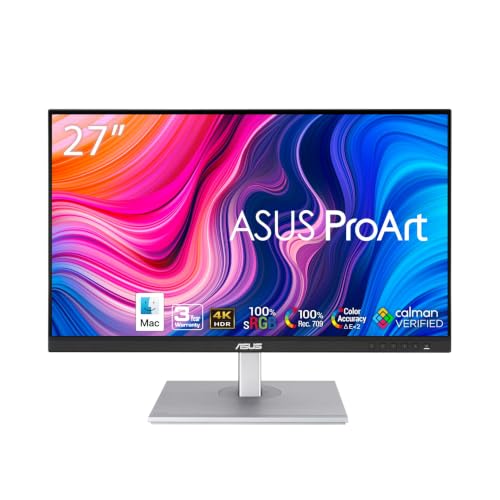
Any 4K monitor with HDMI, DisplayPort or USB-C video input works with a Mac mini; the M6 drives up to three. We have not compared monitors side by side, so here are two 27-inch 4K screens chosen on their listed specs:
| Dell S2725QC | ASUS ProArt PA279CV | |
|---|---|---|
| Panel | 27 in. 4K IPS, up to 120 Hz | 27 in. 4K (3840 x 2160) IPS |
| Colour | 99% sRGB | 100% sRGB, 100% Rec. 709, Delta E < 2, Calman Verified |
| Brightness | 350 nits | 350 cd/m² |
| Inputs | USB-C (65W charging) | USB-C (65W), DisplayPort, HDMI, USB hub |
| Extras | Two 5W speakers, VESA 100 x 100 | Height adjustable, 5-year warranty with registration |
| Good for | Office, school, streaming | Photo and colour work |
Specs are from the Amazon.ca listings, read November 19, 2026. What we do not know: neither listing gives its power draw in watts, and we do not rate how either looks next to Apple’s own displays. Three practical points. Connect to the Mac mini’s back Thunderbolt ports or HDMI: Apple lists the front USB-C ports as USB 3 data ports, without mentioning video. The 65W USB-C charging on both screens matters for a laptop, not a Mac mini. And at 4K and 120 Hz, the Dell is well within what Apple lists for the M6 (4K up to 165 Hz on two displays).
How much power does a Mac mini use?
Very little at rest: Apple’s environmental report lists 3.0 W at idle with the display on and 0.7 W in sleep, 70% less energy than the ENERGY STAR requirement (US configurations; the report does not say which one was measured). Apple’s spec page gives a 155 W maximum continuous power, which is the ceiling under heavy load. Apple puts the base M6 model’s carbon footprint at 30 kg CO2e.
Yearly cost, our estimate, at Hydro-Québec’s rate D second tier of 11.142¢/kWh. Formula: watts x hours ÷ 1,000 = kWh, then kWh x $0.11142. The Mac mini only; the monitor adds its own.
| Scenario (our estimate) | Energy per year | Cost per year |
|---|---|---|
| Asleep all year: 0.7 W x 8,760 h | 6.1 kWh | About $0.68 |
| Home office: 8 h idle at 3.0 W + 16 h asleep at 0.7 W, every day | 12.8 kWh | About $1.43 |
| Always on at idle: 3.0 W x 8,760 h | 26.3 kWh | About $2.93 |
| Ceiling: 155 W for 8 h a day, 5 days a week (2,080 h) | 322 kWh | About $36 |
Real use sits between the idle rows and the ceiling: browsing and office work stay close to idle, while video exports and AI models push toward the 155 W maximum for as long as they run. Nobody runs at maximum all day, so read the last row as an upper bound, not a forecast.
During an outage: the Mac mini runs on wall power through its internal supply, so it turns off when the power does. On a portable power station with about 1,024 Wh of capacity, roughly 870 Wh is usable after 85% conversion losses (our estimate). At 3.0 W idle, the Mac mini alone would run about 290 hours (870 ÷ 3.0); at its 155 W maximum, about 5.6 hours. The monitor changes everything here, and neither monitor listing above gives its watts: measure yours with a plug-in watt meter, then divide 870 by (3.0 + the monitor’s watts). See our best portable power stations, follow the grid on the Hydro-Québec outage map, and plug the desk into a surge protector.
The picks, one by one
| Model | Chip | Memory | Storage | Ports | Displays | Power (Apple) |
|---|---|---|---|---|---|---|
| Mac mini M6 (16 GB, 256 GB, 2026) | M6, 12-core CPU, 12-core GPU | 16 GB (24 or 32 GB to order) | 256 GB (up to 2 TB to order) | 3 Thunderbolt 4, HDMI, 2.5Gb Ethernet; 2 USB-C and headphone jack in front | Up to 3 | 155 W max; 3.0 W idle |
| Mac mini M5 Pro (24 GB, 512 GB, 2026) | M5 Pro, 15-core CPU, 16-core GPU | 24 GB (48 or 64 GB to order) | 512 GB (up to 8 TB to order) | 3 Thunderbolt 5, HDMI, 2.5Gb Ethernet; 2 USB-C and headphone jack in front | Up to 3 at 6K | 155 W max; 3.0 W idle |
| Mac Studio M5 Max (36 GB, 512 GB, 2026) | M5 Max, 18-core CPU, 32-core GPU | 36 GB (up to 128 GB per the listing) | 512 GB | 4 Thunderbolt 5, 2 USB-A, HDMI 2.1, 10Gb Ethernet, SDXC | Up to 5 (per the listing) | 480 W max |
Where to buy a Mac mini in Canada
| Where | What to know |
|---|---|
| Apple Canada | Every chip, memory and storage option. From $1,249 (M6) or $2,399 (M5 Pro), read November 19, 2026. Store page. |
| Apple education store | From $1,109 (M6) or $2,259 (M5 Pro) for eligible buyers. Education store. |
| Amazon.ca | The M6 16 GB / 256 GB and the M5 Pro 24 GB / 512 GB were in stock on November 19, 2026. Upgraded memory or storage is easier to find at Apple. |
| Other retailers | May still carry M4 models. Check the chip name, the condition (new or renewed) and who sells it. |
Which Mac mini should you buy?
- Home office, family or school: Mac mini M6, with 512 GB if you keep photos on it.
- Developer or photographer: the M6 with 24 GB, configured at Apple, or the M5 Pro if you also need Thunderbolt 5.
- Video, local AI, three 6K screens: Mac mini M5 Pro.
- More than 64 GB of memory, or more GPU: Mac Studio M5 Max.
Still weighing a laptop, Windows included? Our French guide to the best laptops in Quebec covers the whole field.
Frequently asked questions
How much is the Mac mini in Canada?
Apple Canada lists the Mac mini from $1,249 with the M6 chip (16 GB memory, 256 GB storage) and from $2,399 with the M5 Pro (24 GB, 512 GB), read on November 19, 2026. Education pricing is $1,109 and $2,259. Memory and storage upgrades are priced in Apple's configurator, for example +$300 for 512 GB on the M6.
Is the Mac mini M4 still worth buying?
Apple replaced the M4 and M4 Pro Mac mini with the M6 and M5 Pro, available since September 22, 2026, and its Canadian store no longer sells the M4. If you find one on sale, it has an older chip: make sure it is new rather than renewed, sold by a retailer you trust, and compare its price with the $1,249 Apple lists for the M6.
Mac mini M6 or M5 Pro: which should I get?
The M6 for office work, school, photos and light editing; most people should add memory or storage before they move up a chip. The M5 Pro for video, large photo libraries, software development with heavy tools or local AI models: it has 307GB/s of memory bandwidth, Thunderbolt 5 and up to 64 GB of memory, per Apple.
Mac mini vs Mac Studio: what is the difference?
Apple calls the Mac mini its most versatile Mac and the Mac Studio its most powerful. The Mac Studio starts at $3,499 in Canada with the M5 Max, offers 36 GB to 512 GB of memory across its chips, four Thunderbolt 5 ports, 10Gb Ethernet as standard and an SD card slot, and draws up to 480 W against 155 W for the Mac mini, per Apple.
What is the best monitor for a Mac mini?
Any 4K monitor with HDMI, DisplayPort or USB-C works; the Mac mini M6 drives up to three. For everyday work, the Dell S2725QC is a 27-inch 4K screen at up to 120 Hz; for colour work, the ASUS ProArt PA279CV is factory calibrated to Delta E < 2, per their listings. Connect through the back Thunderbolt ports or HDMI.
How much electricity does a Mac mini use?
Apple's environmental report lists 3.0 W at idle and 0.7 W in sleep, with a 155 W maximum. Our estimate: left idle 24 hours a day, that is 26.3 kWh a year, about $2.93 at Hydro-Québec's rate D second tier of 11.142¢/kWh. Real work draws more than idle, and the monitor adds its own.
Keep reading
Apple, compared: MacBook Air vs MacBook Pro, the MacBook Neo in Canada and our iPad comparison. Buying for a job: the best laptop for programming and the best laptop for working from home. The desk itself: standing desks and office chairs. En français: meilleur ordinateur portable au Québec. Ready for the next outage: portable power stations and the Hydro-Québec outage map.