

Top choices
Specs as stated on the manufacturers' listings; the price shows on the retailer's page. Budget · second computer for the houseMacBook Neo 13" (8 GB, 256 GB)The least expensive Mac, and a sensible shared computer for email, documents and the odd call. Apple lists an A18 Pro chip, a 13-inch 500-nit screen, a 1080p camera, dual mics, no fan and up to 16 hours of video playback.Watch out: 8 GB of memory is the only option, the camera has no Center Stage, and it drives one external display, from the left USB port only. Touch ID is on the 512 GB model only. Apple's Canadian spec page lists a 20W adapter in the box, while the Amazon.ca listing says the box has only the cable: check the listing before you buy.Check price on Amazon.ca ↗
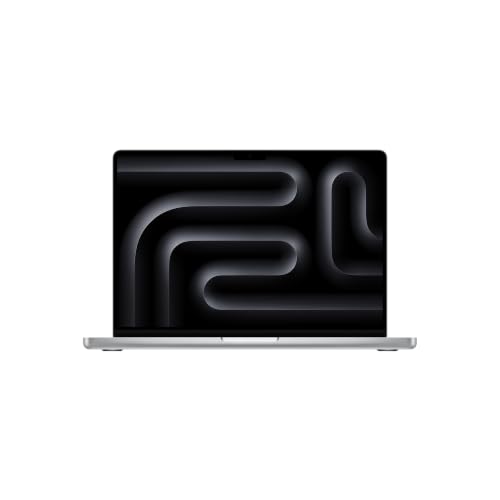 Power user · longest battery, most portsMacBook Pro 14" M6 (16 GB, 1 TB)For long days of heavy files, editing or many apps at once. Apple claims up to 24 hours of video playback, the longest of our picks, and the HDMI port and SD card slot mean fewer adapters on the desk. The Liquid Retina XDR screen reaches 1000 nits sustained, per Apple.Watch out: The heaviest and most expensive of our picks. Apple's spec page does not say whether it has a fan, so we do not either. Two external displays, the same as the Air.Check price on Amazon.ca ↗
 Windows pick · work apps that need WindowsDell 14 Plus (Core Ultra 7, 16 GB, 1 TB)For employers who require Windows. The listing gives a 14-inch 16:10 2.5K screen (2560 × 1600), an Intel Core Ultra 7 256V, 16 GB of LPDDR5X memory, a 1 TB SSD, Intel Arc graphics, an aluminum body and a backlit keyboard with a Copilot key.Watch out: The Amazon.ca listing we read gives no webcam, microphone, battery, weight or port details. Check Dell's own spec sheet before you count on it for daily calls, two monitors or a full day unplugged.Check price on Amazon.ca ↗
Working from home asks different things of a laptop than school or gaming. You spend hours on video calls, so the camera and microphones matter more than the graphics chip. You probably plug into a bigger monitor, so the number of external displays matters. You want quiet in a small room, a battery that lets you move to the balcony, and enough ports to avoid a drawer of adapters. And in Quebec, where a winter storm can cut power for hours, it helps to know how long you can keep working when the lights go out.
The short answer
- Best overall: MacBook Air 13 M5, Center Stage camera, two monitors, no fan.
- No room for a monitor: MacBook Air 15 M5.
- Budget or second computer: MacBook Neo, with real limits for full-time use.
- Heavy work, longest battery: MacBook Pro 14 M6, up to 24 hours of video per Apple.
- Employer requires Windows: Dell 14 Plus.
How we picked, and what we did not do: this is a buyer’s guide compared on published specs; we have not tested these laptops. Mac specifications come from Apple Canada’s spec pages and environmental reports, read November 19, 2026 and linked where they appear. The Dell and the accessories are quoted from their Amazon.ca listings, checked the same day, when every product on a card was in stock. Prices shown are Apple Canada’s own starting prices for each Mac line, dated; we never write Amazon prices. Energy figures marked “our estimate” show their formula. Links to Amazon are affiliate links; BranchéQC may earn a commission at no extra cost to you.
Five work-from-home laptops compared
Mac figures are from Apple’s spec pages for the MacBook Neo, MacBook Air and MacBook Pro. Battery hours are Apple’s claims for video playback and wireless web. Starting prices are Apple Canada’s for the line (Neo, Air, Pro), not for the exact configuration on the card.
| Laptop | Camera | Mics | External displays | Battery | Fanless | Weight | Ports | Apple Canada price |
|---|---|---|---|---|---|---|---|---|
| MacBook Air 13" M5 (16 GB, 512 GB) | 12 MP Center Stage + Desk View | Three-mic array | Up to 2 external | 53.8 Wh · up to 18 h video, 15 h web | Yes (Apple) | 1.23 kg | 2 × Thunderbolt 4, MagSafe 3, headphone jack | From $1,799 (read 2026-11-19) |
| MacBook Air 15" M5 (16 GB, 512 GB) | 12 MP Center Stage + Desk View | Three-mic array | Up to 2 external | 66.5 Wh · up to 18 h video, 15 h web | Yes (Apple) | 1.51 kg | 2 × Thunderbolt 4, MagSafe 3, headphone jack | From $2,099 (read 2026-11-19) |
| MacBook Neo 13" (8 GB, 256 GB) | 1080p FaceTime HD, no Center Stage | Dual mics | 1 external (4K 60 Hz, left USB port) | 36.5 Wh · up to 16 h video, 11 h web | Yes (Apple) | 1.23 kg | 1 × USB 3 (10 Gb/s, video), 1 × USB 2, headphone jack | From $949 (read 2026-11-19) |
| MacBook Pro 14" M6 (16 GB, 1 TB) | 12 MP Center Stage + Desk View | Three studio-quality mics | Up to 2 external | 72.4 Wh · up to 24 h video, 16 h web | Not stated by Apple | 1.55 kg | 3 × Thunderbolt 4, HDMI, SDXC, MagSafe 3, headphone jack | From $2,799 (read 2026-11-19) |
| Dell 14 Plus (Core Ultra 7, 16 GB, 1 TB) | Not on the listing | Not on the listing | Not on the listing | Not on the listing | Not stated | Not on the listing | Not on the listing | Not an Apple product: see listing |
What matters for a home office
Camera and microphones for calls
The MacBook Air and the MacBook Pro 14 M6 have a 12 MP Center Stage camera, which keeps you centred in the frame as you lean back or reach for a coffee, plus Desk View, which shows what is on your desk. The Air has a three-mic array and the Pro three studio-quality mics, per Apple. The MacBook Neo has a 1080p FaceTime HD camera without Center Stage and dual mics. For a weekly team meeting, the Neo is fine. For six calls a day with clients, the Air’s camera and mics are the better tool.
External monitors
Most home workers end up at a desk with a monitor. The Air and the Pro 14 M6 support up to two external displays, per Apple. The Neo supports one, at up to 4K 60 Hz, and only from its left USB port. If you already own two monitors, the Neo is out.
Battery
Apple claims up to 18 hours of video playback and 15 hours of wireless web on both Air sizes, 16 and 11 hours on the Neo, and 24 and 16 hours on the Pro 14 M6. A day of video calls with many browser tabs open may drain the battery faster than Apple’s test conditions, but the order on paper is clear: Pro, then Air, then Neo. That ranking matters most during a power outage, covered below.
Quiet
Apple lists both the MacBook Air and the MacBook Neo as fanless: no fan, so no fan noise on a call or late at night beside a sleeping partner. Apple’s spec page does not say whether the Pro 14 M6 has a fan, so we make no claim either way.
Ports
The Air has two Thunderbolt 4 ports, MagSafe 3 for charging and a headphone jack. The Pro 14 M6 adds a third Thunderbolt port, HDMI and an SD card slot. The Neo has one 10 Gb/s USB 3 port (the one that carries video), one slow 480 Mb/s USB 2 port, a headphone jack and no MagSafe: it charges over USB-C, which takes one of its two ports while plugged in. A USB-C monitor that carries power, or a hub, solves this.
Keyboard
The Air and the Pro have backlit keyboards with Touch ID. Apple’s spec page does not list a backlit keyboard for the Neo, unlike the Air’s, and Touch ID is on the 512 GB Neo only. The Dell listing names a backlit keyboard with a Copilot key. At a desk, most people end up on an external keyboard anyway: see the setup section.
Memory cannot be added later on any of these Macs, so buy what you will need in three years. For more on the Air and Pro trade-offs, see MacBook Air vs MacBook Pro; for the budget question, MacBook Neo vs MacBook Air.
The picks, and who each one is for
MacBook Air 13" M5 (16 GB, 512 GB)Best overall · calls, two monitors, silentThe laptop most home workers should buy. Apple gives it a 12 MP Center Stage camera that keeps you framed as you move, a three-mic array, up to two external displays and up to 18 hours of video playback on a 53.8 Wh battery. It has no fan, per Apple, so it stays silent on a call.Watch out: Two Thunderbolt ports and a headphone jack, nothing else: a desk with a wired network, a card reader and two screens needs a hub or a monitor with USB-C. The 40W adapter in the box is below the 70W Apple names for fast charging.Check price on Amazon.ca ↗MacBook Air 15" M5 (16 GB, 512 GB)Big screen · no external monitor neededFor a kitchen table or a small apartment with no room for a monitor. The same camera, mics and silence as the 13-inch, on a 15.3-inch screen with six speakers instead of four, per the listing. This configuration has the 10-core GPU.Watch out: 1.51 kg against 1.23 kg for the 13-inch, per Apple. If it will sit on a desk next to a 27-inch monitor all day, the 13-inch does the same job for less.Check price on Amazon.ca ↗MacBook Neo 13" (8 GB, 256 GB)Budget · second computer for the houseThe least expensive Mac, and a sensible shared computer for email, documents and the odd call. Apple lists an A18 Pro chip, a 13-inch 500-nit screen, a 1080p camera, dual mics, no fan and up to 16 hours of video playback.Watch out: 8 GB of memory is the only option, the camera has no Center Stage, and it drives one external display, from the left USB port only. Touch ID is on the 512 GB model only. Apple's Canadian spec page lists a 20W adapter in the box, while the Amazon.ca listing says the box has only the cable: check the listing before you buy.Check price on Amazon.ca ↗MacBook Pro 14" M6 (16 GB, 1 TB)Power user · longest battery, most portsFor long days of heavy files, editing or many apps at once. Apple claims up to 24 hours of video playback, the longest of our picks, and the HDMI port and SD card slot mean fewer adapters on the desk. The Liquid Retina XDR screen reaches 1000 nits sustained, per Apple.Watch out: The heaviest and most expensive of our picks. Apple's spec page does not say whether it has a fan, so we do not either. Two external displays, the same as the Air.Check price on Amazon.ca ↗Dell 14 Plus (Core Ultra 7, 16 GB, 1 TB)Windows pick · work apps that need WindowsFor employers who require Windows. The listing gives a 14-inch 16:10 2.5K screen (2560 × 1600), an Intel Core Ultra 7 256V, 16 GB of LPDDR5X memory, a 1 TB SSD, Intel Arc graphics, an aluminum body and a backlit keyboard with a Copilot key.Watch out: The Amazon.ca listing we read gives no webcam, microphone, battery, weight or port details. Check Dell's own spec sheet before you count on it for daily calls, two monitors or a full day unplugged.Check price on Amazon.ca ↗
The Neo deserves a closer look before you buy it as a main work computer: our MacBook Neo guide covers its price in Canada, the adapter question and who it suits. If your work is writing code, the priorities shift toward memory and storage: see the best laptop for programming.
Turn the laptop into a desk
A laptop on a kitchen table works for a week. For a real home office, four things make the difference: a large monitor, a single cable, a raised camera and a full keyboard.
Dell 27 Monitor S2725QCOne cable to the laptop · 4K 120 HzA 27-inch 4K IPS screen at up to 120 Hz, 99% sRGB and 350 nits, with a USB-C port that carries video and up to 65W of power, per the listing. One cable from an Air to the monitor gives you the big screen and keeps the battery topped up.Watch out: 65W charges an Air, but Apple names a 70W or higher adapter for its fast charging, so do not expect fast charging from this cable. The Neo drives an external display at up to 4K 60 Hz, per Apple, so it will not use the 120 Hz.Check price on Amazon.ca ↗ASUS ProArt PA279CVColour work · height adjustableA 27-inch 4K monitor with 65W USB-C, Calman verified colour (ΔE under 2) and a height-adjustable stand, per the listing. For photo, design or presentation work where colours must match the print.Watch out: The same 65W ceiling as the Dell, below Apple's 70W fast-charge threshold for the Air and the Pro 14 M6's own 70W adapter.Check price on Amazon.ca ↗Anker PowerExpand 8-in-1 USB-C hubWired network, HDMI and SD from one portTwo HDMI outputs, Gigabit Ethernet, an SD reader and 85W USB-C pass-through, per the listing. Wired Ethernet takes Wi-Fi out of the equation for important calls.Watch out: The Mac still sets the screen count, not the hub: a Neo shows one external display, from its left USB port. For two monitors on an Air, the simplest route is one monitor per Thunderbolt port.Check price on Amazon.ca ↗CalDigit TS5 Thunderbolt 5 dockFor the MacBook Pro · 15 ports, 140WA Thunderbolt 5 dock with 15 ports and 140W of host charging, per the listing: enough to power the Pro 14 M6 above its 70W adapter while it drives the desk. One cable in, one cable out at the end of the day.Watch out: Overkill for an Air or a Neo. Apple lists Thunderbolt 4 ports on the Pro 14 M6, so the dock runs at Thunderbolt 4 speed there.Check price on Amazon.ca ↗Besign LS10 laptop standCamera at eye levelAn adjustable aluminium stand that lifts the laptop screen, and its camera, closer to eye level, per the listing. Your colleagues see your face instead of your ceiling.Watch out: Once the laptop is raised, typing on it is awkward: plan on a separate keyboard.Check price on Amazon.ca ↗Apple Magic Keyboard with Touch ID, French (Canada)French Canadian layout · Touch ID at the deskApple's wireless keyboard in the French (Canada) layout, with Touch ID so you can unlock and approve passwords while the laptop sits on its stand or closed under the monitor.Watch out: Touch ID on this keyboard depends on your Mac: check Apple's compatibility list for your model before you buy. A US English version is also sold.Check price on Amazon.ca ↗



About charging through the monitor. Apple ships the MacBook Air with a 40W Dynamic adapter (60W maximum) and says it fast-charges with a 70W or higher adapter. A 65W USB-C monitor keeps an Air charged at the desk, but not at fast-charge speed. If you want fast charging when you unplug for a meeting, keep Apple’s 70W USB-C adapter in the bag. The Pro 14 M6 ships with a 70W adapter and fast-charges with 96W or more, per Apple; the CalDigit TS5’s 140W covers that. For the Neo, Apple’s spec page lists a 20W adapter, so Apple’s 20W USB-C adapter or the 35W dual-port compact adapter covers it if your box has only the cable. A US English Magic Keyboard with Touch ID is also sold, if you do not type in French.
On taxes: home-office expense rules are set by the Canada Revenue Agency. We give no tax advice; check canada.ca or ask your employer.
What a laptop costs to run in Quebec
Laptops are among the most frugal devices in a home office. Apple’s environmental reports, measured on U.S. 115 V configurations, give these figures for sleep and for idle with the screen on, and how far below the ENERGY STAR limit each model sits: MacBook Neo, MacBook Air M5, MacBook Pro 14 M6. Apple publishes no yearly kWh figure, so the yearly columns are our estimate.
| Laptop | Battery | Sleep | Idle, screen on | vs ENERGY STAR | Our estimate, kWh/year | Our estimate, $/year |
|---|---|---|---|---|---|---|
| MacBook Neo | 36.5 Wh | 0.15 W | 2.73 W | At least 60% less | ≈ 15.7 | ≈ $1.75 |
| MacBook Air 13 M5 | 53.8 Wh | 0.22 W | 3.69 W | At least 55% less | ≈ 23.1 | ≈ $2.57 |
| MacBook Air 15 M5 | 66.5 Wh | 0.23 W | 4.11 W | Not quoted here | ≈ 28.6 | ≈ $3.18 |
| MacBook Pro 14 M6 | 72.4 Wh | 0.25 W | 3.94 W | 55% less | ≈ 31.1 | ≈ $3.46 |
| Dell 14 Plus | Not on the listing | Not on the listing | Not on the listing | Not on the listing | Not estimated | Not estimated |
How we estimate it: one full battery’s worth of charging per day, divided by 0.85 to account for charging losses, times 365 days, at Hydro-Québec’s rate D second block of 11.142 ¢/kWh (in effect April 1, 2026). For the Air 13: 53.8 Wh ÷ 0.85 × 365 ≈ 23.1 kWh, × $0.11142 ≈ $2.57 a year. A heavy day with the screen bright and a camera on may use more than one battery’s worth; a light day less. Either way, the laptop itself costs a few dollars a year.
An external monitor adds its own consumption on top, and we do not invent it: check the energy label or spec sheet of the monitor you buy. We also skip the laptop-versus-desktop comparison, because there is no published desktop figure on hand to compare fairly. If you want the real number for your own desk, a smart plug with energy monitoring will show it.
Working through a Hydro-Québec outage
When a storm takes down lines, your laptop keeps going on its battery. The problem is everything else: the monitor goes dark, and so do the modem and router. Before you plan your day, check the Hydro-Québec outage map for your area and the estimated return time.
| Laptop | Apple claim, video / web | Our estimate: full recharges from a ~1,024 Wh station |
|---|---|---|
| MacBook Neo | Up to 16 h / 11 h | ≈ 23 |
| MacBook Air 13 M5 | Up to 18 h / 15 h | ≈ 16 |
| MacBook Air 15 M5 | Up to 18 h / 15 h | ≈ 13 |
| MacBook Pro 14 M6 | Up to 24 h / 16 h | ≈ 12 |
How we estimate it: station capacity of about 1,024 Wh × 0.85 (conversion and charging losses) ≈ 870 Wh delivered, divided by the laptop’s battery size. For the Air 13: 870 ÷ 53.8 ≈ 16 full recharges. In practice the station will also power the internet gear, so you get fewer laptop recharges, but even half of these numbers covers a multi-day outage for the laptop alone. Our portable power station guide compares the models.
- Keep the internet up. A laptop without Wi-Fi is a typewriter. Plug the modem and router into the station too. Their draw depends on the model: check the rating printed on each one’s power adapter rather than guessing. Your provider’s own equipment outside the house also needs power, and that part is out of your hands; a phone hotspot is the fallback.
- Use a USB-C output if the station has one. Plugging the laptop’s USB-C cable straight into the station skips the AC outlet and the laptop adapter. Check that the port’s wattage matches what your laptop expects.
- Leave the monitor off. Every watt it draws comes out of the station; the laptop screen is enough for a day or two.
- Charge fully when a storm is forecast. Laptop, phone and station. A charged battery is the cheapest backup there is.
- Protect the desk when power returns. Plug the laptop adapter, monitor and modem into a surge protector, not straight into the wall.
Which one should you buy
| If you… | Buy | Why |
|---|---|---|
| Work from home most days | MacBook Air 13 M5 | Center Stage camera, three mics, two monitors, silent |
| Have no room for a monitor | MacBook Air 15 M5 | 15.3" screen, six speakers, same camera |
| Need a budget or shared computer | MacBook Neo | Apple Canada from $949; one monitor, 8 GB |
| Run heavy apps all day | MacBook Pro 14 M6 | Up to 24 h video per Apple, HDMI and SD |
| Must use Windows | Dell 14 Plus | Core Ultra 7, 16 GB, 1 TB, 2.5K screen |
Frequently asked questions
What is the best laptop for working from home in Canada?
For most people, the MacBook Air 13 M5: a 12 MP Center Stage camera, three mics, up to two external displays, no fan and up to 18 hours of video playback, per Apple. Apple Canada lists the MacBook Air 13 from $1,799 (read November 19, 2026). Choose the 15-inch if you will not use a monitor, the MacBook Pro 14 M6 for heavy work and the longest battery, or the Dell 14 Plus if your employer requires Windows.
Is the MacBook Neo good enough for working from home?
For email, documents, web apps and occasional calls, it is a sensible budget pick. Its limits matter for a full-time home office: 8 GB of memory is the only option, the 1080p camera has no Center Stage, it drives one external display, and Apple's spec page does not list a backlit keyboard, unlike the Air's. Our MacBook Neo vs MacBook Air comparison goes into detail.
How many external monitors can a MacBook Air or MacBook Neo run?
Per Apple, the MacBook Air M5 supports up to two external displays and the MacBook Neo one, at up to 4K 60 Hz from its left USB port only. The MacBook Pro 14 M6 also supports two. A hub with two HDMI outputs does not raise those limits.
How much does it cost to charge a laptop in Quebec?
Very little. Our estimate counts one full battery's worth of charging per day, with 15% charging loss, at Hydro-Québec's rate D second block of 11.142 ¢/kWh: about $1.75 a year for a MacBook Neo (36.5 Wh), $2.57 for a MacBook Air 13 (53.8 Wh), $3.18 for an Air 15 (66.5 Wh) and $3.46 for a MacBook Pro 14 M6 (72.4 Wh). An external monitor adds its own consumption.
Can I keep working from home during a Hydro-Québec outage?
Yes, for a while. Apple claims up to 15 to 16 hours of wireless web on the Air and the Pro 14 M6, and 11 hours on the Neo. A portable power station of about 1,024 Wh can refill an Air 13 battery about 16 times, by our estimate. The catch is internet: your modem and router need power too, so check their adapter ratings and plug them into the station as well.
Can I claim my laptop as a home-office expense?
We do not give tax advice. Home-office expense rules are set by the Canada Revenue Agency: check canada.ca, or ask your employer or an accountant.
Keep reading
The rest of the home office: the best office chair in Canada, the best standing desk in Canada, and the Mac mini if the laptop stays docked. Choosing between Apple’s laptops? Start with MacBook Air vs MacBook Pro, then MacBook Neo vs MacBook Air and our MacBook Neo guide. Developers should read the best laptop for programming. To keep the home office running through a storm, see the best portable power stations in Canada and the Hydro-Québec outage map. En français : le meilleur ordinateur portable au Québec.