
Top choices
Specs as stated on the manufacturers' listings; the price shows on the retailer's page. Best monitor light bar · wireless dialBenQ ScreenBar Halo 2For a computer desk where every centimetre counts: the bar sits on top of your monitor, lights the keyboard at an 18° anti-glare angle without reflecting on the screen, and adds a wide backlight behind the monitor to soften the contrast with a dark room. A wireless dial with its own display sets brightness and 2700 to 6500 K colour temperature; BenQ states it runs up to 3 months per charge. It turns itself on and off when you sit down or leave, and adjusts to the room light.Watch out: The listing gives no CRI and no lux figure for the Halo 2. It lights the desk in front of the screen only: for paper spread to the side, a lamp with an arm reaches further.Check price on Amazon.ca ↗
 Brightest stated · motion sensorBenQ ScreenBar ProThe only bar here that gives real light figures: over 1000 lux at the centre and 500 lux across an 85 × 50 cm area, as listed, with auto-dimming that holds the desk at 500 lux. An ultrasonic sensor lights it when you are within about 60 cm and shuts it off after 5 minutes away. BenQ states a flicker-free driver meeting IEEE PAR 1789, and the clamp is shaped for monitors with an uneven top edge or a webcam on top.Watch out: No wireless controller: the buttons are on the bar itself. The listing does not state the colour-temperature range or a CRI value.Check price on Amazon.ca ↗
 Monitor light bar · remote, Ra 95Quntis ScreenLinear Classic 16-inch Monitor Light BarThe light-bar idea from a brand that sells far more models in Canada than BenQ: 84 LEDs with a stated colour rendering of Ra 95, an ambient sensor for auto-dimming, and a desktop remote that slides brightness and colour temperature without reaching up. One remote can run several bars, the clip is cut for curved screens and leaves room for a webcam, and a 2-hour auto-off timer reminds you to step away.Watch out: The listing does not give the Kelvin values of its three colour temperatures, nor a lux figure. No backlight on this model; Quntis sells versions with one.Check price on Amazon.ca ↗
A desk lamp is task lighting: its job is to put even, glare-free light on the keyboard, the paper or the project in front of you, not to make the room cozy. That is a different purchase from a bedside or living-room lamp, which our table lamp guide covers. Here the questions are colour temperature, colour rendering, where the light lands relative to your screen, and how much of the desk the lamp itself takes up.
The short answer
- One lamp that does it all: the Honeywell HWT-H4, CRI 97, 3000/4000/5000 K and auto-dimming, as listed.
- Computer desk, no space to spare: the BenQ ScreenBar Halo 2 (wireless dial, backlight) or the ScreenBar Pro (over 1000 lx at the centre, motion sensor).
- A light bar with a remote, for less: the Quntis ScreenLinear Classic, Ra 95 and auto-dimming.
- Wide desk or two monitors: the Micomlan 24 W clamp-on architect lamp with three light bars.
- Classic look, your own bulb: the TORCHSTAR metal swing-arm lamp, base or clamp.
How we picked, and what we did not do: we have not worked under any of these lamps. We looked for one model per real use (all-round LED lamp, premium light bar, brightest stated light bar, light bar with a remote, wide clamp lamp, classic architect lamp, compact high-CRI lamp, simple foldable lamp), favoured listings that state colour temperature or CRI, and read every specification from the manufacturer’s Amazon.ca listing on November 27, 2026. Every product on a card was in stock in Canada that day; the BenQ ScreenBar Max for dual monitors was low in stock and left out. Where a listing leaves a number out, we write “not stated”. Eye-care claims on the listings are not repeated. Links to Amazon are affiliate links; BranchéQC may earn a commission at no extra cost to you. We do not write prices by hand: the button says “Check price on Amazon.ca” and the Amazon page is what counts.
LED desk lamp, monitor light bar or architect lamp: the three kinds
LED desk lamp on a base
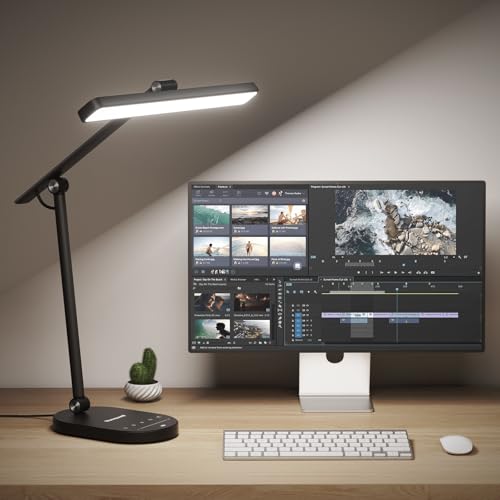
The familiar study lamp or office lamp: a weighted base, an arm, an LED head. Most now let you change colour temperature and brightness on a touch panel. The Honeywell HWT-H4 adds an ambient sensor and a CRI of 97, the Lepro keeps it simple at 800 lumens and folds flat, and the OttLite Balance is the small one for close work. It is the most flexible type, at the cost of a spot on the desk.
Monitor light bar (screen bar)
A slim LED bar that hangs on top of your monitor with a weighted clip and shines down and slightly forward onto the keyboard. The optics are asymmetric, so the light does not bounce off the screen into your eyes, and it takes zero desk space. BenQ popularised the format with the ScreenBar; Quntis and others sell it too. Check the clip against your monitor: the BenQ listings give 0.43 to 6 or 6.5 cm thick and 1000R to 1800R curves, the Quntis Classic 0.19 to 3.54 inches and curves to 1000R. A thin Quntis 15.6-inch monitor lamp and the SOAMCO light bar with a wireless remote, which lists Ra 95 and auto-dimming, are two more options.
Architect, clamp and clip-on lamps
The long-armed lamp that clamps to the desk edge and swings over your work. It frees the desktop and reaches further than a lamp on a base, which makes it the classic choice for drafting tables, sewing and wide desks. The Micomlan is the modern LED version with built-in light bars; the TORCHSTAR is the metal spring-arm design that takes a bulb. Globe Electric's 32-inch multi-joint clamp lamp is another bulb model, with a metal clamp for surfaces up to 2 inches.
The eight desk lamps, compared on published specs
Every figure is the manufacturer’s own. Where a listing gives no number, the table says so rather than guessing. Lux is light on the desk; lumens are the lamp’s total output; the two are not interchangeable.
| Model | Type | Colour temp | CRI | Light output | Auto-dimming | Mount | Power |
|---|---|---|---|---|---|---|---|
| Honeywell HWT-H4 LED Desk Lamp | LED desk lamp, folding arm | 3000 K, 4000 K, 5000 K | ≥ 97 | 5 levels, 10-100 % | Yes, ambient sensor | Metal base | Not stated |
| BenQ ScreenBar Halo 2 | Monitor light bar + backlight | 2700-6500 K, stepless | Not stated | Stepless | Yes, plus presence on/off | Clamp on monitor, 0.43-6 cm, 1000R-1800R curved | USB |
| BenQ ScreenBar Pro | Monitor light bar | Adjustable, range not stated | Not stated | > 1000 lx centre, 500 lx over 85 × 50 cm | Yes, to 500 lx | Clamp on monitor, 0.43-6.5 cm, 1000R-1800R curved | USB-C or included adapter |
| Quntis ScreenLinear Classic 16-inch Monitor Light Bar | Monitor light bar | 3 colour temperatures, stepless via remote | Ra 95 | Stepless, 84 LEDs | Yes, ambient sensor | Weighted clip, 0.19-3.54 in, curved to 1000R | USB-C (L-shaped cable) |
| Micomlan 24 W Clamp Architect LED Desk Lamp | Clamp-on architect LED, 3 light bars | 3000-6500 K, stepless | > 90 | 24 W, 20-100 % stepless | Yes, light sensor | Desk clamp | 24 W |
| TORCHSTAR Metal Swing Arm Desk Lamp | Swing-arm architect lamp, E26/E27 bulb | Depends on the bulb | Depends on the bulb | Bulb up to 40 W max | No | Weighted base or clamp up to 2 in | Bulb, 40 W max |
| OttLite Balance LED Desk Lamp with USB | Compact LED lamp, counterbalance arm | Daylight, bright white, warm white | 97 | 428 lm max, 3 levels | No | 6 in base | Not stated |
| Lepro LED Desk Lamp, 800 lm | Foldable LED desk lamp | 5 modes, 3000-6500 K | Not stated | 800 lm, 9 W, 5 levels | No | Anti-slip base | 9 W, 12 V adapter |
Which desk lamp for your desk
Honeywell HWT-H4 LED Desk LampLED desk lamp, folding arm · CRI ≥ 97The lamp that ticks every task-lighting box on its listing: 108 full-spectrum LEDs with a stated CRI of 97 or more, three colour temperatures (3000 K warm, 4000 K natural, 5000 K cool) with five brightness steps each, and an ambient sensor that adjusts the brightness to the room. The head tilts 180° and turns 300°, the arm folds flat, and a 60-minute timer and a memory of your last setting are built in.Watch out: Wattage and lumen output are not stated on the listing. Honeywell lists 24-month after-sales service rather than a warranty term in years. It sits on a base, so it takes desk space a clamp lamp or a light bar would free.Check price on Amazon.ca ↗BenQ ScreenBar Halo 2Monitor light bar + backlight · CRI Not statedFor a computer desk where every centimetre counts: the bar sits on top of your monitor, lights the keyboard at an 18° anti-glare angle without reflecting on the screen, and adds a wide backlight behind the monitor to soften the contrast with a dark room. A wireless dial with its own display sets brightness and 2700 to 6500 K colour temperature; BenQ states it runs up to 3 months per charge. It turns itself on and off when you sit down or leave, and adjusts to the room light.Watch out: The listing gives no CRI and no lux figure for the Halo 2. It lights the desk in front of the screen only: for paper spread to the side, a lamp with an arm reaches further.Check price on Amazon.ca ↗BenQ ScreenBar ProMonitor light bar · CRI Not statedThe only bar here that gives real light figures: over 1000 lux at the centre and 500 lux across an 85 × 50 cm area, as listed, with auto-dimming that holds the desk at 500 lux. An ultrasonic sensor lights it when you are within about 60 cm and shuts it off after 5 minutes away. BenQ states a flicker-free driver meeting IEEE PAR 1789, and the clamp is shaped for monitors with an uneven top edge or a webcam on top.Watch out: No wireless controller: the buttons are on the bar itself. The listing does not state the colour-temperature range or a CRI value.Check price on Amazon.ca ↗Quntis ScreenLinear Classic 16-inch Monitor Light BarMonitor light bar · CRI Ra 95The light-bar idea from a brand that sells far more models in Canada than BenQ: 84 LEDs with a stated colour rendering of Ra 95, an ambient sensor for auto-dimming, and a desktop remote that slides brightness and colour temperature without reaching up. One remote can run several bars, the clip is cut for curved screens and leaves room for a webcam, and a 2-hour auto-off timer reminds you to step away.Watch out: The listing does not give the Kelvin values of its three colour temperatures, nor a lux figure. No backlight on this model; Quntis sells versions with one.Check price on Amazon.ca ↗Micomlan 24 W Clamp Architect LED Desk LampClamp-on architect LED, 3 light bars · CRI > 90For a wide desk, two monitors or a drafting and craft table: a swing arm with seven joints holds a main bar angled 45° away from the screen plus two side bars that turn down for more light or up as soft ambient light. The listing states 24 W, CRI above 90, stepless 3000 to 6500 K and 20 to 100 % brightness, a light sensor for auto-dimming and a memory of the last setting. The clamp frees the whole desktop.Watch out: The listing does not state the maximum desk thickness for this model's clamp; check your desk edge before ordering. The side bars switch separately from the main bar.Check price on Amazon.ca ↗TORCHSTAR Metal Swing Arm Desk LampSwing-arm architect lamp, E26/E27 bulb · CRI Depends on the bulbThe classic spring-balanced architect lamp, in solid metal: stand it on its weighted base or clamp it to a desk or shelf up to 2 inches thick, and stretch the arm up to 18 inches. Because it takes a standard E26 or E27 bulb, you pick the light yourself, for example a high-CRI LED bulb at the colour temperature you like. The listing states a 55-inch cord, a rocker switch, a UL-listed plug and a 12-month warranty.Watch out: No dimming, sensor or colour control unless your bulb has them, and the listing does not say a bulb is included. Respect the 40 W maximum the listing states.Check price on Amazon.ca ↗OttLite Balance LED Desk Lamp with USBCompact LED lamp, counterbalance arm · CRI 97The OttLite people search for by name, in a small footprint: a 10-inch counterbalance arm that sets the head between 4 and 18 inches high on a 6-inch base, a stated CRI of 97 for reading fine print, sewing or colour work, three light modes and a memory of the last one. A 5 V, 2.1 A USB port in the base charges a phone.Watch out: 428 lumens at most, as listed: a lamp for close work, not for lighting a whole desk. The Kelvin values of the three modes are not stated.Check price on Amazon.ca ↗Lepro LED Desk Lamp, 800 lmFoldable LED desk lamp · CRI Not statedThe no-fuss study lamp for a dorm, a child's desk or a kitchen-table office: a wide 72-LED panel behind a matte diffuser, 800 lumens at 9 W, five colour modes from 3000 to 6500 K and five brightness steps on a touch panel that remembers your last setting. The head tilts 180° and the aluminium arm folds completely flat.Watch out: No CRI is stated and there is no sensor or timer. The arm folds but does not swing out over a wide desk.Check price on Amazon.ca ↗


Colour temperature and CRI: the two numbers that matter
Colour temperature, in Kelvin (K), is how warm or cool the white looks. Around 2700 to 3000 K is a warm, yellowish white, 4000 K is neutral, and 5000 to 6500 K is a cool, bluish daylight white. For focused work most people settle near 4000 to 5000 K and drop to warm white in the evening, so a lamp that lets you switch is worth more than any single setting. The ranges listed here: 2700 to 6500 K on the BenQ Halo 2, 3000 to 6500 K on the Micomlan and the Lepro, three fixed steps (3000, 4000, 5000 K) on the Honeywell.
CRI, the colour rendering index, scores how faithfully a light shows colours, up to 100. It matters for drawing, sewing, makeup, sorting colour-coded files and looking natural on a video call. The Honeywell HWT-H4 and the OttLite Balance state 97, the Quntis Classic Ra 95 and the Micomlan above 90. The BenQ and Lepro listings give no CRI value, which does not mean it is low, only that you cannot compare it from the listing.
Auto-dimming, motion sensors and timers
An ambient light sensor reads the room and raises or lowers the lamp so the desk stays evenly lit as daylight fades: the Honeywell, both BenQ bars, the Quntis Classic and the Micomlan have one. BenQ states that the ScreenBar Pro holds the desk at 500 lux. A presence or motion sensor goes further and switches the light off when you leave: the ScreenBar Pro turns off after 5 minutes away, and the Halo 2 detects your presence too. Timers are simpler: 60 minutes on the Honeywell, 2 hours on the Quntis.
Avoiding glare on your screen
- Aim the light at the desk, not at the screen. Light bars do this by design (BenQ states an 18° anti-glare angle on the Halo 2, Micomlan angles its main bar 45° away from the screen).
- Place a lamp on a base to the side, opposite your writing hand, with the head below eye level.
- Soften the contrast behind the monitor in a dark room: the Halo 2's backlight does this, as does an LED strip behind the desk.
- Mount the monitor at the right height first. A monitor arm or a laptop stand changes where a light bar sits and where a lamp needs to reach.
Modern, vintage, banker's and wood desk lamps
Searches for a modern, vintage, wood, brass, white or banker's desk lamp are mostly about looks. The useful rule: a lamp with a bulb socket lets you choose the light, a lamp with built-in LEDs fixes it. A green-glass banker's lamp or a brass architect lamp can be as good for work as an LED panel if you fit a high-CRI LED bulb at a neutral colour temperature, within the maximum wattage on the lamp. Halogen desk lamps run hot; an LED bulb or an LED lamp is the cooler option on a desk where you rest your arms.
Cordless and rechargeable desk lamps
A cordless desk lamp moves from the desk to the kitchen table or the cottage, at the cost of recharging. OttLite's Travel LED task lamp lists a rechargeable battery, a digital display and three brightness settings. For a fixed home office, a plug-in lamp avoids the battery question entirely. Rechargeable headlamps and work lights are another category: see our French guide to the rechargeable headlamp.
Power: USB, adapter or outlet
A desk lamp is a small load. The light bars run on USB (the ScreenBar Pro on USB-C or its included adapter, the Quntis on a USB-C cable), the Lepro states 9 W through a 12 V adapter, the Micomlan 24 W, and the TORCHSTAR takes a bulb of 40 W at most. Plug lamps into a wall outlet or a good power bar rather than a chain of extension cords. If your desk has no outlet nearby, or you want a ceiling light or a new outlet in a home office, that is electrician work: in Quebec it takes a contractor holding an RBQ electrical licence. Request a free quote through BranchéQC and one licensed contractor in your area gets back to you.
Desk lamp, table lamp or light therapy lamp?
These are three different products. A desk lamp lights your work. A table or bedside lamp lights a room softly. A light therapy (SAD) lamp is a bright panel built to a lux rating for winter mornings, and is chosen on very different criteria. Some people keep a light therapy lamp on the desk in a Canadian winter; it does not replace task light, and vice versa.
Where to buy a desk lamp in Canada
| Retailer | Strength | Note |
|---|---|---|
| Amazon.ca | Widest range of LED lamps, light bars (BenQ, Quntis) and clamp lamps | Check the exact model and stock; several variants were low in stock in November 2026 |
| IKEA | Work lamps and clamp lamps such as TERTIAL and FORSÅ | Bulb models: the light depends on the bulb you add |
| Canadian Tire, Bureau en Gros (Staples) | Desk and study lamps in store | Compare colour temperature and CRI, as on this page |
| Best Buy | Table and desk lamps, some monitor light bars | Check the clamp range against your monitor |
Frequently asked questions
What is the best desk lamp in Canada?
For most home offices, the Honeywell HWT-H4 LED Desk Lamp: its listing states a CRI of 97 or more, three colour temperatures from 3000 to 5000 K, five brightness steps and an ambient sensor that dims it automatically. If your desk is all screen and keyboard, a monitor light bar such as the BenQ ScreenBar Halo 2 frees the desk entirely. Both were in stock on Amazon.ca on November 27, 2026.
Is a monitor light bar better than a desk lamp?
It is better for a computer desk, not for every desk. A light bar sits on the monitor, lights the keyboard without reflecting on the screen and takes no desk space. A desk lamp with an arm reaches paper, books or a craft project to the side, which a bar cannot do. Many people who work at a screen all day pair a bar with a small lamp.
Is the BenQ ScreenBar worth it compared with Quntis?
It depends on what you want to control. The BenQ ScreenBar Halo 2 adds a wireless dial, a backlight and presence detection; the ScreenBar Pro states over 1000 lux at the centre and a motion sensor. The Quntis ScreenLinear Classic states Ra 95, auto-dimming and a desktop remote. BenQ's listings do not state a CRI, and Quntis does not state lux, so compare what you value most.
What colour temperature is best for a desk lamp?
Choose a lamp that lets you change it. Around 4000 to 5000 K, a neutral to cool white, is the usual setting for focused work, and 2700 to 3000 K, a warm white, for the evening. Four listings here give their range in Kelvin: 2700 to 6500 K on the BenQ Halo 2, 3000 to 6500 K on the Micomlan and the Lepro, and 3000, 4000 and 5000 K on the Honeywell.
What does CRI mean on a desk lamp?
CRI, the colour rendering index, says how faithfully a light shows colours, on a scale up to 100. A high value matters for drawing, sewing, sorting paperwork with coloured highlights or video calls. The Honeywell HWT-H4 and the OttLite Balance state 97, the Quntis Classic Ra 95 and the Micomlan above 90; several other listings do not give a value.
What is the best clamp desk lamp?
For a modern LED clamp lamp, the Micomlan 24 W architect lamp: three light bars, 3000 to 6500 K, CRI above 90 and a light sensor, as listed. For the classic look, the TORCHSTAR metal swing-arm lamp clamps to surfaces up to 2 inches thick or stands on its base, and takes a standard E26 or E27 bulb of 40 W at most.
Is an OttLite desk lamp good?
The OttLite Balance is a good pick for close work in a small space: its listing states a CRI of 97, 428 lumens at most, a counterbalance arm from 4 to 18 inches high and a USB port. It is not bright enough to light a whole desk. OttLite also sells a cordless, rechargeable travel task lamp.
Do I need an electrician to install a desk lamp or a light bar?
No. Every product on this page plugs into a USB port, a small adapter or a standard outlet. Plug a lamp straight into a wall outlet or a good power bar rather than a chain of extension cords. If you want a new outlet or a ceiling light over the desk, that wiring is electrician work: in Quebec it takes a contractor holding an RBQ electrical licence.
Are halogen desk lamps still worth buying?
For most desks, an LED lamp is the simpler choice: it runs cool, and every LED lamp here states its colour temperature or its CRI. A halogen lamp gets hot to the touch. If you love a vintage or banker's lamp look, a bulb lamp like the TORCHSTAR lets you fit an LED bulb instead, within the maximum the listing states.
Keep reading: the home office series
Setting up a home office? Light is one piece. Our guides to the best standing desk, best office chair, best laptop for working from home, best computer monitor, best monitor arm, best laptop stand, best USB-C docking station and best ergonomic mouse compare models on what each listing states.
For the rest of the house, see the best table lamp and best light therapy lamp guides. A monitor light bar makes a practical gift for anyone who works from home; for more ideas, see our gift guide for Canada.