

Top choices
Specs as stated on the manufacturers' listings; the price shows on the retailer's page. Best contoured mouse · power usersLogitech MX Master 3S (for Business)For people who want a mouse that still looks and moves like a mouse, with a shape that fills the palm. The listing title states MagSpeed scrolling, an 8K DPI sensor that tracks on any surface, quiet clicks, USB-C charging, and both Bluetooth and a Logi Bolt USB receiver for Windows, Mac, ChromeOS and Linux. The Business edition is the one in stock that comes with the receiver.Watch out: It keeps your palm flat on the desk, so it is less upright than a vertical mouse. This listing does not state hand size, battery life, button count or multi-device switching. A Bluetooth-only edition (no receiver, no cable) also exists: check which one you order.Check price on Amazon.ca ↗
 Vertical · medium to large handsLogitech MX VerticalThe bigger vertical. Logitech calls it "a great fit for medium to large size right hands", with the same 57-degree handshake angle as the Lift, a textured rubber surface, a 4000 DPI sensor and a cursor speed switch to change speed with one button. The listing title adds that it is rechargeable and moves content between three Windows and Apple computers.Watch out: Too big for small hands, where the Lift fits better. The listing does not state battery life or button count.Check price on Amazon.ca ↗
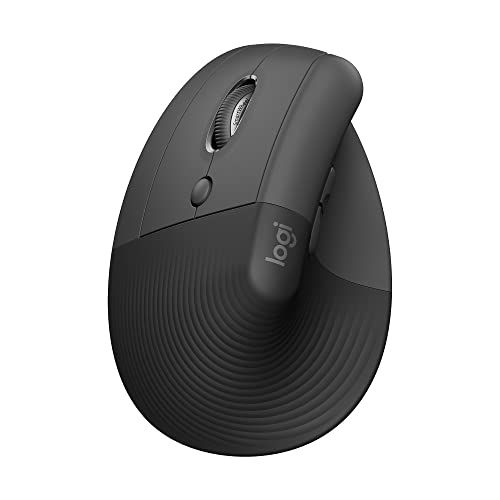 Best for left-handed usersLogitech Lift Left (left-handed)A true left-handed vertical mouse, not an ambidextrous shape. The listing describes it as "a great fit for small to medium left hands", with a thumb rest sculpted for the left hand, quiet clicks, a SmartWheel, Bluetooth Low Energy or Logi Bolt and up to two years of battery life, like the right-handed Lift.Watch out: No large left-handed vertical was in stock: if you have big hands, look at the ambidextrous Kensington SlimBlade Pro below. Sensor resolution is not stated.Check price on Amazon.ca ↗
An “ergonomic mouse” is not one product. It is three shapes that put your hand in a different position: a vertical mouse held like a handshake, a trackball that stays still while your thumb or fingers move the cursor, and a contoured mouse sculpted to fill the palm. The right one depends on your hand size, which hand you use, and the computers you connect it to.
The short answer
- Most people, small to medium hands: the Logitech Lift vertical mouse, Bluetooth or Logi Bolt, up to two years per battery as listed.
- Large hands: the Logitech MX Vertical, same 57-degree angle, 4000 DPI and rechargeable.
- A mouse that still feels like a mouse: the Logitech MX Master 3S, contoured, 8K DPI, Bluetooth or receiver.
- Arm stays still: the MX Ergo S thumb trackball with a 20-degree tilt, or the M575S to try one for less.
- Left-handed: the Logitech Lift Left, or the ambidextrous Kensington SlimBlade Pro trackball.
How we picked, and what we did not do: we have not used these mice. We looked for one model per real need (vertical for small and large hands, left hand, contoured, two thumb trackballs, a finger trackball, a budget vertical) and read every specification from the manufacturer’s Amazon.ca listing on November 27, 2026. Every product on a card was in stock in Canada that day; the Razer Pro Click Humanscale was out of stock and the Microsoft Sculpt was low in stock, so they have no card. Where a listing leaves a detail out, we write “not stated”. Listing claims about reduced muscle strain are not repeated. Links to Amazon are affiliate links; BranchéQC may earn a commission at no extra cost to you. We do not write prices by hand: the button says “Check price on Amazon.ca” and the Amazon page is what counts.
Vertical, trackball or contoured: the three kinds of ergonomic mouse
Vertical mouse
A vertical mouse stands your hand on its side, like a handshake, instead of flat on the desk. You still move it around like a regular mouse. CCOHS describes the vertical or column mouse as keeping the hand in a neutral handshake position and moving the whole arm rather than just the wrist. The Logitech Lift and MX Vertical both list a 57-degree angle; the Anker is the budget version.
Trackball mouse
A trackball stays in one place. With a thumb trackball (Logitech MX Ergo S, Ergo M575S) your thumb rolls a ball on the side; with a finger trackball (Kensington SlimBlade Pro) your fingers roll a large ball on top. CCOHS notes that a trackball lets you keep your arm and hand in one place and needs little desk space. The trade-off is a learning curve of a few days. Kensington also sells the Orbit wireless trackball with a scroll ring, a smaller 40 mm ball with 2.4 GHz and Bluetooth and four speed settings (400 to 1600 DPI) on its listing.
Contoured (sculpted) mouse
A contoured mouse keeps the classic shape but is sculpted to fill the palm, with a thumb rest. The Logitech MX Master 3S is the best-known example. It is the smallest change from the mouse you have now, and the one that keeps your palm the flattest. The Microsoft Bluetooth Ergonomic Mouse is a lighter, simpler contoured option: a soft thumb rest, an aluminium scroll wheel and 3 customizable buttons, Bluetooth only, as listed.
The eight ergonomic mice, compared on published specs
Every detail is the manufacturer’s own. Hand size is the maker’s wording, not a measurement. Where a listing gives nothing, the table says so rather than guessing.
| Model | Type | Hand (listed) | Connection | Power | Buttons | Sensor |
|---|---|---|---|---|---|---|
| Logitech Lift Vertical Ergonomic Mouse | Vertical, 57° | Right, small to medium | Bluetooth Low Energy or Logi Bolt USB receiver | Battery, up to 2 years (as listed) | 6 (4 customizable) | Not stated |
| Logitech MX Master 3S (for Business) | Contoured (sculpted) | Right, size not stated | Bluetooth or Logi Bolt USB receiver | Rechargeable, USB-C | Not stated | 8K DPI, any surface |
| Logitech MX Vertical | Vertical, 57° | Right, medium to large | Wireless; moves content between 3 computers (as listed) | Rechargeable | Not stated | 4000 DPI, cursor speed switch |
| Logitech Lift Left (left-handed) | Vertical, 57° | Left, small to medium | Bluetooth Low Energy or Logi Bolt USB receiver | Battery, up to 2 years (as listed) | 6 (4 customizable) | Not stated |
| Logitech MX Ergo S Trackball | Thumb trackball, 20° tilt | Right, medium to large | Bluetooth or encrypted USB receiver | Rechargeable, USB-C; up to 120 days per charge | 6 customizable | Precision mode button |
| Logitech Ergo M575S Trackball | Thumb trackball | Right, most hand sizes (as listed) | Bluetooth or Logi Bolt USB receiver | 1 AA battery (included), up to 18 months | 3 customizable | Cursor speed set in Logi Options+ |
| Kensington SlimBlade Pro Trackball | Finger trackball, 55 mm ball | Right or left | Bluetooth, 2.4 GHz USB receiver or USB-C cable | Rechargeable, about 4 months per charge | Programmable with KensingtonWorks | Dual sensors |
| Anker Wireless Vertical Ergonomic Mouse | Vertical | Right, size not stated | 2.4 GHz USB receiver | 2 AAA batteries (not included) | 5 | 800 / 1200 / 1600 DPI |
Which ergonomic mouse for you
Logitech Lift Vertical Ergonomic MouseVertical, 57° · Right, small to mediumThe easiest way into a vertical mouse for most people. Logitech describes the Lift as "a great fit for small to medium right hands", with a 57-degree upright shape, a soft textured grip and a thumb rest, quiet clicks and a SmartWheel. It connects by Bluetooth Low Energy or the included Logi Bolt USB receiver to Windows, macOS, iPadOS, ChromeOS and Linux, and the listing states up to two years of battery life.Watch out: Not for large hands: Logitech points those to the MX Vertical. The listing gives no sensor resolution, and it does not say how many computers it can switch between.Check price on Amazon.ca ↗Logitech MX Master 3S (for Business)Contoured (sculpted) · Right, size not statedFor people who want a mouse that still looks and moves like a mouse, with a shape that fills the palm. The listing title states MagSpeed scrolling, an 8K DPI sensor that tracks on any surface, quiet clicks, USB-C charging, and both Bluetooth and a Logi Bolt USB receiver for Windows, Mac, ChromeOS and Linux. The Business edition is the one in stock that comes with the receiver.Watch out: It keeps your palm flat on the desk, so it is less upright than a vertical mouse. This listing does not state hand size, battery life, button count or multi-device switching. A Bluetooth-only edition (no receiver, no cable) also exists: check which one you order.Check price on Amazon.ca ↗Logitech MX VerticalVertical, 57° · Right, medium to largeThe bigger vertical. Logitech calls it "a great fit for medium to large size right hands", with the same 57-degree handshake angle as the Lift, a textured rubber surface, a 4000 DPI sensor and a cursor speed switch to change speed with one button. The listing title adds that it is rechargeable and moves content between three Windows and Apple computers.Watch out: Too big for small hands, where the Lift fits better. The listing does not state battery life or button count.Check price on Amazon.ca ↗Logitech Lift Left (left-handed)Vertical, 57° · Left, small to mediumA true left-handed vertical mouse, not an ambidextrous shape. The listing describes it as "a great fit for small to medium left hands", with a thumb rest sculpted for the left hand, quiet clicks, a SmartWheel, Bluetooth Low Energy or Logi Bolt and up to two years of battery life, like the right-handed Lift.Watch out: No large left-handed vertical was in stock: if you have big hands, look at the ambidextrous Kensington SlimBlade Pro below. Sensor resolution is not stated.Check price on Amazon.ca ↗Logitech MX Ergo S TrackballThumb trackball, 20° tilt · Right, medium to largeA trackball stays put: your thumb rolls the ball and your arm does not move. The MX Ergo S, the current version of the MX Ergo, has a 20-degree tilt, a soft rubber grip and a precision button to switch between speed and fine tracking. The listing states it is for medium to large hands, charges by USB-C (1 minute for up to 24 hours of use, up to 120 days on a full charge) and has quieter clicks than before.Watch out: The charging cable is not included, as listed. A thumb trackball takes a few days to get used to, and it is right-handed only.Check price on Amazon.ca ↗Logitech Ergo M575S TrackballThumb trackball · Right, most hand sizes (as listed)The simplest way to try a trackball. Logitech says the sculpted shape is "a good fit for most hand sizes", it now has quiet clicks, connects by Bluetooth or the included Logi Bolt receiver, and runs on one AA battery (included) for up to 18 months. Because the mouse does not move, it works on a small desk, a couch armrest or any surface.Watch out: No tilt adjustment, unlike the MX Ergo S, and only 3 customizable buttons. Right-handed only.Check price on Amazon.ca ↗Kensington SlimBlade Pro TrackballFinger trackball, 55 mm ball · Right or leftA large ball you roll with your fingers, in a low shape that the listing says suits both right- and left-handed users. You get three ways to connect (Bluetooth, a 2.4 GHz receiver with a USB-C adapter, or the 1.5 m USB-C cable), dual sensors under a 55 mm ball, and a rechargeable battery that Kensington states lasts about 4 months per charge.Watch out: The KensingtonWorks software does not support Windows on ARM computers, and on macOS custom buttons work only through the cable or the USB receiver, as listed. A big finger ball feels very different from a mouse.Check price on Amazon.ca ↗Anker Wireless Vertical Ergonomic MouseVertical · Right, size not statedThe low-cost way to find out whether a handshake grip suits you before spending more. The listing states a vertical shape, three sensor settings (800, 1200, 1600 DPI), next and previous buttons for the browser, a USB receiver stored in the bottom, a size of 120 × 62.8 × 74.8 mm, a weight of 3.4 oz and an 18-month warranty.Watch out: No Bluetooth: it needs a USB-A port or an adapter. Batteries are not included, and it sleeps after 8 minutes idle until you press a button.Check price on Amazon.ca ↗


Hand size: the spec that decides most of it
CCOHS advises choosing a mouse that fits your hand and supports its natural shape, and notes that a larger mouse that still fits in the palm lets you use the larger muscles of your arm rather than the small muscles of your wrist. Makers rarely publish a hand measurement; they describe a fit. On the listings we read:
- Small to medium hands: Logitech Lift (right) and Lift Left.
- Medium to large hands: Logitech MX Vertical and MX Ergo S.
- Most hand sizes: Logitech Ergo M575S.
- Not stated: MX Master 3S, Anker vertical, Kensington SlimBlade Pro. The Anker lists its size, 120 × 62.8 × 74.8 mm.
If you are between sizes, measure your hand from the wrist crease to the tip of the middle finger and compare it with the size guide on the manufacturer’s website before ordering, and keep the box until you have tried it for a few days.
Left-handed ergonomic mice
Most ergonomic mice are right-handed only, because the shape is the whole point. Three real options for a left-hander: the Logitech Lift Left, a true left-handed vertical mouse for small to medium hands; a finger trackball such as the Kensington SlimBlade Pro, whose listing says its low shape suits both hands; or a symmetrical regular mouse. Logitech also sells the Lift Left bundled with the Wave Keys ergonomic keyboard. CCOHS suggests alternating the hand you use for the mouse when possible, which an ambidextrous trackball makes easier.
Bluetooth, USB receiver and multi-device
Bluetooth pairs with laptops, tablets and phones without using a USB port. A USB receiver (Logitech calls its current one Logi Bolt) is plug-and-play and is often the only option on a work computer where Bluetooth is disabled. The Lift, Lift Left, MX Master 3S for Business, M575S and MX Ergo S list both. The Anker uses a receiver only, so a USB-C laptop needs an adapter or a USB-C docking station. The Kensington SlimBlade Pro offers Bluetooth, a receiver and a USB-C cable.
Multi-device: if you switch between a work laptop and a home computer, check this point on the listing itself. The MX Vertical's listing title says it moves content between three Windows and Apple computers. The other listings on this page do not state a number of devices, so we do not claim one. Logitech's MX Master 4, the successor to the 3S, lists a USB-C receiver or Bluetooth, haptic feedback and the MagSpeed wheel.
Battery: the Lift lists up to two years, the M575S up to 18 months on one AA, the MX Ergo S up to 120 days per USB-C charge, the SlimBlade Pro about 4 months. Rechargeable mice save batteries; AA and AAA mice never leave you waiting on a cable.
Logitech MX Master 3S vs MX Master 4
The MX Master 3S is one of the most searched mice in Canada. On Amazon.ca, two editions were in stock on November 27, 2026: the MX Master 3S for Business (our card), which lists both Bluetooth and a Logi Bolt receiver, and an MX Master 3S Bluetooth Edition, which its listing says is Bluetooth only and comes with no USB receiver and no charging cable. Both list the 8000 DPI sensor that works on glass and quiet clicks. The newer MX Master 4 adds a haptic feedback panel and an on-screen Actions Ring, as listed. For ergonomics, all three are contoured mice; none is vertical.
Ergonomic keyboard: the other half of the desk
The mouse is only one hand. An ergonomic keyboard such as Logitech's Wave Keys has a wave-shaped key layout and a cushioned palm rest; Logitech sells it with the Lift as the Wave Keys and Lift combo, which its listing says connects up to 3 devices. CCOHS also suggests using keyboard shortcuts instead of the mouse when you can, which shortens the time your hand spends on it.
How to set up your mouse: what CCOHS says
The Canadian Centre for Occupational Health and Safety's fact sheet on mouse selection and use (updated November 24, 2026) gives practical rules that apply to any mouse on this page:
- Choose a cordless mouse for more placement options; CCOHS highly recommends a battery-powered one.
- Hold it loosely, with a relaxed grip; do not squeeze.
- Keep forearm, wrist and fingers in a straight line, and move the mouse with your arm rather than by bending the wrist.
- Be careful with wrist rests: their benefit is not clearly proven, and used incorrectly they can add pressure on the carpal tunnel.
- Try several shapes: no single design suits everyone.
The mouse also depends on the rest of the desk. A standing desk set to elbow height, an office chair that supports your arms, a monitor arm or a laptop stand to raise the screen, and a separate keyboard and mouse keep the whole posture straight. If you have pain, numbness or tingling in your hand, wrist or arm, see a health professional: a mouse is a comfort choice, not a treatment.
Where to buy an ergonomic mouse in Canada
| Retailer | Strength | Note |
|---|---|---|
| Amazon.ca | Logitech, Kensington, Anker, Microsoft and many generic vertical mice | Check the exact edition (Business, Bluetooth-only, left-handed) and stock |
| Best Buy, Canada Computers | Category pages for ergonomic mice | Useful to hold a model in your hand before buying |
| Staples | Office brands and its own ergonomic mice | Check the model number against the listings above |
| Logitech.com/en-ca | Size guides and the full MX and Ergo range | Compare hand-size guidance before you order |
Evoluent's VerticalMouse and HP's vertical and tilt mice are also widely searched; we did not compare them for this guide.
Frequently asked questions
What is the best ergonomic mouse in Canada?
For most people, the Logitech Lift vertical mouse: a 57-degree upright shape for small to medium right hands, Bluetooth or a Logi Bolt receiver, and up to two years of battery life as listed. For large hands take the MX Vertical, for a classic shape the MX Master 3S, and for a trackball the MX Ergo S. All were in stock on Amazon.ca on November 27, 2026.
Vertical mouse or trackball: which is better?
Neither is better for everyone; they solve different things. A vertical mouse turns your hand to a handshake position and you still move your arm, while a trackball stays still and your thumb or fingers move the cursor. CCOHS notes that a trackball needs little desk space, and that no single design suits everyone, so try the shape if you can.
Is an ergonomic mouse good for wrist pain or carpal tunnel?
An ergonomic mouse is a comfort choice, not a treatment. If you have pain, numbness or tingling in your hand or wrist, see a health professional before changing your setup. CCOHS recommends a mouse that fits your hand, a relaxed grip, a straight forearm-wrist-finger line and moving the mouse with the arm rather than bending the wrist.
What is the best ergonomic mouse for small hands?
The Logitech Lift is the one whose listing names small hands: "a great fit for small to medium right hands", and the Lift Left says the same for left hands. The Logitech Ergo M575S trackball is listed as a good fit for most hand sizes.
Is there a good left-handed ergonomic mouse?
Yes: the Logitech Lift Left is a true left-handed vertical mouse for small to medium left hands, as listed. For a larger hand, the Kensington SlimBlade Pro trackball has a low shape its listing says suits both right- and left-handed users.
Is the Logitech MX Master 3S an ergonomic mouse?
It is a contoured mouse: sculpted to fill the palm, with a thumb rest and a thumb wheel, but your palm stays flat on the desk. If you want the most upright position, a vertical mouse like the Lift or the MX Vertical turns your hand further.
Bluetooth or USB receiver: which should I choose?
Bluetooth frees a USB port and pairs with laptops and tablets; a receiver is plug-and-play and works on computers where Bluetooth is off or locked by an employer. The Lift, the MX Master 3S for Business, the M575S and the MX Ergo S list both; the Anker uses a receiver only; the Kensington SlimBlade Pro adds a USB-C cable.
Do I need an ergonomic mouse pad or wrist rest?
Not necessarily. CCOHS says the benefit of wrist rests is not clearly proven and that, used incorrectly, they can put more pressure on the carpal tunnel. A large, smooth mouse pad that lets you move with the arm, not the wrist, is the simpler choice.
Is there an ergonomic gaming mouse?
Yes, but the picks on this page are office mice. Razer's Pro Click Humanscale, an ergonomic office mouse from a gaming brand, was out of stock on Amazon.ca on November 27, 2026, so it has no card; for gaming, check the sensor and polling rate on the listing.
Keep reading
Building a home office? Our guides to the best standing desk in Canada, the best office chair, the best laptop for working from home, the best computer monitor, the best monitor arm, the best desk lamp, the best laptop stand and the best USB-C docking station compare models on what each listing states.
An ergonomic mouse is a practical gift for anyone working from home. For more ideas, see our gift guide for Canada.