

Top choices
Specs as stated on the manufacturers' listings; the price shows on the retailer's page. Best dual monitor armHUANUO Dual Monitor Arm (up to 32 in, 19.8 lb per arm)Two screens on one base. HUANUO lists three conditions your monitors must meet at the same time: 13 to 32 inches, 4.4 to 19.8 lb each, and VESA 75 or 100 mounting holes. Each arm tilts from -50° to +85°, swivels 180° and rotates 360° without tools, and cable management runs along the arms. It is the most direct answer to "dual monitor arm" and "dual monitor stand" for a home office.Watch out: Both screens hang from one pole, so the clamp side of the desk carries all the weight. The listing highlights do not state the desk-thickness range: check it on the full listing before you order.Check price on Amazon.ca ↗
 Dual · mechanical spring, no gasHUANUO FlowLift Pro Dual Monitor Arm (mechanical spring)For anyone who has watched a cheap gas arm slowly sink: HUANUO uses a mechanical spring it calls MechaSpring and claims up to twice the service life of conventional mounts, with a LockSteady system meant to resist droop. The listing states TÜV Rheinland certification and testing at three times its load. Both a C-clamp and a grommet base are included.Watch out: Lighter limit than the other dual arm: 4.4 to 15.4 lb per screen. HUANUO recommends it only on wood desks 15 to 90 mm thick and warns about irregular desk edges, so glass, thin metal and some standing-desk tops are out.Check price on Amazon.ca ↗
 Gas spring · clamp and grommetMount-It! Single Monitor Arm, Gas SpringA classic articulating gas-spring arm from one of the brands Canadians search by name. The listing states 13 to 32-inch screens up to 17.6 lb, tilt from +90° to -45°, swivel ±90°, landscape-to-portrait rotation, adjustable tension and gas springs tested for more than 20,000 motion cycles. Clamp and grommet bases are both in the box.Watch out: Rotation is listed at 180°, not 360°. Mount-It itself advises checking and tightening the mounting screws periodically.Check price on Amazon.ca ↗
A monitor arm lifts your screen off the desk, lets you set its height, distance and angle, and gives back the space the stand used to take. The catch: an arm only works if it matches your monitor and your desk. That comes down to four numbers you can read on any listing: screen size, weight, VESA pattern and desk thickness.
The short answer
- One screen: the Amazon Basics Adjustable Single Monitor Arm, up to 10 kg and 38-inch ultrawides as listed.
- Two screens: the HUANUO Dual Monitor Arm, 13 to 32 inches and 4.4 to 19.8 lb per arm; or the HUANUO FlowLift Pro if you want a mechanical spring instead of gas.
- Three screens: the VIVO triple pneumatic mount, 17 to 32 inches and 17.6 lb each.
- A 49-inch ultrawide: the VIVO aluminum ultrawide arm, rated for 44 lb.
- No spring to wear out: the VIVO V001 pole mount, 22 lb.
How we picked, and what we did not do: we have not mounted these arms. We looked for one model per real setup (one screen, two screens with gas, two screens with a mechanical spring, budget gas arm, spring-free pole, three screens, heavy ultrawide), kept only listings that state the screen size, the weight limit and the VESA pattern, and read every specification from the Amazon.ca listing on November 27, 2026. Every product on a card was in stock in Canada that day; every Ergotron LX listing we checked was low in stock or on back-order, so Ergotron has no card. Where a listing leaves a number out, we write “not stated”. Inches and pounds are converted by us. Links to Amazon are affiliate links; BranchéQC may earn a commission at no extra cost to you. We do not write prices by hand: the button says “Check price on Amazon.ca” and the Amazon page is what counts.
Will it fit? VESA 75 or 100, weight and screen size
VESA mounting pattern
Turn your monitor around. If you see four threaded holes in a square, measure the distance between them: 75 × 75 mm or 100 × 100 mm is what every arm on this page accepts. No holes means the monitor is not VESA compatible and needs an adapter made for that model. A pattern larger than 100 × 100, common on big TVs, is beyond these arms. When the holes sit in a recess, North Bayou and Amazon Basics both warn that you may need longer screws and spacers; the North Bayou plate itself measures 120 × 120 mm.
Weight without the stand
The weight that counts is the monitor alone, without its stand, from the manufacturer's spec sheet. Compare it with the arm's range, not just its maximum: the HUANUO FlowLift Pro, for example, lists 4.4 to 15.4 lb, and a screen lighter than the minimum can make a spring arm drift upward. Gas and spring arms also need their tension set to the screen's weight; Amazon Basics says its joints may feel stiff out of the box until you adjust them as instructed.
Screen size and ultrawides
Size limits are about balance and clearance. Most arms here stop at 32 inches. For ultrawides, check the listing explicitly: the VIVO V001 and the Amazon Basics 10 kg arm list up to 38 inches, the VIVO aluminum arm up to 49 inches. A wide curved screen extended far from the pole loads the arm harder, which is why Amazon Basics says performance depends on how far the arm is extended. Choosing the screen first? Our best computer monitor in Canada guide lists sizes and VESA patterns.
The eight monitor arms, compared on published specs
Every figure is the listing’s own; metric values are our conversions. Where a listing gives no number, the table says so rather than guessing.
| Model | Type | Mechanism | Screens | Weight (listed) | VESA | Desk mount | Movement |
|---|---|---|---|---|---|---|---|
| Amazon Basics Adjustable Single Monitor Arm (10 kg) | Single arm | Adjustable tension arm | Up to 32 in (81.2 cm), 38 in (96.5 cm) ultrawide | Up to 10 kg (22 lb) | 75 × 75, 100 × 100 | Desk mount (base type not stated) | Not stated |
| HUANUO Dual Monitor Arm (up to 32 in, 19.8 lb per arm) | Dual arm | Spring-assisted, tool-free adjustment | 13 to 32 in (33 to 81 cm) | 2 to 9 kg (4.4 to 19.8 lb) per arm | 75 × 75, 100 × 100 | Desk mount | Tilt -50° to +85°, swivel 180°, rotate 360° |
| HUANUO FlowLift Pro Dual Monitor Arm (mechanical spring) | Dual arm | MechaSpring mechanical spring | 13 to 32 in (33 to 81 cm) | 2 to 7 kg (4.4 to 15.4 lb) per arm | 75 × 75, 100 × 100 | C-clamp or grommet; wood desks 15-90 mm thick | Tilt, swivel, rotation |
| Mount-It! Single Monitor Arm, Gas Spring | Single arm | Gas spring | 13 to 32 in (33 to 81 cm) | Up to 8 kg (17.6 lb) | 75 × 75, 100 × 100 | Clamp or grommet | Tilt +90°/-45°, swivel ±90°, rotate 180° |
| North Bayou F80 Gas Spring Monitor Arm | Single arm | Gas spring | 17 to 30 in (43 to 76 cm) | 2 to 9 kg (4.4 to 19.8 lb) | 75 × 75, 100 × 100 (120 × 120 mm plate) | C-clamp or grommet | Tilt -30° to +85°, swivel ±90°, rotate 360°, 26 cm travel |
| VIVO Single Monitor Desk Mount, pole (STAND-V001) | Single arm on pole | Mechanical, height set on the pole | 13 to 32 in, ultrawide up to 38 in (96.5 cm) | Up to 10 kg (22 lb) | 75 × 75, 100 × 100 | Grommet or C-clamp | Tilt ±90°, swivel 360°, rotate 360° |
| VIVO Triple Pneumatic Monitor Mount (STAND-V300G) | Triple mount | 2 pneumatic arms + 1 fixed centre bracket | 17 to 32 in (43 to 81 cm) | Up to 8 kg (17.6 lb) each | 75 × 75, 100 × 100 | C-clamp | Tilt ±90°, swivel 180°, rotate 360° |
| VIVO Aluminum Ultrawide Monitor Arm, up to 49 in (STAND-V101V) | Single heavy-duty arm | Spring-assist tension arm | Ultrawide up to 49 in (124 cm) | Up to 20 kg (44 lb) | 75 × 75, 100 × 100 (max) | C-clamp up to 8.1 cm desk; optional grommet up to 3.6 cm | Tilt +50°/-20°, swivel 180°, rotate 360°, 28 cm lift |
Which monitor arm for your desk
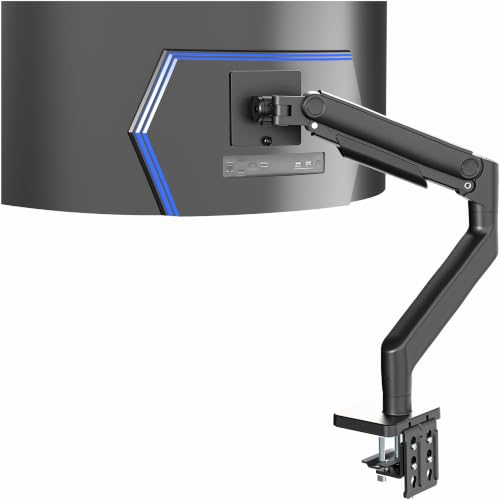
Amazon Basics Adjustable Single Monitor Arm (10 kg)Single arm · Adjustable tension armThe arm we would point most people to for one screen: the listing states up to 10 kg (22 lb), monitors up to 32 inches and ultrawides up to 38 inches (96.5 cm), VESA 75 × 75 and 100 × 100, and an adjustable tension you set to your monitor's weight so it neither sags nor drifts up. Its 10 kg ceiling ties the VIVO pole mount for the highest load among the standard arms on this page.Watch out: The listing says performance depends on monitor size, weight distribution and how far the arm is extended, and that you may need longer screws or spacers for a recessed VESA plate. Tilt, swivel, lift range and the clamp's desk-thickness range are not stated in the listing highlights we read.Check price on Amazon.ca ↗HUANUO Dual Monitor Arm (up to 32 in, 19.8 lb per arm)Dual arm · Spring-assisted, tool-free adjustmentTwo screens on one base. HUANUO lists three conditions your monitors must meet at the same time: 13 to 32 inches, 4.4 to 19.8 lb each, and VESA 75 or 100 mounting holes. Each arm tilts from -50° to +85°, swivels 180° and rotates 360° without tools, and cable management runs along the arms. It is the most direct answer to "dual monitor arm" and "dual monitor stand" for a home office.Watch out: Both screens hang from one pole, so the clamp side of the desk carries all the weight. The listing highlights do not state the desk-thickness range: check it on the full listing before you order.Check price on Amazon.ca ↗HUANUO FlowLift Pro Dual Monitor Arm (mechanical spring)Dual arm · MechaSpring mechanical springFor anyone who has watched a cheap gas arm slowly sink: HUANUO uses a mechanical spring it calls MechaSpring and claims up to twice the service life of conventional mounts, with a LockSteady system meant to resist droop. The listing states TÜV Rheinland certification and testing at three times its load. Both a C-clamp and a grommet base are included.Watch out: Lighter limit than the other dual arm: 4.4 to 15.4 lb per screen. HUANUO recommends it only on wood desks 15 to 90 mm thick and warns about irregular desk edges, so glass, thin metal and some standing-desk tops are out.Check price on Amazon.ca ↗Mount-It! Single Monitor Arm, Gas SpringSingle arm · Gas springA classic articulating gas-spring arm from one of the brands Canadians search by name. The listing states 13 to 32-inch screens up to 17.6 lb, tilt from +90° to -45°, swivel ±90°, landscape-to-portrait rotation, adjustable tension and gas springs tested for more than 20,000 motion cycles. Clamp and grommet bases are both in the box.Watch out: Rotation is listed at 180°, not 360°. Mount-It itself advises checking and tightening the mounting screws periodically.Check price on Amazon.ca ↗North Bayou F80 Gas Spring Monitor ArmSingle arm · Gas springThe long-running North Bayou F80, a simple gas-spring arm for one 17 to 30-inch screen of 4.4 to 19.8 lb. The listing gives the numbers people need: tilt from -30° to +85°, swivel ±90°, 360° rotation and an upright range of 10 inches (260 mm), with a C-clamp or grommet base and all hardware included.Watch out: The VESA plate itself is 120 × 120 mm: if your monitor's holes sit in a recess, North Bayou says you may need longer screws and spacers. Not for 32-inch screens or ultrawides.Check price on Amazon.ca ↗VIVO Single Monitor Desk Mount, pole (STAND-V001)Single arm on pole · Mechanical, height set on the poleThe set-and-forget mount: no gas or spring to wear out, the monitor height is set along a centre pole and the arm articulates around it. VIVO lists up to 22 lb, most 13 to 32-inch screens and ultrawides up to 38 inches, tilt from +90° to -90°, 360° swivel and rotation, and detachable cable clips.Watch out: You do not float the screen up and down with one hand: raising it means loosening the collar on the pole. Fine for a fixed desk, less so if you change heights all day.Check price on Amazon.ca ↗VIVO Triple Pneumatic Monitor Mount (STAND-V300G)Triple mount · 2 pneumatic arms + 1 fixed centre bracketFor a trading, editing or sim-racing desk: two pneumatic side arms and a fixed centre bracket hold three 17 to 32-inch screens of up to 17.6 lb each, as listed. The springs counterbalance the side monitors and their tension can be raised or lowered for heavier or lighter screens. Steel and aluminum construction.Watch out: The centre screen is on a fixed bracket, so it moves only with the pole, not on its own arm. Only a C-clamp is listed. Three 32-inch screens side by side need a very wide, deep desk.Check price on Amazon.ca ↗VIVO Aluminum Ultrawide Monitor Arm, up to 49 in (STAND-V101V)Single heavy-duty arm · Spring-assist tension armBuilt for the big curved screens that standard arms cannot carry: VIVO lists ultrawides up to 49 inches and 44 lb, and names the Samsung Odyssey G9. A spring-assist tension arm counterbalances the weight with 11 inches of lift, and the heavy-duty C-clamp takes desks up to 3.2 inches thick (1.4 inches with the optional grommet).Watch out: Tilt is limited to +50° / -20° and swivel to 180°, normal for this weight class. The grommet mount is optional, not included, by the listing's own words.Check price on Amazon.ca ↗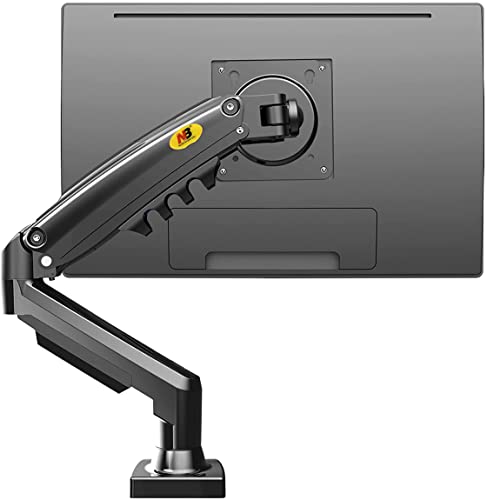


Gas spring vs mechanical spring vs pole mount
Gas spring (pneumatic). A gas cylinder in the arm counterbalances the screen, so once the tension is set you move it with one hand and it stays put. This is what Mount-It, North Bayou and the side arms of the VIVO triple use. Mount-It states its gas springs are tested for more than 20,000 motion cycles. The weak point people mention with cheap gas arms is a slow sag over time, usually fixed by raising the tension.
Mechanical spring. A steel spring does the same job without gas. HUANUO says its MechaSpring offers up to twice the service life of conventional mounts and resists droop. In exchange, the FlowLift Pro carries less per arm (15.4 lb) and asks for a wood desk 15 to 90 mm thick.
Pole mount, no spring. The VIVO V001 slides along a vertical pole and locks with a collar. Nothing to wear out and a high load (22 lb), but no one-hand height change. It suits a desk where the screen height never changes.
Single, dual or triple monitor arm
- Single monitor arm. One screen, the most flexible setup, and the one that fits small desks and laptop setups. Pair it with a laptop stand to bring the laptop screen up to the same height.
- Dual monitor arm. Two screens on one pole: the HUANUO pair or the Amazon Basics Gas Spring Dual Monitor Arm, which lists 2 to 7 kg per arm, 38.1 to 68.6 cm screens, VESA 75 or 100 and an independent tension adjustment for each arm. Dual monitor arms keep both screens at the same height and free the desk entirely.
- Triple monitor arm. The VIVO V300G puts the centre screen on a fixed bracket. The Mount-It! triple monitor desk stand instead lists three independent gas-spring arms of 17.6 lb each, 13 to 32-inch screens and built-in USB-A and USB-C ports.
For arranging several screens, CCOHS suggests placing them edge to edge in front of you if you use them equally, or putting the main one straight ahead and the secondary one to the side at an angle if you mostly use one.
Clamp vs grommet, and desk thickness
A C-clamp screws onto the back edge of the desk: no drilling, but it needs a solid lip of the right thickness with nothing under it. A grommet mount bolts through a hole in the desktop, often an existing cable hole, and lets you place the arm away from the edge. The listed ranges differ: the VIVO ultrawide arm takes up to 3.2 inches (8.1 cm) with its clamp and 1.4 inches (3.6 cm) with an optional grommet; HUANUO limits the FlowLift Pro to wood desks 15 to 90 mm thick. Glass tops, thin metal and hollow-core tops are poor surfaces for a clamp: ask the maker before you try.
Monitor arms on a standing desk
A monitor arm and a standing desk go well together, since the screen rises with the desk. Three checks before you clamp:
- The edge. Clamp where no crossbar, leg bracket or control box sits under the back edge.
- The cables. Leave enough slack in the monitor, power and dock cables for the full travel of the desk, and route them through the arm's clips. A USB-C docking station on the desktop cuts the run to a single cable.
- The load. The arm and the screens add to what the desk motors lift. Stay within the desk's listed capacity, and remember that a dual or triple arm puts most of the weight at the back.
Monitor stand, riser or wall mount instead
“Monitor stand” is searched more than “monitor arm” in Canada, and for some desks it is the better buy. A riser simply lifts the screen on its own stand, needs no clamp and works on glass. A freestanding dual monitor stand sits on a weighted base when the desk edge cannot take a clamp. A wall mount frees the desk completely: the HUANUO Dual Monitor Wall Mount lists two screens up to 32 inches and 17.6 lb each, ±90° swivel, ±35° tilt and installation on wood studs, solid concrete or brick. Drywall alone is not on that list.
Setting the height: what CCOHS recommends
The point of an arm is to put the screen where your neck wants it. The Canadian Centre for Occupational Health and Safety's page on monitor positioning suggests an arm's length as a good starting distance, with the top of the screen no higher than your eyes, and a viewing angle around 15 degrees below horizontal. It notes that a screen set too high causes more discomfort than one slightly too low, and that people with bifocals may prefer it slightly below eye level. If text is too small at that distance, it suggests making the font bigger rather than moving closer.
The chair sets your eye height in the first place: see our best office chair in Canada guide, and for the hands, the best ergonomic mouse.
Ergotron, Humanscale and other brands
Ergotron is the name most searched with “monitor arm” in Canada. Its LX listing states screens up to 34 inches, 7 to 25 lb, VESA 75 or 100, 13 inches of lift, a two-piece clamp for desks 0.4 to 2.4 inches thick and a grommet for desks up to 2.25 inches. On November 27, 2026, every LX listing we checked on Amazon.ca was low in stock or on back-order, so it has no card; Ergotron also sells directly in Canada. Humanscale arms are sold mostly through office furniture dealers, and IKEA sells monitor stands and risers rather than arms. We have not compared those here.
Where to buy a monitor arm in Canada
| Retailer | Strength | Note |
|---|---|---|
| Amazon.ca | Widest range of single, dual, triple and ultrawide arms | Check the exact model and stock; Ergotron listings were low in stock in November 2026 |
| Best Buy | Monitor stands and mounts category | Compare weight, size and VESA as on this page |
| Brand websites | Ergotron, Desky, Mount-It, Vari | Check warranty and return terms in Canada before ordering |
| Office furniture dealers | Humanscale and commercial arms | Usually sold with a desk or a workstation |
Frequently asked questions
What is the best monitor arm in Canada?
For one screen, the Amazon Basics Adjustable Single Monitor Arm: its listing states up to 10 kg (22 lb), screens up to 32 inches or 38-inch ultrawides, and VESA 75 or 100. For two screens, the HUANUO Dual Monitor Arm holds 13 to 32-inch monitors of 4.4 to 19.8 lb each. Both were in stock on Amazon.ca on November 27, 2026.
How do I know if a monitor arm will fit my monitor?
Check three numbers against the listing: screen size, weight and VESA pattern. Use the monitor's weight without its stand, from the manufacturer's spec sheet, and look for four screw holes on the back spaced 75 or 100 mm apart. If there are no holes, or the pattern is larger than 100 × 100, these arms will not fit without an adapter designed for your monitor.
Gas spring or mechanical spring monitor arm: which is better?
Gas spring if you move the screen often, mechanical if you want it to hold its position for years. A gas-spring arm lets you raise and lower the screen with one hand once the tension matches its weight. HUANUO says its MechaSpring mechanical arm offers up to twice the service life of conventional mounts because there is no gas to lose pressure. A pole mount like the VIVO V001 has no spring at all.
Clamp or grommet mount: which should I use?
Use the clamp unless your desk already has a cable hole where you want the arm. A C-clamp grips the back edge and needs a solid lip with nothing under it; a grommet bolts through a hole in the top. Check the listed desk-thickness range: the VIVO ultrawide arm, for example, lists up to 3.2 inches with its clamp and 1.4 inches with the optional grommet.
Can I put a monitor arm on a standing desk?
Yes, as long as the clamp fits the desktop and the cables have slack. Clamp where no frame crossbar or motor housing sits under the edge, leave enough cable length for the desk's full travel, and add the weight of the arm and screens to what you already load on the desk: it must stay within the desk's listed capacity. See our standing desk guide for the frames and their capacities.
Monitor arm or monitor stand: which do I need?
An arm if you want the screen to move and free up the desk, a stand or riser if you just need it higher. A riser costs no drilling or clamping and can hold a keyboard underneath; an arm lets you set height, depth and angle exactly and switch to portrait. Dual monitor stands that sit on a base are another option when your desk edge cannot take a clamp.
What monitor arm do I need for an ultrawide or a 49-inch screen?
One rated for its real weight and size. Up to 38 inches, the VIVO V001 pole mount and the Amazon Basics 10 kg arm list ultrawide support. For a 49-inch curved screen like a Samsung Odyssey G9, the VIVO aluminum ultrawide arm lists up to 49 inches and 44 lb. Never exceed the listed weight: a wide screen also pulls harder on the arm when extended.
Is an Ergotron monitor arm worth it?
Ergotron's LX is the reference arm, but every Ergotron LX listing we checked was low in stock or on back-order on Amazon.ca on November 27, 2026, so it has no card here. Its listing states screens up to 34 inches, 7 to 25 lb, VESA 75 or 100, 13 inches of lift and both a clamp and a grommet. Compare those numbers with the picks above.
How high should a monitor be?
With the top of the screen no higher than your eyes, about an arm's length away. That is the guidance of the Canadian Centre for Occupational Health and Safety (CCOHS), which adds that a screen too high causes more discomfort than one slightly too low, and that people with bifocals may prefer it slightly below eye level.
Keep reading
Building a home office? Our guides to the best standing desk, best office chair, best computer monitor and best laptop for working from home compare models on what each listing states, as do the best desk lamp, best laptop stand, best USB-C docking station and best ergonomic mouse guides.